
Have you read that a website “hashes” your password, or seen a breach report say the stolen passwords were hashed, and wondered what is password hashing, and whether it actually keeps your password safe?
Password hashing is how a website checks your password without keeping it. When you sign up, the site runs your password through a one way function and stores only the result, called the hash. When you sign in, it runs what you typed through the same function and compares the two results. If they match, you are in.
A hash works like a fingerprint. It identifies you reliably, and nobody can rebuild your hand from it.
Four ideas explain the whole thing:
- Hashing is one way, which is what makes it different from encryption
- A salt makes two identical passwords produce different hashes
- A password hash is slow on purpose
- Some algorithms are right for passwords today and some never were
In this article you will learn each of those, what a real hash looks like piece by piece, and what all of it means for you when a site you use is breached.
So let’s get started.
1) Hashing is not encryption
Encryption is two way. Whoever has the key can turn the scrambled text back into the original, which is exactly what you want for a message and exactly what you do not want for a password.
Hashing has no key and no way back. The OWASP guidance for developers puts it plainly: it is impossible to “decrypt” a hash and obtain the original value, which is why hashing is the right tool for checking passwords.
This gives you a simple test for any website. If a site can email you your current password when you forget it, it is not hashing it, because a properly hashed password cannot be sent back to anybody, even by the site itself. A reset link is the sign of a site doing it right.
2) The salt: why the same password gets a different hash
If every site simply hashed the password on its own, everybody using “password123” would have the same hash. An attacker could work out the hashes of millions of common passwords once, in advance, and look them up. Those ready made lists are called rainbow tables.
A salt stops that. It is a random value, different for every password, mixed in before hashing and stored openly next to the hash. The same password now gives a different hash for every person, so a precomputed list is useless and two users with the same password no longer look alike.
Some systems add a pepper as well: a secret value kept outside the database, in the application’s own settings. The only drawback is the extra thing to look after, and in return a thief who copies just the database is missing a piece.
3) Slow on purpose: why MD5 and SHA-256 are wrong for passwords
MD5, SHA-1 and SHA-256 are fast by design, because they were built to check files and messages. That speed is a disaster for passwords: a single graphics card can try billions of MD5 guesses a second against a stolen list.
Password hashing algorithms are made slow on purpose, and the slowness can be turned up. bcrypt has a cost setting where each step up doubles the work. PHP 8.4 raised its default from 10 to 12, and the benchmark in that change put a cost of 12 under half a second on every processor tested, which a person signing in never notices and an attacker guessing billions of times does.
Keep in mind what slowness cannot fix. A weak password is among the first things any attacker tries, so “123456” falls within the first few guesses however slow each guess is. Hashing protects a strong password, not a weak one.
4) What a real hash looks like, piece by piece
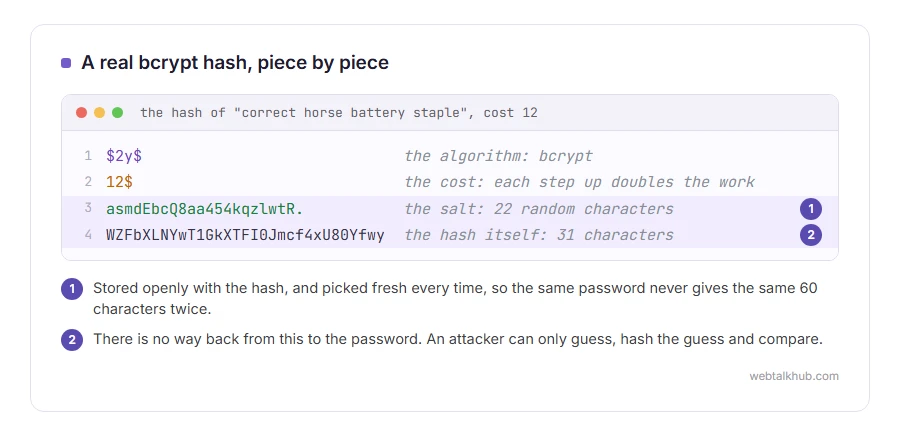
This is a real bcrypt hash of the password “correct horse battery staple”, made with PHP’s password_hash at cost 12:
$2y$12$asmdEbcQ8aa454kqzlwtR.WZFbXLNYwT1GkXTFI0Jmcf4xU80Yfwy
It is 60 characters in four parts. $2y$ names the algorithm, bcrypt. 12$ is the cost. The next 22 characters, asmdEbcQ8aa454kqzlwtR., are the salt. The last 31 characters are the hash itself.
The salt travels with the hash, which is why nothing else needs storing. Run the same password again and you get a completely different 60 characters, because a fresh salt is picked every time, yet checking either one against the password still says yes.
5) Which algorithms are right today
The OWASP Password Storage Cheat Sheet, the reference most developers work from, recommends these, in this order:
- Argon2id, with at least 19 MiB of memory, 2 iterations and 1 degree of parallelism
- scrypt, when Argon2id is not available
- bcrypt, for older systems, with a cost of at least 10
- PBKDF2 with HMAC-SHA-256 and 600,000 iterations, where a FIPS certified algorithm is required
Never MD5, SHA-1 or a plain SHA-256, and never a password that is encrypted rather than hashed.
bcrypt has one known limit: it only reads the first 72 bytes of a password. WordPress, which switched from its old phpass hashing to bcrypt in version 6.8, runs the password through HMAC-SHA384 first so that long passwords are not cut short, and marks those hashes with a $wp in front. Existing passwords are upgraded the next time each person signs in. Our WordPress password hash generator makes hashes in that format, for when you need to reset a password in the database.
If you write code, I don’t recommend building any of this yourself. In PHP, password_hash() with PASSWORD_DEFAULT and password_verify() do the salting, the cost and the comparison for you, and other languages have their own equivalents.
6) What it means for you when a site is breached
When a site says the stolen passwords were hashed, how worried to be depends on how. With bcrypt or Argon2id and a salt, a long, unique password is very unlikely to be recovered. A short or common one will be guessed, however it was stored.
Change it anyway, and change it everywhere else you used the same one, because reused passwords are what turns one breach into five. You cannot control how a website stores your password, so the part you can control is using a different long one on each site. Our password generator makes one in your browser.
FAQ(Password Hashing)
Can a password hash be reversed?
No, there is no way back from a hash. What attackers do is guess: hash a likely password, compare, repeat. That is why slow hashes and long passwords matter.
What is the difference between hashing and encryption?
Encryption can be undone with the key, and hashing cannot be undone at all. Passwords should be hashed, never encrypted.
What is a rainbow table?
A precomputed list of passwords and their hashes, used to look up unsalted hashes instantly. A unique salt for every password makes those lists useless.
Why does the same password give a different hash each time?
Because a new random salt is chosen each time and stored inside the result. password_verify() reads the salt back out of the hash, so it still matches.
If you have any issues, you can ask me via comment, and I will love to help you out.
