
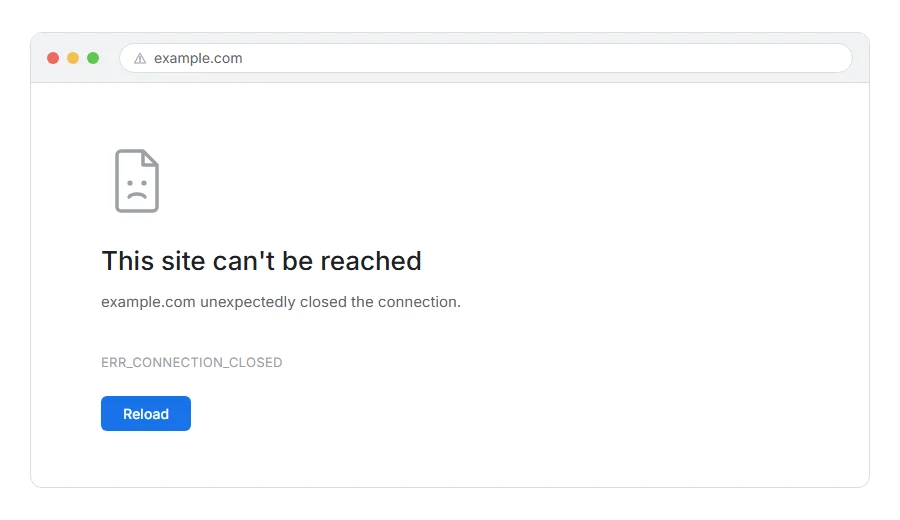
Your page stops loading and Chrome tells you the connection was closed, with ERR_CONNECTION_CLOSED underneath.
In one line: the conversation started and the far end hung up before saying anything useful.
Think of it like calling somebody, hearing them pick up, and then the line going dead before either of you speaks. Somebody was there. Something ended it.
Do not worry, you are not alone. This one is usually short lived, and where it is not, there are a small number of causes. I am here to help.
Where it actually breaks
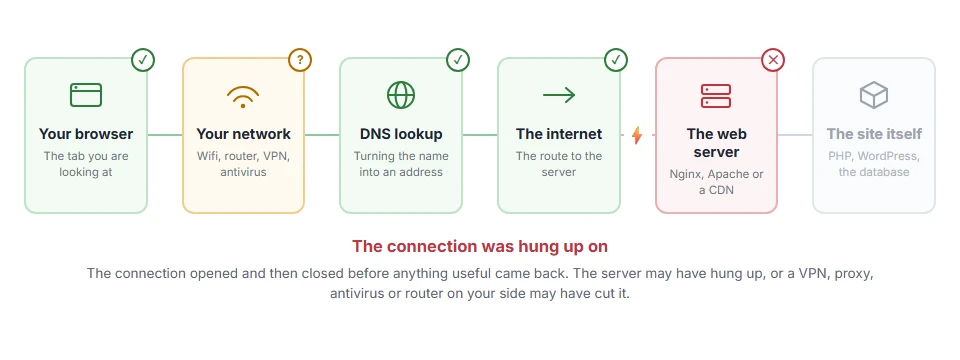
Every page you open makes the same journey. Knowing which step this error stops at tells you which half of the list below is worth your time, because the green steps are already proven to be working.
Step 1: Reload, then try a private window
Both take seconds and between them they rule out a lot.
Wait about ten seconds and press Ctrl and F5, or Cmd and Shift and R on a Mac. Many closed connections are momentary, from a server restarting or a network blip.
Then try a private window. If it works there, an extension or a cached copy in your normal browser was involved.
When this will not help: if it fails every time on every reload, it is not a blip and the rest of the list applies.
Step 2: Turn off your VPN and proxy
A VPN adds a hop, and a hop that drops the connection produces exactly this.
Turn it off and reload. Then check your proxy settings, because a proxy that drops the connection can cause this too.
When this will not help: on a company network you may be behind a proxy you cannot switch off, in which case whoever runs it is the person to ask.
Step 3: Turn off antivirus HTTPS scanning
Security suites that inspect encrypted traffic sit in the middle of the connection. When they get it wrong, they close it.
Look for HTTPS scanning, SSL scanning or web shield. Turn it off for two minutes, load the page, turn it back on.
If that was the cause, add the site to the exception list rather than leaving the feature off.
When this will not help: Windows Defender does not do this by default. Third party suites are the ones to suspect.
Step 4: Reset the network stack
If it is still happening, reset the plumbing on your own machine.
On Windows, in Command Prompt as administrator:
ipconfig /flushdns
netsh winsock reset
netsh int ip reset
Then restart the computer, because those last two do not fully apply until you do.
On macOS, in Terminal:
sudo dscacheutil -flushcache; sudo killall -HUP mDNSResponderWhen this will not help: netsh winsock reset clears settings some VPN and antivirus tools rely on. If your VPN stops working afterwards, reinstall it and it will be fine.
Step 5: Try another network
The test that tells you which side the problem is on.
Turn wifi off and load the page over mobile data. If it works, your home or office connection is closing it. If it fails there too, the far end is.
When this will not help: it locates the problem rather than fixing it, but that is worth two minutes before you try six more things.
Step 6: Restart your router
Routers hold broken connection state for a surprisingly long time.
Unplug it for thirty seconds, plug it back in, and give it a minute before retrying.
When this will not help: on mobile data there is no router involved.
Step 7: If it happens on one site only
Then that server is closing connections, and you cannot fix it from outside.
Tell them. Say you are getting ERR_CONNECTION_CLOSED, roughly when, and that other sites are fine. That last detail saves them a lot of guessing.
When this will not help: if the site is yours, telling yourself achieves little. The owner section below is the one you want.
If it is your own site
Then something on your side is hanging up, and there are four usual causes.
The web server is crashing or restarting. It drops you before the page starts. Check your server error log around the time it happened, because a crash or restart is normally recorded there.
A worker or memory limit. When the server is full and its queue fills up, new connections get dropped. This is the likely cause if it only happens at busy times.
A TLS mismatch. If only older devices get it, your server is refusing old TLS versions. That is usually correct behaviour rather than a fault, though it is worth knowing you are doing it.
A firewall dropping rather than refusing. Some rules close the connection silently instead of returning an error, which is exactly what this looks like from outside.
If you are on shared hosting, message support with the page and the time, say you are getting ERR_CONNECTION_CLOSED, and ask them to check the PHP-FPM and server error logs for that moment.
When this will not help: none of this helps if your site is simply on a plan too small for its traffic. If the error appears every day at your busiest hour, that is capacity, not a bug.
Closed, reset and refused
The three get muddled and they point at different things, so it is worth being precise.
Closed means the connection was established and then ended without a proper answer.
Reset means it was cut abruptly mid stream, usually by something in the middle.
Refused means the far end answered immediately and said no, so nothing was listening.
Closed sits between the other two, which is why the fixes overlap with both.
Frequently asked questions
Is ERR_CONNECTION_CLOSED a virus? No. It is a network event. Antivirus software is more often the cause than the cure here, which surprises people.
Why does it happen on only one site? Because it is specific to that server or the path to it. Step 5 confirms in a minute whether the problem is your network or theirs.
It works in Firefox but not Chrome. That usually points at a Chrome extension or at QUIC. Try a private window first, and if that fixes it, an extension is your answer.
Will resetting winsock break anything? It puts network settings back to defaults. Some VPN and antivirus tools need reinstalling afterwards. Nothing is lost permanently.
If you have any issues, you can ask me via comment, and I will love to help you out.
