
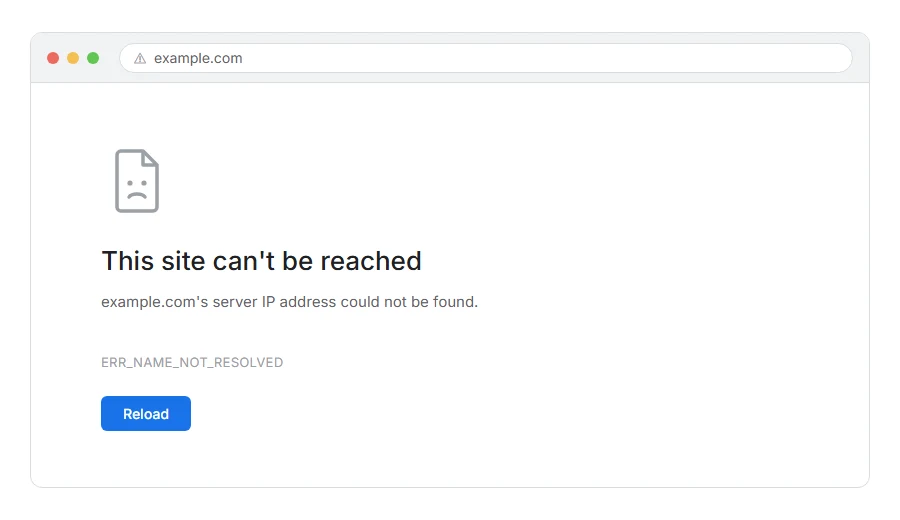
Your page will not load and Chrome says the site cannot be reached, with ERR_NAME_NOT_RESOLVED underneath.
In one line: your computer asked for the address behind that website name and never got a usable answer.
Think of it like asking directory enquiries for a number and getting silence. The person you want may well exist. You simply have no number to dial.
Do not worry, you are not alone. This is one of the most common errors on the web and the first two fixes clear most of them in about a minute. I am here to help.
How this differs from DNS_PROBE_FINISHED_NXDOMAIN
Worth thirty seconds, because the two look identical and people waste time on the wrong list.
NXDOMAIN means the lookup completed and the answer was definite: there is no such name. That points at a typo, an expired domain, or a domain with no records.
ERR_NAME_NOT_RESOLVED is broader. The lookup did not produce a usable answer, which includes the definite no but also includes the lookup timing out, being blocked, or failing partway.
In practice the fixes overlap heavily, and this page covers both. If Chrome named NXDOMAIN specifically, our page on DNS_PROBE_FINISHED_NXDOMAIN goes into the definite-no causes in more detail.
Where it actually breaks
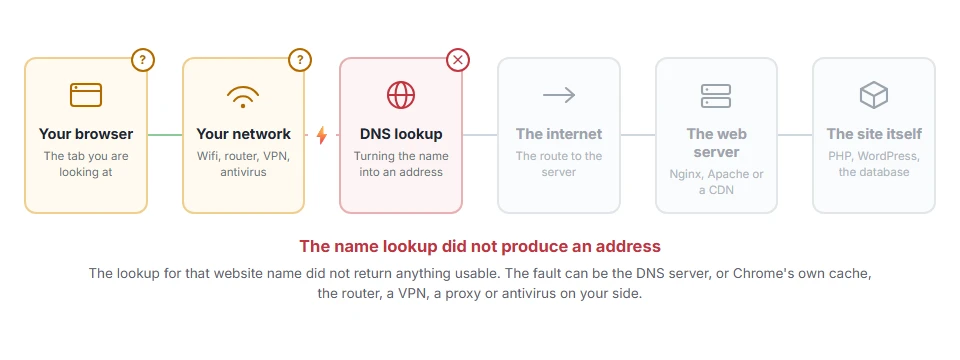
Every page you open makes the same journey. Knowing which step this error stops at tells you which half of the list below is worth your time, because the green steps are already proven to be working.
Step 1: Flush your DNS cache
Your computer keeps its own copy of recent lookups. A wrong entry in there will keep failing long after the real problem is fixed.
On Windows, open Command Prompt as administrator and run:
ipconfig /flushdnsOn macOS, open Terminal and run:
sudo dscacheutil -flushcache; sudo killall -HUP mDNSResponderThen close every browser window and reopen the site.
When this will not help: if the domain has genuinely expired, flushing only makes your computer ask again and get the same nothing. Step 5 checks that.
Step 2: Clear Chrome’s own DNS cache
Chrome keeps a second copy that flushing your computer does not touch. This is why the error sometimes survives step 1.
Type this in the address bar and press enter:
chrome://net-internals/#dnsClick Clear host cache. While you are there, go to the Sockets section and click Flush socket pools as well.
When this will not help: this page only exists in Chrome and Chrome based browsers. In Firefox, type about:networking#dns in the address bar and click Clear DNS Cache instead. Safari has no such page, so restarting the browser is the nearest equivalent there.
Step 3: Change your DNS server
Your internet provider supplies a lookup service by default, and some of them are slow, unreliable, or quietly blocking things.
Switching is free and reversible. Cloudflare’s is 1.1.1.1 and 1.0.0.1. Google’s is 8.8.8.8 and 8.8.4.4.
On Windows, go to Settings, Network and Internet, your connection, then Edit next to DNS server assignment. On a Mac, System Settings, Network, Details, DNS.
Flush again afterwards and retry.
When this will not help: on a work or school network the DNS is usually fixed and often deliberately filtered. If the site is blocked there on purpose, changing this will not get you past it and asking is the better move.
Step 4: Restart your router
Routers cache lookups too, and they hold on longer than computers do.
Unplug it at the wall for thirty seconds, plug it back in, and give it a minute to settle before trying again.
When this will not help: on mobile data there is no router involved. Skip it.
Step 5: Check the domain still exists and still points somewhere
If nothing so far has worked, consider that the answer really is nothing.
Search for a whois lookup and enter the domain. It will tell you whether it is registered and when it expires. An expired domain is a very common cause and it hits sites that worked perfectly last week.
Then check it has DNS records. A registered domain with no A record will fail exactly like this.
When this will not help: whois tells you the domain exists but not whether it points anywhere. Both need to be true.
Step 6: Turn off your VPN, proxy and antivirus
Each of the three can intercept lookups, and any of them getting it wrong produces this.
Turn off the VPN and retry. Check your proxy settings, because a proxy that is set but not running fails everything. Then turn antivirus off for two minutes to test, and back on afterwards.
When this will not help: on a managed work laptop these may all be enforced and unchangeable. That is a conversation rather than a fix.
Step 7: Check your hosts file
Last because it is rare, but nothing else finds it.
Your computer has a small file that overrides lookups completely. Malware writes to it sometimes, and so do developers who forget to tidy up.
On Windows it is at C:\Windows\System32\drivers\etc\hosts. On a Mac it is /etc/hosts. Open it in a text editor and look for the site. If it is listed, remove that line and save.
When this will not help: you need administrator rights to edit it, and on a work machine you very likely do not have them.
If you own the site and visitors report this
Then your domain is not resolving for some people, and there are three things to check in order.
Is the domain still registered and paid for. Are the nameservers at your registrar pointing at your host. Does an A record exist and point at your server.
A change to any of those takes hours to spread, sometimes up to two days. During that spread, some people will reach the site and others will get this error. That is normal, it is not something you can speed up, and it is not a fault.
Frequently asked questions
Why does it work on my phone but not my laptop? Because they use different DNS. Your phone on mobile data uses your carrier’s, your laptop uses your home or office one. That points squarely at steps 1 to 3.
Is it a virus? Almost never. Malware can cause it in two ways, by editing the hosts file (step 7) or by changing your DNS server setting (step 3), and both are uncommon.
How long until a new domain works? Usually a few hours, occasionally up to two days. Until then some people will reach it and some will not, and there is nothing to fix in between.
I get it on every site, not one. Then your DNS itself is not working. Steps 3 and 4 are your fixes, and if neither helps, your internet provider is the one to call.
If you have any issues, you can ask me via comment, and I will love to help you out.
