
You clicked a link and landed on 404 Not Found, or a page telling you it cannot be found.
In one line: the server was reached, understood you perfectly, and has nothing at that address.
Think of it like turning up at a house number that does not exist on that street. The street is real, the postman found it, there is simply no number 47.
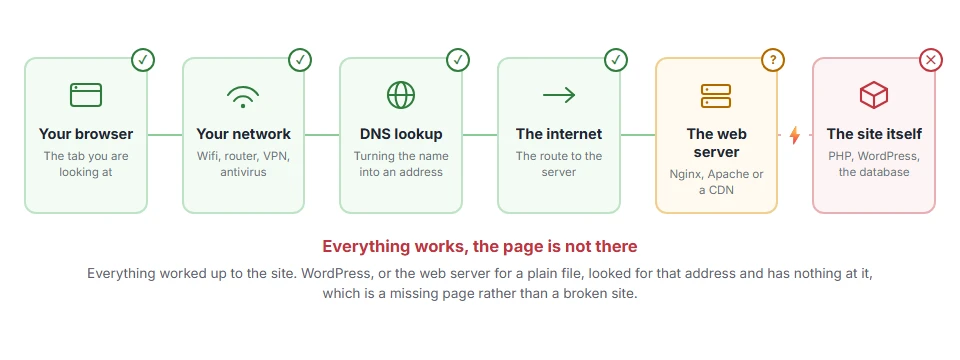
That rules out a lot. The site is up, your connection is fine, and the address was understood. Only the page is missing.
Do not worry, you are not alone. This is the most common error on the web and it is often nothing to fix at all. I am here to help you tell the difference.
If you are a visitor
There are four things worth trying, and they take under a minute between them.
Check the address for a typo. Especially a missing letter at the end, or a full stop that got included when you copied the link.
Cut the address back a level. If example.com/blog/posts/thing gives a 404, try example.com/blog/posts, then example.com/blog. You will usually find the thing you wanted one level up.
Search the site. Most sites have a search box, and most 404 pages have one on them. The page has often just moved rather than gone.
Try the site’s own menu. If the link came from somewhere else, it may simply be out of date. The site’s own navigation will be current.
When this will not help: if the page was genuinely deleted, none of this brings it back. For an old page you really need, paste its old address into the Wayback Machine at archive.org, which often has a copy.
Where it actually breaks
Every page you open makes the same journey. Knowing which step this error stops at tells you which half of the list below is worth your time, because the green steps are already proven to be working.
If it is your own site
Now it matters, because 404s cost you visitors, and a page that keeps giving a 404 drops out of search results.
The WordPress fix that works most of the time
If every page except your home page gives a 404, this is your answer and it takes one click.
Go to Settings > Permalinks and click Save Changes. Do not change any setting. Just saving rewrites the rules that tell WordPress how to find your pages.
This fixes it after a migration, after a plugin change, or after anything touched your .htaccess.
When this will not help: if only one or two pages 404 and the rest are fine, the rules are working and the problem is those specific pages. Read on.
Check the page is actually published
Obvious and worth ruling out. A page in the trash gives a 404 to everybody, you included, until you restore it. A page left as a draft or scheduled for the future gives a 404 to everybody except you while you are logged in.
That last part is the trap: it looks fine to you and broken to everybody else.
When this will not help: if you can see the page while logged out, it is published and something else is wrong.
Check the slug has not changed
If you edited a page title, some setups update the address with it. The old address then 404s for anybody who had it bookmarked or linked.
Compare the current address with the one people are trying. If it changed, set up a redirect from the old to the new rather than changing it back.
Rebuild your .htaccess
If saving permalinks did not help and you are on Apache, the file may not be writable.
Rename it to .htaccess-off, then save permalinks again so WordPress writes a fresh one. If it cannot, it will tell you and show you the rules to paste in by hand.
When this will not help: on Nginx there is no .htaccess at all and the rules live in the server config. Only your host can change those.
Look at what is actually 404ing
Stop guessing and look. Bing Webmaster Tools and Google Search Console both list the addresses returning 404, and how they were found. To find the links on your own pages that still point at them, our guide to finding broken links covers five free tools.
That list usually splits into three groups. Pages you deleted on purpose, which are fine. Pages that moved, which need redirects. And addresses that were never real, usually from bots probing, which you can ignore.
Knowing which group each one is in saves a great deal of pointless work.
Do not redirect everything to your home page
This is the one piece of advice I would push back on, because plenty of guides suggest it.
Google treats a redirect from a missing page to an unrelated page as a soft 404. It does not count as a real answer, and you lose the honest signal that tells search engines the page is gone.
Redirect a page to its genuine replacement. If there is no replacement, let it 404 and make the 404 page a good one.
What a good 404 page looks like
Since some 404s are unavoidable, the page itself is worth five minutes.
It should say plainly that the page is not there, without blaming the visitor. It should have a search box. It should link to your most useful pages. And it should look like the rest of your site, so people know they have not left it.
That turns a dead end into a second chance, which is the most you can get from a 404.
Frequently asked questions
Do 404s hurt my search rankings? No. Search engines expect them and handle them fine, and a missing page does not count against the rest of your site. Links on your own site that still point at missing pages are worth cleaning up, because they send your visitors to a dead end.
Should I delete pages that 404? There is nothing to delete. A 404 means the page is already gone. What you can do is remove the links that still point at it.
Why does my site 404 after moving hosts? Almost always the permalink rules. Save the Permalinks page and it usually comes back at once.
What is the difference between 404 and 410? A 404 says not found, which might be temporary. A 410 says gone for good. Google treats the two the same, so a 410 is simply the honest choice for something you deliberately removed.
If you have any issues, you can ask me via comment, and I will love to help you out.
When the page is gone on purpose
A 404 says the page could not be found, which leaves the door open. If you removed the page deliberately and it is never coming back, the honest answer is a 410 gone, which tells search engines it is gone for good, not just missing.
What the number itself means
Every one of these numbers tells you who has the problem before you read a word of the message.
- the full list of HTTP status codes, grouped by whether it is your request or the server at fault.
