
Do you need the http status codes list, either because a page threw a number at you or because you are building something and want to send the right one?
You do not have to learn all of them. There are about sixty in regular use and you will meet perhaps twelve, and the first digit alone tells you who has the problem. Think of it as the name on the desk the problem sits on. That one habit saves more time than memorising the rest. If you are here because a page threw a number at you rather than because you are building something, I recommend skipping to the 4xx and 5xx sections, since those are the two that appear on screen.
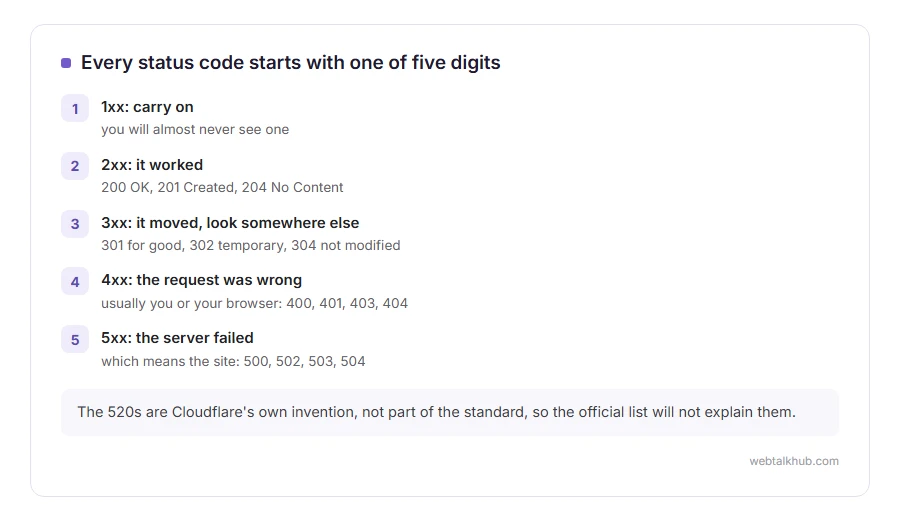
Here is that habit in four lines:
- 1xx means carry on, you will almost never see one
- 2xx means it worked
- 3xx means it moved, look somewhere else
- 4xx means the request was wrong, which usually means you or your browser
- 5xx means the server failed, which means the site
In this article you will find every code you are likely to meet, grouped that way, with the ones that come up most often explained properly and linked to their own page.
So let’s get started.
2xx: it worked
200 OK is the normal answer for every page that loads. 201 Created is what an API sends after making something. 204 No Content means it worked and there is nothing to show, which is what a delete button often gets back. 206 Partial Content appears when a video is streamed or a download is resumed.
If you are debugging and you see a 200 where you expected an error, that is worth stopping on: a page that says not found while returning 200 tells search engines everything is fine, which is the classic soft 404 mistake.
3xx: it moved
301 Moved Permanently is the one to use when a page has a new address for good, because it passes on the value of the old one. 302 Found is a temporary move and keeps the old address as the real one.
304 Not Modified is the browser being told nothing has changed since last time, which is why a repeat visit is fast. 307 and 308 are the strict versions of 302 and 301: they keep the method, so a POST stays a POST.
Getting 301 and 302 the wrong way round is the most common mistake in this group, and it quietly costs a site its rankings.
4xx: the request was refused
These are the ones people actually meet, so each has its own page here.
400 Bad Request, the request was malformed: 400 bad request. 401 Unauthorized, you need to sign in: 401 unauthorized. 403 Forbidden, you are not allowed in, signed in or not: 403 forbidden. 404 Not Found, no such page: 404 not found.
405 Method Not Allowed, the address is fine and that way of asking is not: 405 method not allowed. 406 Not Acceptable, the server will not answer in the format asked for, and on shared hosting usually a firewall rule: 406 not acceptable. 408 Request Timeout, your request never arrived in full: 408 request timeout.
410 Gone, deliberately removed and not coming back: 410 gone. 413 Content Too Large, your upload was over the limit: 413 request entity too large. 429 Too Many Requests, you asked too often: 429 too many requests. 431, your headers were too long: 431 request header fields too large.
The others you may meet are 402 Payment Required, which is rare and mostly used by APIs, 409 Conflict, 415 Unsupported Media Type and 418 I’m a teapot, which is a genuine joke code from 1998 and does occasionally turn up.
5xx: the server failed
500 Internal Server Error, the catch all for a server that crashed while building the page: 500 internal server error. 502 Bad Gateway, one server got a broken answer from another: 502 bad gateway. 503 Service Unavailable, the server is up and refusing for now: 503 service unavailable. 504 Gateway Timeout, nothing answered in time: 504 gateway timeout.
507 Insufficient Storage and 509 Bandwidth Limit Exceeded turn up on small hosting plans that have run out of something.
Cloudflare’s own numbers, which are not standard
If your site sits behind Cloudflare you will also meet codes in the 520s, and they are Cloudflare’s invention rather than part of the standard.
520 means your server gave an answer Cloudflare could not read, 521 that your server refused the connection, 522 that it timed out, 524 that your server never finished, 525 that the secure handshake failed and 526 that the certificate was refused. We have pages on 520, 525 and 526.
Knowing they are not standard matters, because searching the official list for them does not work at all, and people then conclude their server is doing something strange.
Which code should I send?
For anybody building something, the short version.
Send 200 when it worked, 201 when you created something, 301 when a page has moved for good and 302 when it is temporary. Send 400 when the request is malformed, 401 when they need to sign in, 403 when they are not allowed and signing in would not change that, 404 when it does not exist and 410 when it did and never will again.
And never send 200 with an error message in the body. That is the one mistake that confuses browsers, search engines and your own monitoring all at once.
FAQ(HTTP Status Codes)
How many HTTP status codes are there?
Around sixty are registered and in use. You will meet about a dozen, which is why this page explains those properly rather than listing all of them with one line each.
What is the difference between 401 and 403?
401 means you have not proved who you are. 403 means you are not allowed, signed in or not.
Is a 404 bad for SEO?
Not in itself. Lots of 404s on pages that used to exist and had links is a problem, and a single missing page is normal.
What is the most common status code?
200, by an enormous margin, because it is sent for every page that works.
Where do the 5xx codes come from?
The server. A 4xx is about your request, a 5xx is the site failing to answer it, which is why there is usually nothing you can do about a 5xx as a visitor.
If you have any issues, you can ask me via comment, and I will love to help you out.
Reading the address that gave you the code
Many 4xx codes come down to a URL that is slightly wrong, so it helps to know which part is which.
- every part of a URL, the scheme, the domain, the path, the query and the fragment, with one real example.
