
Every page you open has an address, and somebody has just asked you to send them the URL, or a form wants one, or a guide told you to check it before clicking. So what is a URL, exactly, and which part of that long line actually matters?
A URL, short for Uniform Resource Locator, is the full address of one thing on the web: a page, a picture, a file or a video. Picture a postal address, which goes from the country down to the flat number. A URL does the same, from the kind of connection down to one spot on one page.
Knowing how to read one helps with more than people expect:
- Copying the right link to send to someone
- Spotting a fake site before you type a password into it
- Understanding why a page shows 404 Not Found
- Sharing a link that opens at the exact spot you meant
In this article I will take one real URL apart piece by piece, show you how to find and copy one on a computer and a phone, and explain how to read the one part that tells you whose site you are really on.
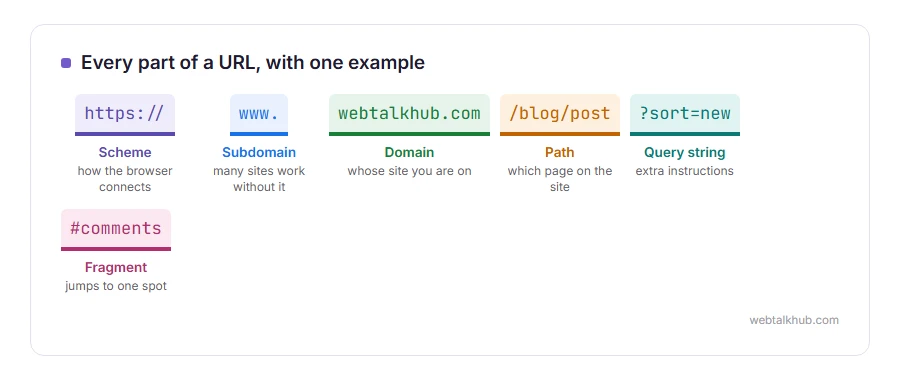
Every part of a URL, with one example
Here is a full URL:
https://www.webtalkhub.com/blog/post?sort=new#commentshttps:// is the scheme, meaning how your browser connects. https is encrypted and http is not, which is why browsers warn about http pages that ask for anything private.
www is a subdomain. Many sites work with or without it, and some use other subdomains, such as mail or shop, for different parts of the business.
webtalkhub.com is the domain name, the part somebody registered and pays for. The .com at the end is the top level domain, and others include .org, .net and country endings such as .uk or .de.
/blog/post is the path, which page on that site you want. Most 404 errors come from a path that has changed or was typed wrong.
?sort=new is the query string, extra instructions for the page, such as a search term or a filter. Links in emails often carry long query strings for tracking, and they can usually be removed without breaking anything.
#comments is the fragment, which jumps to one spot on the page. It never goes to the server, and it is how a link can open halfway down a long article.
URL, domain and link: the difference
The domain is one part of the URL, the name of the site. The URL is the whole address of one thing on that site. A link is a URL that has been made clickable, often hiding the address behind words like “click here”.
How to find and copy a URL
On a computer, click once in the address bar at the top of the browser. The whole URL is selected, so press Ctrl and C, or Command and C on a Mac, to copy it.
On a phone, tap the address bar and the full URL appears. Many phone browsers show only the domain until you tap, which is why people struggle to find it. The share button, then Copy, does the same job.
For a picture, right click it on a computer and choose Copy image address. On a phone, press and hold the picture.
How to read a URL before you trust it
This is the most useful habit on the list. Look for the domain, which is the part just before the first single slash after the double slash. That is whose site you are on, whatever the rest says.
So in paypal.com.account-check.net/login, the real site is account-check.net, and PayPal has nothing to do with it. Be careful with lookalikes too, such as a zero in place of a letter o, or an extra letter that is easy to miss.
I recommend typing the address of your bank or email yourself, or using a bookmark, rather than following a link to it from a message.
Why some URLs look strange
Spaces and unusual characters are not allowed in a URL, so they are written as codes. A space becomes %20, which is why a file called my file.pdf shows up as my%20file.pdf.
Keep in mind that very long URLs can break when pasted into some programs and emails. Around 2,000 characters is the practical limit, because older browsers stopped there.
Related pages
If a URL takes you to an error, our pages on 404 Not Found and 400 Bad Request explain what went wrong. For the padlock and the warnings about http, see your connection is not private and our guide on redirecting http to https.
FAQ(What Is a URL)
What does URL stand for?
Uniform Resource Locator. It is the full address of one thing on the web.
Is a URL the same as a website address?
Mostly, yes. The website address usually means the domain, and a URL can point to any single page or file on it.
Where is the URL on my phone?
In the address bar at the top or bottom of the browser. Tap it to see the full URL rather than just the site name.
Can a URL have spaces?
Not directly. Spaces are written as %20, or sometimes as a plus sign in the query part.
Is a URL case sensitive?
The domain is not. The path after it can be, depending on the server, so copy it exactly rather than retyping it.
If you have any issues, you can ask me via comment, and I will love to help you out.
Making the page a URL points to
A path can point to a real file, and the simplest of those is an HTML file you can write yourself.
- how to create an HTML file, in five minutes, with nothing but Notepad or TextEdit.
