
Every time you type a website’s name, something has to find out where that website actually lives, and that something is DNS. If you have met it in an error message, a router setting or a hosting control panel, and you want to know what is DNS before you touch anything, this is the plain version.
DNS stands for Domain Name System. Computers on the internet find each other by numbers called IP addresses, such as 203.0.113.10, and people remember names. DNS is the system that turns one into the other, millions of times a second, all over the world.
Think of it as the contacts app on your phone. You tap a name, and the phone looks up the number behind it and dials that. Nobody remembers the numbers, and nobody needs to.
It matters to you in a few everyday ways:
- Every page you open starts with a DNS lookup
- A DNS error stops a site loading even when the internet works
- Moving a website or setting up email means changing DNS records
- Your choice of DNS server affects speed a little and privacy a lot
In this article you will learn how a lookup actually happens, what the different records are for, why changes take a while to show, and what the common DNS errors mean.
So let’s get started.
How a DNS lookup works
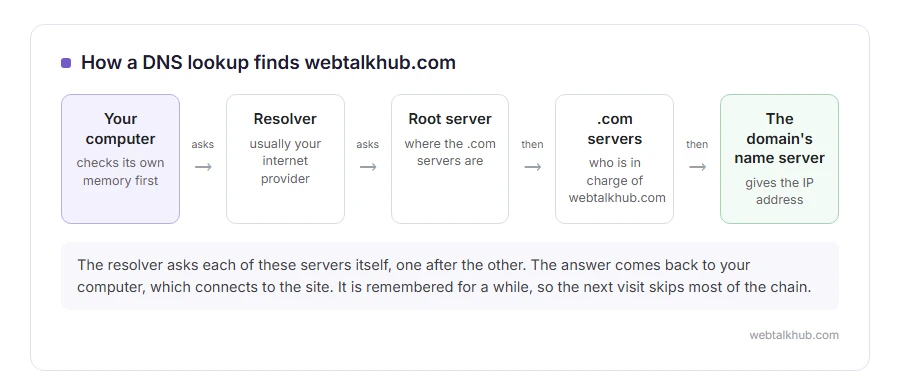
When you type webtalkhub.com, your computer first checks its own memory, because it keeps recent answers for a while. If the answer is not there, it asks a resolver, which is usually run by your internet provider unless you have changed it.
The resolver may know the answer already. If not, it goes looking, one level at a time. It asks a root server where the .com addresses are kept, then asks the .com servers who is in charge of webtalkhub.com, then asks that domain’s own name server for the actual address.
The answer comes back to your computer, which connects to the site. The whole chain usually takes tens of milliseconds, and after that the answer is remembered, so the next visit skips most of it.
The records you will meet
A domain’s DNS is a short list of records, and each one answers a different question.
A points the name to an IPv4 address, the usual kind. AAAA does the same for the newer, longer IPv6 addresses.
CNAME says this name is another name for that one, so www.example.com can follow example.com without its own address.
MX says which servers receive email for the domain. Get this wrong and the website works while every email bounces.
TXT holds text that other services read, most often to prove you own the domain, and for the SPF and DKIM records that stop your emails landing in spam.
NS says which name servers are in charge of the domain in the first place. Change these and every other record is suddenly read from somewhere else.
Why DNS changes take time to show
Every record comes with a TTL, time to live, which tells resolvers how long they may keep the answer before asking again. It is often an hour, sometimes a day.
So when you change a record, everybody who looked it up recently keeps the old answer until their copy expires. Most changes show within an hour or two, and some take up to a day or two. People call this propagation, and there is nothing to speed it up from your side except lowering the TTL a day before a planned change.
Keep in mind that your own computer holds copies too. If a change works on your phone and not on your laptop, flushing the DNS cache on the laptop usually settles it.
DNS servers, and choosing your own
The resolver your provider gives you works, and it sees every name you look up. Public resolvers such as Cloudflare’s 1.1.1.1 and Google’s 8.8.8.8 are free, quick almost everywhere, and publish what they log.
If you only came here to fix an error, I suggest going straight to our guide on how to change DNS, which has the exact settings for every device and the two addresses to type in.
The DNS errors people actually see
DNS_PROBE_FINISHED_NXDOMAIN means the name does not exist, often a typo or an expired domain. DNS server not responding means the resolver itself is not answering, which is a network problem rather than a website one.
When only some sites fail and others load fine, our page on websites not loading walks through telling a DNS fault apart from everything else. And if you are setting up email on your own domain, the MX and TXT records above are the whole job, covered step by step in our guide to getting a business email address.
FAQ(What Is DNS)
What does DNS stand for?
Domain Name System. It is the internet’s way of turning names into the numeric addresses computers use to connect.
Is DNS the same as my internet connection?
No. Your connection can be fine while DNS fails, which is why some errors say the site cannot be found even though other apps work.
Can DNS make my internet faster?
Only a little. A quicker resolver shaves milliseconds off the start of each page, and your download speed does not change at all.
Is changing DNS safe?
Yes, with a well known public resolver. Setting it back to automatic undoes it instantly.
Who controls DNS?
Nobody owns all of it. The root is coordinated internationally, each ending such as .com is run by its own registry, and each domain’s records are controlled by whoever owns that domain.
If you have any issues, you can ask me via comment, and I will love to help you out.
