
Are you getting some websites loading normally while others hang, time out or come back with an error, on a connection that tells you it is working perfectly?
Don’t worry, you are not alone, and this is one of those problems that looks random and almost never is. When some sites work and others do not, the fault is nearly always in one of four places, and each one has a test that rules it in or out in under a minute.
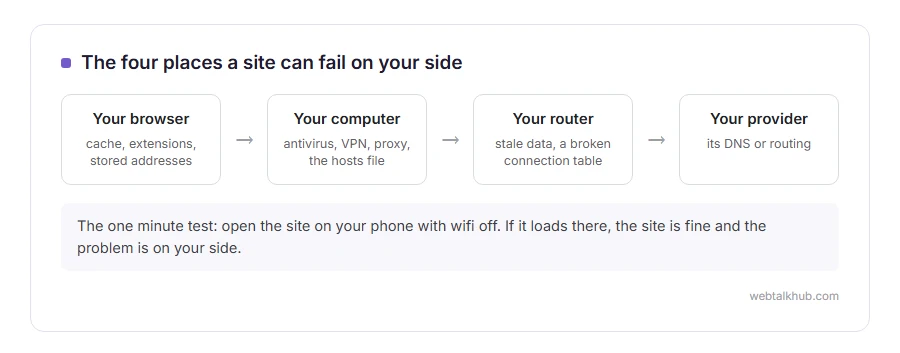
The four places are:
- Your browser, with its cache, its extensions and its own stored addresses
- Your computer, with antivirus, VPN, proxy settings or the hosts file
- Your router, which can hold stale data or a broken connection table
- Your internet provider, whose DNS or routing can be the odd one out
In this article you will learn the order to check them in, which is the fast order rather than the obvious one, and eight fixes with what each of them can and cannot do.
So let’s get started.
The one minute test that says where to look
Open the same site on your phone with wifi turned off, so it uses mobile data.
If it loads there, the site is fine and the problem is on your side. Then open it on another device on the same wifi: if that fails too, you are looking at the router or the provider, and if it works, the trouble is on the first computer.
Two tests, four possible answers, and you have already halved the work.
1) Try another browser, and a private window
This separates the browser from the computer in twenty seconds.
If the site opens in a private window, your cache or an extension is the cause. If it opens in a different browser but not in yours, the same. If every browser fails, skip to step 3, because the browser is not your problem.
A private window shares your network and your antivirus, so a failure there proves nothing about those. It only clears the browser.
2) Clear the cache, and check your extensions
In Chrome, open Settings, Privacy and security, Delete browsing data, and clear cached images and files. Then open chrome://extensions and turn off ad blockers, privacy tools and anything that promises to make browsing faster.
Turn them back on one at a time until the site fails again, which names the culprit in a few rounds. This will not help if every browser on the machine fails, because then the browser is not the cause at all.
Clearing cookies as well will sign you out of everything, so start with cached files only unless you have a reason.
3) Turn off the VPN, the proxy and the antivirus web shield
All three sit between you and the site and any of them can break one site while leaving others alone.
Disconnect the VPN. On Windows, open Settings, Network and internet, Proxy, and switch off anything you did not set. Then turn off the web shield in your antivirus for two minutes and try again.
Put the antivirus back on straight afterwards, and if it was the cause, add an exception for that site rather than leaving the shield off.
4) Flush the DNS and change your DNS server
An old address in your computer’s memory sends you to a server that no longer answers, which looks exactly like a site being down.
Run ipconfig /flushdns on Windows, or use the command in our guide to flushing the DNS cache, then set your connection to 1.1.1.1 or 8.8.8.8 and try again.
Changing DNS often fixes a site that your provider resolves badly. It will not help when the site is genuinely down, and the mobile data test at the top already told you which of those you have.
5) Check the hosts file
Rare, and worth thirty seconds because nothing else will ever fix it when it is the cause.
On Windows the file is at C:\Windows\System32\drivers\etc\hosts, and on a Mac it is /etc/hosts. Look for a line with the site’s name in it and put a hash at the start of any line you did not add yourself.
Some security software keeps a long list in there on purpose, so leave those alone and only comment out the one site you are chasing.
6) Restart the router, properly
Before you start, tell anybody else in the house, because this takes the internet down for two minutes.
Unplug the router, wait thirty seconds, plug it back in and give it two full minutes. That clears its stale connection table and any old address it was holding.
If only one site fails and everything else is fine, the router is unlikely to be it, so do this once and move on rather than repeating it.
7) Check whether the site is down for everyone
Put the address into a service such as downforeveryoneorjustme.com.
If it is down for everybody, you are finished: nothing on your side will change it, every step on this page does nothing, and waiting is the answer. If it is up for everybody else, the tests above are the right list.
8) When it is the whole connection rather than one site
If nothing loads at all, this is a different problem with a different page. Check whether your computer even has an address with ipconfig /all, because an address starting 169.254 means it never got one, which our page on ethernet does not have a valid IP configuration covers.
If pages hang for a long time and then fail with a specific error, read ERR_CONNECTION_TIMED_OUT, which is the same symptom with a name.
FAQ(Websites Not Loading)
Why do some sites load and others do not?
Because the fault is specific: one address in a cache, one blocked route, one rule in a firewall. A broken connection would stop everything.
Can my internet provider block a website?
Yes, and they also route badly sometimes. If a VPN fixes it instantly, that is your answer.
Does restarting the computer help?
Sometimes, because it clears network state. It is worth one try, and it is not the fix for a site that is down.
Why is it fine on my phone but not my laptop?
Different network, different DNS, different security software. The test at the top turns that into information rather than a mystery.
I cleared everything and one site still fails.
Then it is likely to be that site blocking your address, or your provider’s route to it. A VPN proves which in one test.
If you have any issues, you can ask me via comment, and I will love to help you out.
Two things worth checking by hand
Sometimes it is the address and sometimes it is the lookup behind it.
- reading a URL properly, which part is the actual site, and why a small typo in the path gives a 404.
- changing your DNS, the quick test for whether your provider’s lookups are the problem.
