
Did your code stop before it even started, with a message saying syntax error and a line number that does not seem to point at anything wrong?
You are not alone, and it is the friendliest error there is. A syntax error means the code breaks the grammar rules of its language, so the computer cannot even read it, let alone run it. Nothing has gone wrong while running; nothing has run at all. The fix is almost always one missing or extra character.
The usual culprits are:
- A bracket, brace or parenthesis opened and never closed
- A quote mark opened and never closed
- A missing colon, comma or semicolon
- A keyword spelled wrong
- In Python, indentation that does not line up
In this guide I will explain what a syntax error is, how it differs from the other kinds of error, what the messages look like in Python, JavaScript and PHP, and how to find the character that caused it.
So let’s get started.
What a syntax error is
Every programming language has strict grammar. Before a program runs, the computer reads the whole file to understand its structure, and if one part does not follow the rules, it stops right there and reports where it gave up.
Imagine a sentence where a bracket opens and never closes. A person reads straight past it and still understands, and a computer cannot, because it has no way of knowing where the bracket was meant to end.
Syntax errors against the other kinds
A syntax error stops the program before it starts. The code cannot be read.
A runtime error happens while the program is running, such as dividing by zero or using something that does not exist yet. The code was readable and something went wrong on the way.
A logic error is the sneaky one. The program runs happily and gives the wrong answer, and no message appears at all.
Keep in mind that fixing the syntax error only gets you to the start line. The runtime and logic errors are still waiting behind it, if there are any.
What the messages look like
Python:
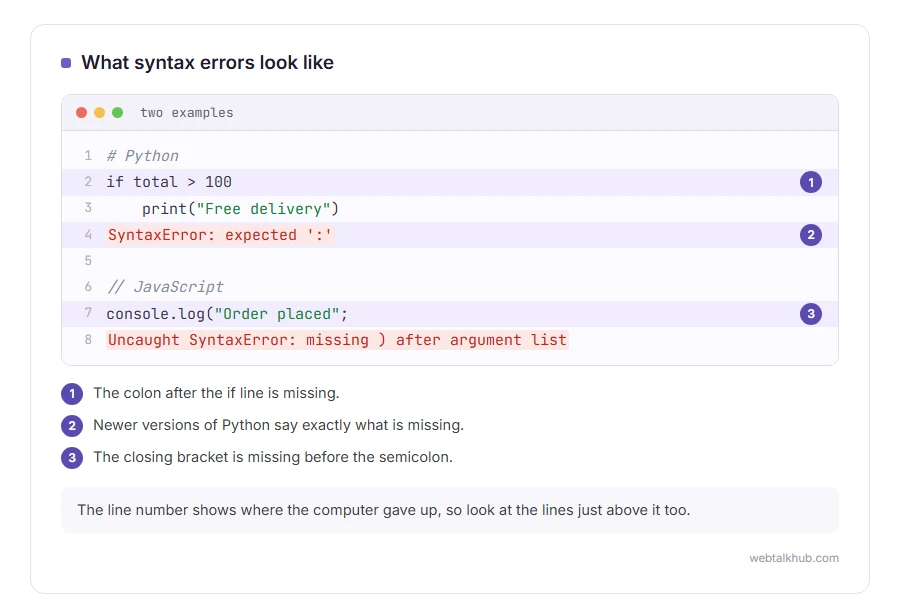
if total > 100
    print("Free delivery")

SyntaxError: expected ':'
Newer versions of Python say exactly what is missing, here the colon after the if line. Older versions only say invalid syntax and point near the spot.
JavaScript:
console.log("Order placed";

Uncaught SyntaxError: missing ) after argument list
PHP:
PHP Parse error: syntax error, unexpected token "}"PHP calls it a parse error, which is the same thing. Parsing is the reading step that failed. If a PHP page only shows a blank screen instead of the message, switch its errors on and it will name the line.
Why the line number seems wrong
The line number shows where the computer gave up, not where you made the mistake. If you forget to close a bracket on line 10, the computer keeps reading and only realises something is wrong at line 14, when it meets something that cannot possibly be inside that bracket.
So look at the reported line, then at the lines just above it. The mistake is nearly always there, and at the end of a file it can be much further up.
How to find it quickly
Count brackets in pairs. Every opening bracket, brace and quote needs its partner, and most code editors highlight the matching one when you click next to it.
Use an editor that colours code. When everything after a certain point suddenly turns the colour of text in quotes, a quote mark was left open just before it.
Undo your last change. If the code worked five minutes ago, the error is in what you changed since then.
For beginners, an editor such as Visual Studio Code saves hours, because it underlines syntax errors in red as you type, before you ever run anything.
Syntax errors in files that are not code
JSON files have grammar too, and the favourite mistakes are a comma after the last item and single quotes instead of double ones. Our JSON formatter points at the exact spot, and our page on how to open a JSON file covers reading them.
On a WordPress site, a syntax error in functions.php takes the whole site down with a critical error. Our guides on editing functions.php and recovery mode show how to get back in and undo it.
FAQ(Syntax Error)
What causes a syntax error?
Code that breaks the grammar rules of its language, most often an unclosed bracket or quote, or a missing colon or comma.
Is a syntax error serious?
No. It is the easiest error to fix, because the computer tells you roughly where it is and nothing has run yet.
What is the difference between a syntax error and a logic error?
A syntax error stops the program starting. A logic error lets it run and gives a wrong result without any message.
Why does the error point to the wrong line?
It points where the computer gave up reading. The actual mistake is usually a line or two above.
Can a syntax error damage my computer?
No. The code never ran, so nothing happened except the error message.
If you have any issues, you can ask me via comment, and I will love to help you out.
Two syntax errors people meet most
The general idea is above. These two pages deal with the cases that come up every day.
- Python SyntaxError: invalid syntax, the eight usual causes and the exact message each one gives.
- creating a JSON file, the five rules whose breaking causes nearly every JSON syntax error.
