
Has a program, a tutorial or a settings screen asked you to create a JSON file, and you want to get it right the first time rather than chase an error about an unexpected token?
A JSON file is plain text, so any text editor can make one. What makes it JSON is a small set of strict rules, and one misplaced comma breaks the whole file. Once you know the rules, writing one takes a few minutes.
Picture a very fussy form. It will accept almost anything you write, as long as every quote, comma and bracket is exactly where the rules say, and it rejects the whole form over a single slip.
What you need to know:
- What a JSON file looks like
- The five rules that every JSON file must follow
- How to save it so programs can read it
- How to check it before you use it
- How to make one from code or a spreadsheet
Below I will go through each one, with an example you can copy.
What JSON looks like
Here is a small, complete JSON file:
{
  "name": "Amina Yusuf",
  "age": 34,
  "subscribed": true,
  "tags": ["customer", "newsletter"],
  "address": {
    "city": "Leeds",
    "postcode": "LS1 4AP"
  }
}
It is a set of names and values. Values can be text in double quotes, numbers, true or false, null, a list in square brackets, or another set in curly brackets.
The five rules that break it
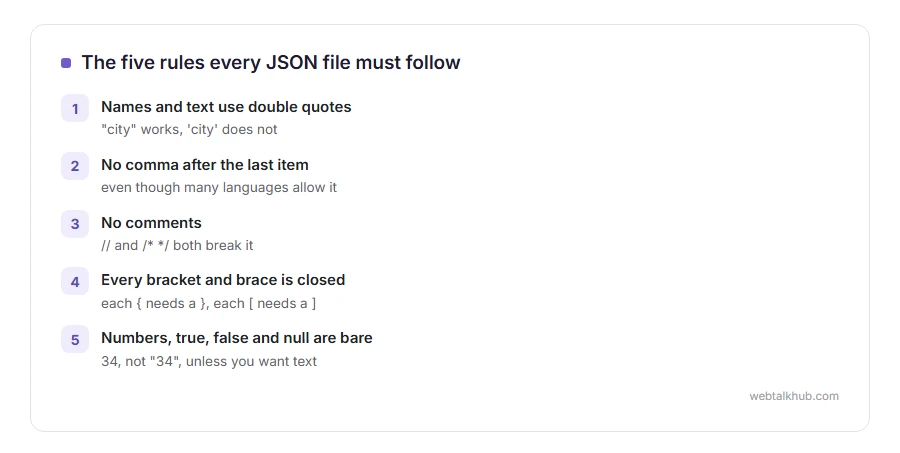
Names and text use double quotes. “city” works, ‘city’ does not. Single quotes are the most common reason a hand written JSON file fails.
No comma after the last item. A comma before a closing bracket or brace is an error in JSON, even though many programming languages allow it.
No comments. JSON has no way to write a note to yourself, so // and /* */ both break it.
Every bracket and brace is closed. Each { needs a }, and each [ needs a ].
Numbers, true, false and null are written bare. 34, not “34”, unless you really want it treated as text.
1) Write it in a text editor
On Windows, use Notepad. On a Mac, use TextEdit and choose Format, then Make Plain Text first, because TextEdit otherwise saves formatting codes into the file.
Type or paste your JSON, then save it with a name ending in .json, such as settings.json. In Notepad, set Save as type to All files and Encoding to UTF-8, or Windows adds .txt to the name.
2) Check it before you use it
Paste the whole file into our JSON formatter. It tells you whether the file is valid, and if it is not, it points at the line and the character where it went wrong.
Keep in mind that the error usually shows where the reader gave up, which can be a line after the real mistake, such as a missing comma on the line above. Our page on what a syntax error is explains why.
3) Make one from code instead
When the data comes from a program, let the program write the JSON, because it never forgets a quote.
In JavaScript, JSON.stringify(data, null, 2) turns an object into neatly indented JSON text. In Python, json.dump(data, file, indent=2) writes it straight to a file after import json.
If you are comfortable with a little code, this is the route I recommend for anything longer than a screen, since hand written JSON is where the errors come from.
4) Make one from a spreadsheet
Save the sheet as a CSV file first, then convert the CSV to JSON with a converter or a few lines of code. A flat sheet does not work for nested data, such as a list inside each row, so anything shaped like that is easier to build in code. Our guide to what a CSV file is covers the saving step.
Check the result in the formatter afterwards. Numbers stored as text in the spreadsheet often arrive in quotes, and dates arrive in whatever format the sheet used.
Opening and editing it later
Double clicking a JSON file often opens it in a browser or the wrong program. Our guide on how to open a JSON file covers every system and the editors that make it readable.
FAQ(Create a JSON File)
How do I create a JSON file in Notepad?
Type the JSON, choose Save as, set Save as type to All files and Encoding to UTF-8, and name it with .json at the end.
Can JSON have comments?
No. Standard JSON has no comments, and adding them breaks the file for most programs.
Why does my JSON file say invalid?
Usually single quotes, a comma after the last item, or a missing bracket. The JSON formatter shows the exact spot.
What is the difference between JSON and a JavaScript object?
JSON is stricter: double quotes only, no trailing commas, no comments and no functions. Every JSON file is valid JavaScript, and not the other way round.
What encoding should a JSON file use?
UTF-8. It is what the standard expects and what every program reads correctly.
If you have any issues, you can ask me via comment, and I will love to help you out.
