
Node.js turns up everywhere once you start building anything for the web: in installation guides, in job adverts, in the error message of a tool you were only trying to install. So what is Node.js, and do you actually need it?
It is a program that runs JavaScript outside a web browser. JavaScript was written to run inside web pages, and Node.js takes the same language and lets it run on your computer or on a server, where it can read files, talk to databases and answer requests from other computers.
Most people meet it for one of these reasons:
- A guide says to install Node.js before a tool will work
- They are learning web development and every course uses it
- A project comes with a package.json file and an npm install step
- They want to run a small web server or script
In this article you will learn what Node.js actually is, what it is used for, how to install it and run your first file, and where it is not the right tool.
What Node.js actually is
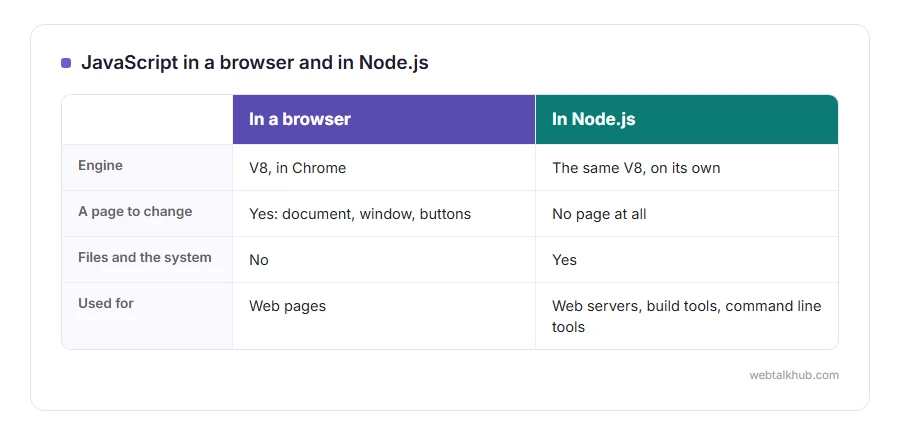
Every browser has an engine that runs JavaScript. Chrome’s is called V8, and in 2009 a developer called Ryan Dahl took V8 out of the browser and built a program around it that could run on its own. That program is Node.js.
Think of V8 as the engine and Node.js as the car built around it. The engine runs the language, and Node.js adds everything a program needs outside a browser: reading and writing files, network connections, and access to the operating system.
So Node.js is not a new language and not a framework. It is a runtime, the environment your JavaScript runs in. The language is the same, and what is different is what the code can reach.
What it cannot do that browser JavaScript can
There is no web page, so there is no document, no window and no buttons to click. Code written for a browser that touches the page will not work in Node.js, and code written for Node.js that reads files will not work in a browser.
That is the first thing that confuses people moving between the two, and it explains many “is not defined” errors.
What people use it for
Web servers and APIs. The back end of a site, the part that answers requests, often with a small library called Express on top.
Build tools. The programs that bundle, compress and check the code of modern websites all run on Node.js, even when the finished site does not.
Command line tools. Many developer tools install with npm and run in the terminal.
Desktop apps. Visual Studio Code, Slack and Discord are built with Electron, which pairs Node.js with a browser window.
How it handles many users at once
Node.js runs your code on a single thread, and instead of waiting when it asks for something slow, like a file or a database, it moves on and comes back when the answer arrives. That is called non-blocking, and it is why one Node.js server can keep thousands of slow connections open without falling over.
The same design is also its weakness, which is covered below.
How to install it and run your first file
Download it from nodejs.org and choose the version marked LTS, which stands for long term support. Up to Node.js 26, only even numbered versions became LTS and got fixes for years, while the odd ones were for trying out new features. From Node.js 27, every version becomes LTS.
Then open a terminal and check it worked:
node -v
npm -v
Both print a version number. npm is the package manager that comes with Node.js, used to install other people’s code into your project.
Now make a file called hello.js containing one line:
console.log('Hello from Node.js');Run it with node hello.js in the same folder, and the message appears in the terminal. That is JavaScript running with no browser anywhere.
If you are new to programming, I recommend learning the basics of JavaScript in the browser first, where you can see what your code does on the page, and moving to Node.js after that.
Where Node.js is the wrong tool
Heavy calculation on a single request, such as resizing large images or crunching big numbers, blocks that one thread, and every other visitor waits. Node.js can hand such work to worker threads, and for a server that mostly does heavy calculation, another language is often a better fit.
Keep in mind too that npm makes it very easy to install packages written by strangers. Check that a package is well used and maintained before you let it into a project, because each one can run code on your machine.
Related pages
JavaScript’s timers work the same way in Node.js as in a browser, and our guide to setTimeout in JavaScript explains them. Node.js projects are full of JSON files, and our page on how to open a JSON file and the JSON formatter help with those.
FAQ(What Is Node.js)
Is Node.js a programming language?
No. The language is JavaScript, and Node.js is the program that runs it outside a browser.
Is Node.js front end or back end?
Back end, mostly. It runs on the server, and it also powers the tools that build front end code.
Is Node.js free?
Yes. It is open source and free for any use, including commercial work.
Do I need Node.js to use JavaScript?
Not for web pages, where the browser runs it. You need Node.js to run JavaScript anywhere else.
What is the difference between Node.js and npm?
Node.js runs the code. npm installs packages of code for it, and it comes with Node.js.
If you have any issues, you can ask me via comment, and I will love to help you out.
The next two things you will meet
Almost every Node.js guide goes straight on to these.
- what npm is, package.json, node_modules, version numbers and the security habits worth having.
- what a command line is, where every node and npm command is typed, on Windows, Mac and Linux.
The language underneath
Node.js runs JavaScript, so it helps to know what JavaScript does in the first place.
- What JavaScript is, where it came from, what it does on every page, and why it is not Java.
