
Are you using setTimeout in JavaScript and finding that it fires late, fires immediately, or does not seem to fire at all?
Don’t worry, all three have the same root and it is not a bug. setTimeout does not run your code in exactly the number of milliseconds you asked for. It puts the code in a queue and the browser runs it when it is free, which means the number you pass is a minimum wait rather than a promise.
Once you know that, the strange behaviour makes sense:
- It fires late, because something else was still running
- It fires straight away, because the function was called instead of passed
- It never fires, because the tab was in the background or the page moved on
- Everything in a loop fires at once, because the timers were all set at the same moment
thisis not what you expected inside it
In this article you will learn the basic use, how to cancel one, and those five traps with the fix for each.
So let’s get started.
The basic use
setTimeout takes a function and a delay in milliseconds.
setTimeout( function () {
  console.log( 'three seconds later' );
}, 3000 );
An arrow function does the same job in less space, and anything you write inside runs once, after the wait.
The delay is a minimum. If the browser is busy rendering, or another piece of code is still running, your function waits its turn, and on a busy page that can be noticeably longer than you asked for.
Cancelling one
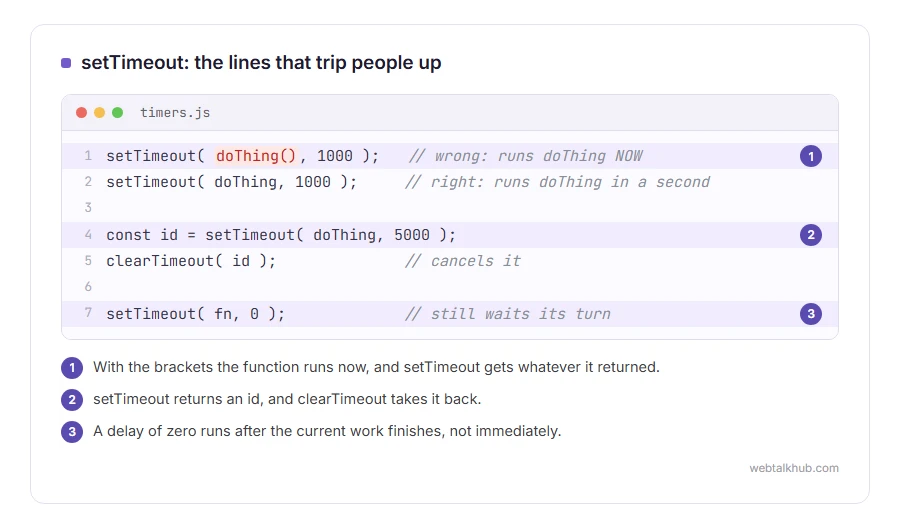
setTimeout returns an id, and clearTimeout takes it back.
const id = setTimeout( doThing, 5000 );
clearTimeout( id );
This matters more than it looks in anything that can be interrupted: a search box that waits for the user to stop typing, a message that hides itself, a retry after a failure. Without the cancel, two timers race each other and the later one wins at random.
Keep in mind that clearTimeout does nothing if the timer has already fired. It is not an undo, so the code either runs or it does not.
1) The trap that catches everybody: the brackets
This one line is the most common setTimeout bug in the world.
setTimeout( doThing(), 1000 );   // wrong: runs doThing NOW
setTimeout( doThing, 1000 );     // right: runs doThing in a second
With the brackets you are calling the function immediately and handing setTimeout whatever it returned, which is usually nothing. Without them you are handing over the function itself.
If you need to pass an argument, use an arrow function: setTimeout( () => doThing( id ), 1000 ). If you are new to JavaScript, I recommend writing every timer that way from the start, because you never have to think about the brackets again.
2) A background tab slows everything down
Browsers throttle timers in tabs you are not looking at, to save battery. A one second timer can become a one minute timer, and on mobile a background tab can be frozen entirely.
So never use setTimeout to measure real time, or to drive anything that must keep pace while the user is elsewhere. Read the clock with Date.now() when the code does run, and work out how much time actually passed.
This is a rule of the browser rather than a setting you can change, which is exactly why the honest answer is to design around it.
3) A loop that fires everything at once
Setting ten timers inside a loop does not space them out. They are all created in the same millisecond, so they all fire at almost the same moment.
If you want a gap between them, multiply the delay by the index, or better, chain them: run the next one when the previous one finishes. Chaining also avoids the pile up that happens when each step takes longer than the gap you allowed.
4) setInterval is not a safer setTimeout
setInterval repeats on a schedule, and it does not care whether the previous run finished. On a slow device, work can stack up and the page stutters.
A repeating setTimeout that schedules the next run at the end of the current one is the safer pattern for anything that does real work, and it is only two lines longer.
5) What this means inside the function
Inside a normal function passed to setTimeout, this is not your object. An arrow function keeps the surrounding this, which is almost always what you wanted.
If you are working in older code without arrow functions, bind does the same job: setTimeout( this.update.bind( this ), 500 ).
A delay of zero is still a delay
setTimeout( fn, 0 ) does not run immediately. It runs after the current work finishes, which is occasionally exactly what you need, for example to let the browser paint before you measure something.
It is a legitimate trick and it is also a sign worth reading: if your code only works with a zero delay in it, something is racing, and the timer is hiding the real problem rather than solving it.
FAQ(setTimeout in JavaScript)
Why does my setTimeout fire immediately?
Because the function was called rather than passed. Remove the brackets after the function name.
Is setTimeout accurate?
No. The delay is a minimum, and a busy page or a background tab makes it longer. Never use it as a clock.
How do I stop a setTimeout?
Keep the id it returns and pass it to clearTimeout. It has no effect once the timer has already run.
What is the difference between setTimeout and setInterval?
setTimeout runs once. setInterval repeats, and it will start a new run whether or not the last one finished.
Can I use await instead?
Yes, and it reads better in modern code. Wrap setTimeout in a promise and await it inside an async function.
If you have any issues, you can ask me via comment, and I will love to help you out.
Running JavaScript outside the browser
setTimeout works the same way in Node.js, and so do the mistakes that stop code before it starts.
- What Node.js is, what it adds to JavaScript, what it cannot do, and how to run your first file.
- what a syntax error is, and why the line number it gives is so often the wrong one.
