
Have you tried to save a gif and ended up with a still picture, or with a file that will not play anywhere?
Don’t worry, you have not done anything wrong. Plenty of sites and apps do not hand you the original GIF at all: they show a silent video instead, because it is smaller and smoother. When you save that, you get a video or a single frame, and both look broken when you expect an animation.
So the right method depends entirely on where the GIF is:
- A GIF on an ordinary web page, which is the easy case
- One in a message, on WhatsApp, iMessage or Messenger
- One on a site that plays videos dressed up as GIFs, which is most of the big ones
- One you want to send on afterwards, where the size matters
In this article you will learn the way that works on iPhone, Android, Windows and Mac, how to tell whether the thing you are looking at is really a GIF, and what to do when it is not.
So let’s get started.
First, is it actually a GIF?
Right click it on a computer and look at the menu. If it offers Save image as, it is a picture, and if it offers Save video as or Copy video address, it is a video wearing a GIF’s clothes.
On a phone, press and hold: a real GIF offers to save to your photos, and a video offers to share or download instead.
This is worth ten seconds, because it decides which of the sections below applies to you and saves you fighting a file that was never a GIF in the first place.
1) On Windows or a Mac
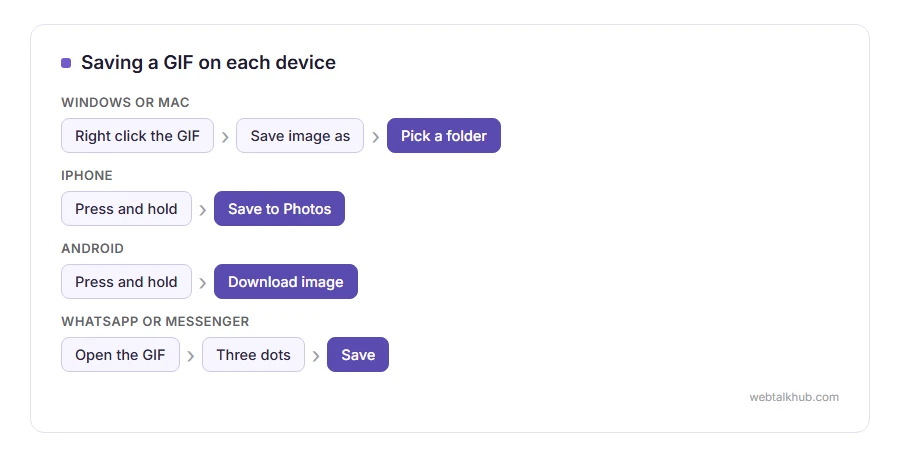
Right click the image and choose Save image as, then pick a folder. On a Mac it is the same with a two finger click or Control and click.
If the file arrives with a .webp ending rather than .gif, it is a WEBP animation. It still plays in a browser and plenty of programs refuse it, so convert it with our WEBP to PNG page if you only need one frame, or keep it as it is for the web.
Dragging the image straight to your desktop does not work reliably, because some browsers save a shortcut instead of the file. The menu is the safer route.
2) On an iPhone
Press and hold the GIF, then choose Add to Photos or Save to Photos. It lands in your photo library and plays there.
From a message, press and hold the GIF in the conversation, tap Save, and it goes to Photos the same way.
The trap on an iPhone is that some saved GIFs appear as still pictures in the Photos grid. They are usually fine: open them and they move, and the Animated album lists them all in one place.
3) On Android
Press and hold the image, then Download image, or Save image, depending on your browser. It goes into your Downloads or Pictures folder.
In WhatsApp or Messenger, open the GIF, tap the three dots and choose Save. Some versions save it as a video rather than a GIF, which is the app’s decision and not something you can change from your side.
4) When the site is really showing a video
This is the case on most of the big GIF sites today. The page calls it a GIF and serves an MP4, because it loads faster.
The same reason works in your favour going the other way. If an app wants video rather than a GIF, or your GIF is too heavy to send, our GIF to MP4 converter makes the video in your browser, with every frame at the speed it had.
Some of them have a download button that gives you a real GIF, usually behind a share or a download menu, so look for that first. If there is only a video, you would need to convert it, and any converter that promises to do that in your browser without uploading is worth checking twice, because video to GIF is heavy work.
I do not recommend uploading anything private to a random conversion site to get around this. It is rarely worth it for a reaction GIF.
5) If you are saving it to send it on
A GIF is usually far bigger than it needs to be, which is why some apps refuse one or silently squash it.
Our GIF resizer and cropper makes it smaller in your browser, keeping every frame, the speed and the loop, and it tells you afterwards whether the file actually got smaller.
Anything over about five megabytes is refused or converted by several messaging apps, so it is worth checking the size before you send rather than wondering why it arrived as a still.
FAQ(How to Save a GIF)
Why does my saved GIF not move?
Either the site gave you a video, or you saved a single frame. The test at the top of this page tells you which.
Where do saved GIFs go on an iPhone?
Into Photos, and they are gathered in the Animated album. They can look still in the grid and play when opened.
Can I save a GIF from WhatsApp?
Yes, through the three dot menu on the GIF. Some versions save it as a video rather than a GIF file.
How do I save a GIF from a tweet or a post?
Those are nearly always videos rather than GIFs. Look for a download option in the app first, because converting is more trouble than it is worth for most people.
My GIF is too big to send.
Shrink it rather than converting it to something else, so it keeps playing. The resizer above does that in the browser with nothing uploaded.
If you have any issues, you can ask me via comment, and I will love to help you out.
If you wanted a still picture instead
Sometimes a still is what you actually needed: one frame for a document, a post or a profile picture. Our GIF to PNG converter takes the first frame, or every frame numbered in a ZIP, and keeps the see-through parts exactly as the GIF had them.
Files that behave like this one
A GIF is not the only format with rules of its own.
- HEIC photos, the format an iPhone uses, which needs converting before most programs will read it.
- SVG files, drawn from instructions every time, so they never go soft.
