
A designer has sent you a file ending in .svg, your picture viewer refuses to show it, and you are not sure what to do with it.
Nothing is broken, and the file is almost certainly fine. The reason it behaves oddly is that an SVG is not a picture in the usual sense. A JPG or a PNG is a grid of coloured dots. An SVG is a set of instructions: draw a circle here, this line to there, fill this shape with that colour. The computer draws it fresh every time, at whatever size it is asked for. It is like a recipe for the picture rather than a photograph of it.
That one difference explains everything people find strange about them:
- Why it stays perfectly sharp at any size, on any screen
- Why the file is tiny for a logo and enormous for a photograph
- Why you can open it in a text editor and read it
- Why some programs refuse it, and why WordPress asks twice before allowing one
In this article you will learn what SVG is genuinely good at, where it is the wrong choice, how to open and edit one, and the security question that comes with it.
So let’s get started.
What an SVG is good at
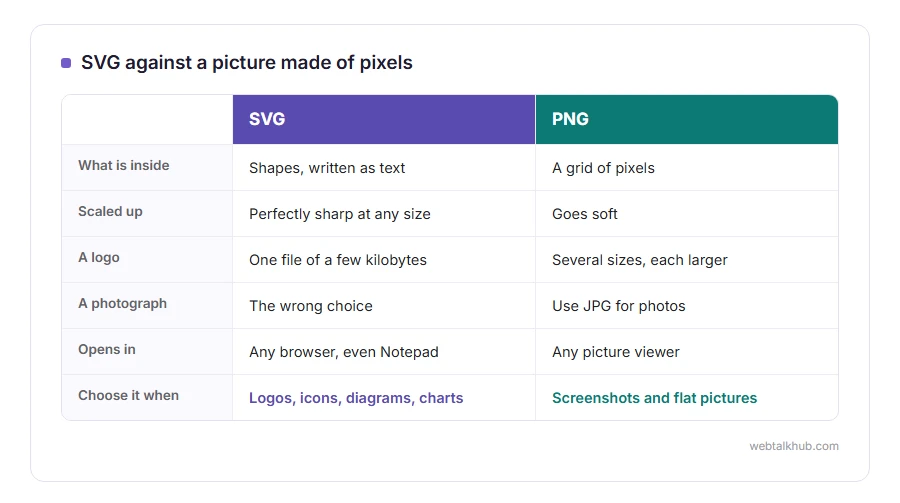
Logos, icons, diagrams, charts and line drawings. Anything made of shapes rather than photographed light.
A logo as an SVG is one file that works on a business card and on a billboard, and it is usually a few kilobytes. The same logo as a PNG needs several sizes, each of them larger, and it still goes soft if somebody scales it up.
It also stays sharp on high resolution screens with no extra work, which is why nearly every website icon set is SVG today.
Where SVG is the wrong choice
A photograph. It has no repeated shapes to describe, so an SVG of a photo either embeds the photo inside it, which helps nothing, or becomes a monstrous list of thousands of coloured paths.
So SVG does not work for photographs, whatever a converter promises. Use JPG for photos, PNG for screenshots and flat pictures, and keep SVG for drawings. Our page on JPG vs PNG covers that side of the choice.
And if you need a still picture of an SVG for a program that will not take one, our SVG to PNG converter makes one at whatever width you ask for, in your browser.
How to open an SVG
In a browser. Drag the file onto Chrome, Edge, Firefox or Safari and it appears, correctly, every time. That is the quickest check that the file itself is fine.
In a text editor, because an SVG is text. Right click, Open with, Notepad, and you can read the shapes and the colours. Changing a colour value there and saving is a perfectly reasonable edit.
To draw or change one properly, use Inkscape, which is free, or Figma in a browser, or Illustrator if you have it. Preview on a Mac and older copies of Windows Photos will not display an SVG, which is a gap in those programs rather than a problem with your file.
The thing to know before uploading one
An SVG can contain script, because it is a document rather than a flat picture.
That is why WordPress refuses SVG uploads by default, and why a plugin that allows them either sanitises the file or asks you to trust the source. It is a real risk on a site where several people can upload, and a small one on a site where only you do.
If you run a site on your own and you are not sure, I recommend leaving SVG uploads switched off and converting to PNG instead, because the convenience is small and the risk is real. If you do want them, use a plugin that sanitises on upload, and only take SVGs from people you trust. Never paste one from a search result straight into your site.
Sizing an SVG so it does not come out tiny
This is the trap people meet first, and it is worth two lines.
An SVG can be written without a fixed width and height, carrying only a viewBox, which is a set of proportions. Some programs then guess, and the guess is usually 150 by 150 pixels, which is where the tiny logo comes from.
In HTML, set a width in your CSS and the browser scales the drawing properly. When converting one to a picture, choose the width yourself rather than accepting the default, or you get that same small square.
FAQ(What Is SVG)
What does SVG stand for?
Scalable Vector Graphics. Scalable is the point: it is drawn at whatever size you ask for, rather than stretched.
Can I convert a JPG or a photo to SVG?
Not usefully. Tracing software can turn a simple picture into shapes, and a photograph becomes a huge, ugly approximation. For photos, stay with JPG.
Why will Windows Photos not open my SVG?
Most likely your copy of Photos is out of date. The latest Photos on Windows 11 opens SVG, so update it from the Microsoft Store, or open the file in a browser or a vector editor instead. There is nothing wrong with the file.
Are SVG files safe?
The file itself is text, and it can carry script, so treat one from an unknown source the way you would treat any downloaded document. Sanitise before uploading to a website.
Is SVG good for email?
No. Older versions of Outlook for Windows and some Gmail apps will not show an SVG, so use PNG for anything that has to appear in an email.
If you have any issues, you can ask me via comment, and I will love to help you out.
For photographs instead of drawings
SVG is for shapes. Photographs belong in JPG, which comes with a naming puzzle of its own.
- whether JPG and JPEG differ, where the missing E came from and what renaming a file does.
Transparency in a picture you already have
An SVG can be see-through from the start. A photo or a JPG needs its background taken out first.
- how to make an image transparent, with Paint, a Mac, an iPhone or PowerPoint, and the one format that keeps it.
