
Which do you actually need, jpg vs png, for a photo, a logo or a screenshot? Every answer online seems to contradict the last one.
Don’t worry, the rule is simpler than it looks. JPG throws detail away to make the file small and cannot hold see-through areas. PNG keeps every pixel exactly and can be see-through, at the cost of a bigger file for photographs. Everything else follows from those two sentences.
So the quick answer, before the detail:
- A photograph, for a web page or an email: JPG
- A logo, an icon or anything with flat colour: PNG
- A screenshot, especially with text in it: PNG
- Anything that needs a see-through background: PNG, always
- A picture you will edit and save again and again: PNG
- A photo you need to email and the file is too big: JPG, at a lower quality
In this article you will learn why each of those is the way round it is, what actually happens to a picture when it is saved as a JPG, and the three mistakes that make people think one format is broken.
So let’s get started.
What the two formats actually do
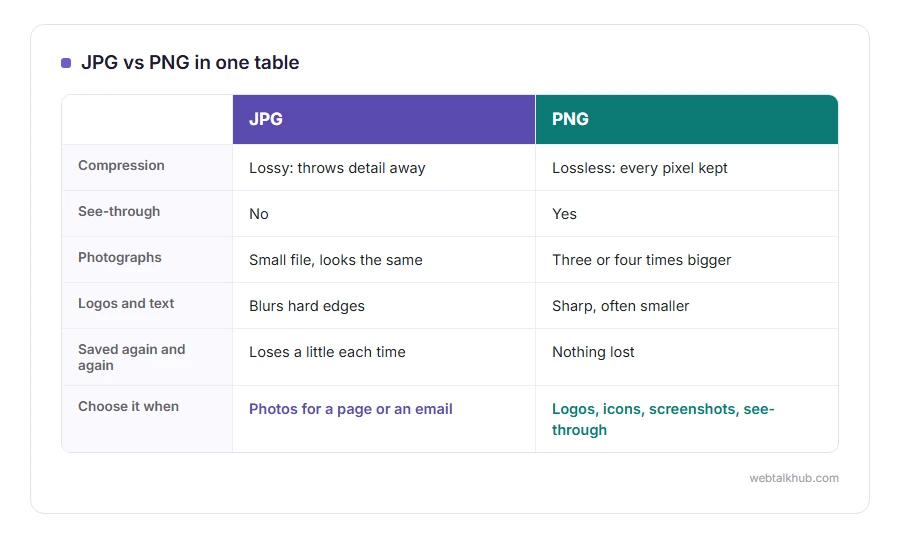
JPG uses lossy compression. It looks at the picture, decides which detail your eye is least likely to miss, and throws that away. The result is a small file and a picture that is very slightly different from the original every time it is saved.
PNG uses lossless compression. It squeezes the file without losing anything, so what comes out is exactly what went in, pixel for pixel. It also has a fourth channel for transparency, which JPG simply does not have.
That is the whole difference, and every practical rule below comes out of it.
Photographs: JPG wins, and it is not close
A photo has thousands of subtle colour changes, which is exactly what PNG is bad at storing. The same holiday photo can be three or four times larger as a PNG with no visible improvement.
For a web page, a JPG at around 80 percent quality is the sweet spot for most photos. Going higher grows the file without anybody seeing a difference, going much lower starts to show blocky patches in skies and smooth walls.
The limit worth knowing: if you are going to edit that photo repeatedly, every save loses a little more. Edit in PNG or in your editor’s own format, and export a JPG at the end.
Logos, icons and flat colour: PNG wins
A logo has a few flat colours and hard edges, which is exactly what PNG handles well, and it is often smaller than the JPG of the same thing.
JPG also blurs hard edges, so a logo saved as a JPG grows faint grey smudges around the letters. Once they are there, no tool fully clears them.
And a logo usually needs a see-through background so it can sit on any colour, which only PNG can do.
Screenshots: PNG, every time
A screenshot is mostly flat panels and text, so PNG keeps it sharp and often makes a smaller file than JPG would.
JPG smears the edges of letters, which is why a screenshot of an error message can end up hard to read on a JPG and perfect on a PNG. If you are sending a screenshot to support or putting one in an article, PNG saves you being asked to send it again.
The see-through trap, which catches everybody
When a see-through PNG is converted to a JPG, the see-through parts have to become something, because JPG has no way to say “nothing here”.
Done carelessly, that something is black, which is why people end up with a logo in a black box. Done properly, you choose the colour, usually white or whatever the background will be.
Our PNG to JPG converter lets you pick that colour before it converts, and the JPG to PNG converter goes the other way. Converting to PNG does not work as a way of getting a see-through background, though. The JPG never had one, so there is nothing to bring back.
What about WEBP, and the others?
WEBP does both jobs, with smaller files than either, and every current browser supports it.
For a website it is the better choice today, and for anything you hand to another person it is still the awkward one, because plenty of programs and older phones cannot open it. Our WEBP to PNG and WEBP to JPG pages exist because of exactly that.
Three mistakes that make people blame the format
Saving a photo as PNG because “PNG is higher quality”, then wondering why the page is slow. The quality is the same, the file is four times bigger.
Saving a screenshot as JPG because it is smaller, then finding the text looks fuzzy.
And converting back and forth: a JPG saved as a PNG and back to a JPG has been through the lossy step twice, so it is worse than either, and it is a habit worth breaking.
FAQ(JPG vs PNG)
Which has better quality, JPG or PNG?
PNG keeps every pixel, so for the same picture it is the exact one. For photographs the difference is usually invisible while the file is several times larger.
Which is better for a website?
JPG for photos, PNG for logos and screenshots, and WEBP for both if you are comfortable with it. Page speed matters more than the format name.
Does converting JPG to PNG improve quality?
No. It preserves what is already there and cannot recover what the JPG threw away.
Is JPG or JPEG different?
No, they are the same format with two spellings, left over from the days when Windows allowed only three letters after the dot.
Why did my logo get a black background?
Because it was converted to JPG without choosing a background colour. Convert it again and pick white, or keep it as a PNG.
If you have any issues, you can ask me via comment, and I will love to help you out.
The other formats you will meet
JPG and PNG cover most of it, and three others turn up often enough to be worth knowing.
- HEIC, what an iPhone saves photos as, and why Windows will not open one.
- SVG, shapes rather than pixels, which is why a logo stays sharp at any size.
- making a small image bigger, what upscaling can and cannot get back, whatever the format.
When the picture moves
JPG never moves and a normal PNG does not either, so most animations are a GIF or a WEBP, and those two are worth a line each here.
- A WEBP that moves can be turned into a GIF, with every frame, the speed and the loop kept, which is what older forums and chat apps still want.
- A GIF you already have can be made smaller with our GIF resizer, or pulled apart into pictures with GIF to PNG.
