
Has somebody sent you a photo ending in .heic that your computer flatly refuses to open?
Don’t worry, the photo is fine and so is your computer. HEIC is the format iPhones have used since 2017. It holds the same picture as a JPG in about half the space, which is good for your phone’s storage and awkward everywhere else, because plenty of programs still do not read it.
So there are three separate questions hiding behind this one, and you probably only need one of them:
- How to open the file you have right now
- How to turn HEIC into something everybody accepts
- How to stop your iPhone making them in the first place
In this article you will learn all three, and the one thing to check before you convert a whole folder of them.
So let’s get started.
What a HEIC actually is
HEIC is a container. Inside it sits an image compressed with HEVC, the same technology as modern video, which is why it manages a smaller file at the same quality.
It also holds things a JPG cannot: several pictures in one file, which is how Live Photos work, depth information from portrait mode, and edits that can be undone. That is why an iPhone keeps using it.
The awkward part is licensing rather than technology. HEVC is patented, so Windows never included support for free, and that single decision is behind almost every complaint about these files.
1) Open it on Windows
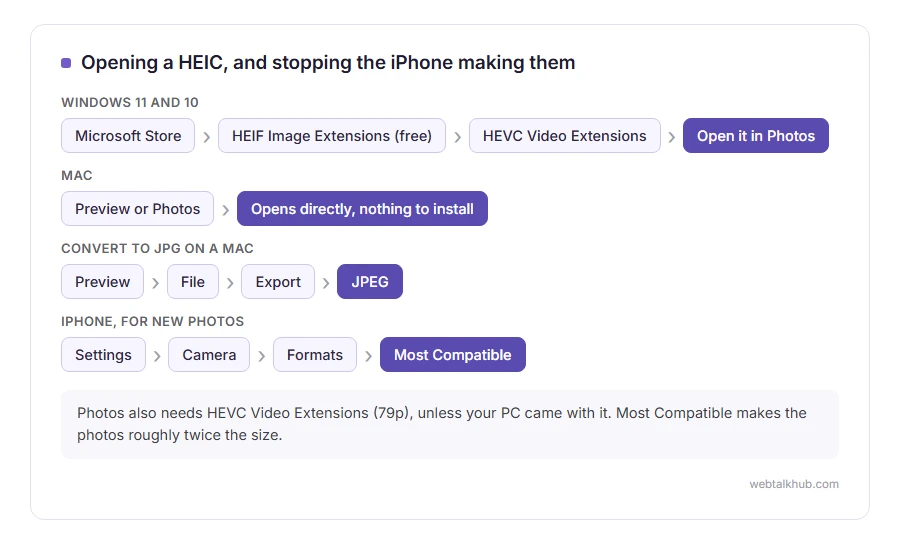
Windows 11 and 10 both open a HEIC once the codec is installed, and the Photos app will offer it to you when you double click the file.
The HEIF Image Extensions package is free in the Microsoft Store. You also need the HEVC Video Extensions package, which is paid unless your PC came with it already. That confusion, and the $0.99 it costs in the US, is why most people give up here.
If a work computer will not let you install anything from the Store, this will not help at all, and converting the file is the route left, which is section 3.
2) Open it on a Mac, a phone or the web
On a Mac, nothing to do. Preview and Photos open HEIC directly, and they have since macOS High Sierra.
On an iPhone it is the native format, so it simply opens. On Android, Google Photos and most gallery apps read HEIC now, and a few older phones do not.
In a browser, Safari shows HEIC and Chrome and Firefox do not. That is worth knowing before you put one on a website: for the web you want JPG, PNG or WEBP, never HEIC.
3) Convert it, keeping the quality
Anything that has to leave your phone is easier as a JPG, and there are three honest routes.
On a Mac, open it in Preview and use File, Export, choosing JPEG. On Windows with the codec installed, open it in Photos and Save as. Both keep the full resolution.
Online converters do it too, and they upload your photo to somebody else’s server, which is a real consideration for family pictures. Our HEIC to JPG converter runs in your browser instead, so nothing is uploaded, and it turns each photo the right way up and takes the location out. It uses the video decoder in your computer’s graphics chip, which most computers from the last several years have.
Before converting a folder of them, check what you lose. A Live Photo becomes a still, portrait depth goes, and any edit history is flattened. The photo itself is untouched, and everything clever around it is not. Converting does not work as a way of keeping a Live Photo moving, so if that matters, keep the original as well.
4) Stop your iPhone producing them
If the awkwardness is not worth it to you, this is one setting.
Open Settings, then Camera, then Formats, and choose Most Compatible. From then on the phone takes JPG photos and H.264 video, and the files are roughly twice the size.
There is a second setting that catches people. Under Settings, Apps, Photos, at the bottom, Transfer to Mac or PC should be set to Automatic, which converts on the way out. Set to Keep Originals, your phone sends the HEIC even when you have chosen Most Compatible for new photos.
FAQ(HEIC Files)
Why can Windows not open my HEIC file?
Because the codec is not included by default, for licensing reasons. Installing the free HEIF Image Extensions and the HEVC Video Extensions, $0.99 in the US, from the Microsoft Store fixes it.
Is HEIC better quality than JPG?
At the same file size, yes, noticeably. At maximum quality the difference is small, and the space saving is the real benefit. If you edit your photos a lot, the choice that matters more is RAW vs JPEG, and Pro iPhones can shoot RAW too.
Does converting HEIC to JPG lose quality?
A little, since JPG is lossy, and for ordinary photos it is invisible. What you definitely lose is Live Photo motion and depth information.
Can I email a HEIC?
You can, and the person on the other end may not be able to open it. Change the format first, or send it from an iPhone with Transfer set to Automatic.
What about HEIF and HEVC, are they the same?
HEIF is the container standard, HEIC is Apple’s use of it for photos, and HEVC is the compression inside. In everyday use they are talked about as one thing.
If you have any issues, you can ask me via comment, and I will love to help you out.
And the other name confusion
Once a HEIC is converted, the question that follows is usually whether to call it .jpg or .jpeg.
- JPG vs JPEG, the same format under two spellings, and why one upload form refuses the other.
