
Your camera or phone offers RAW, JPEG, or both, and you are wondering whether RAW is worth the extra space. RAW vs JPEG comes down to one question: do you want a finished picture now, or everything the sensor captured, to finish yourself later?
A JPEG is a photo the camera has already developed. It picked the colours, the brightness and the sharpening, then threw away the information it decided you would not need, which is why the file is small and ready to send. A RAW file keeps almost everything the sensor recorded, undeveloped, so you can make those decisions yourself afterwards.
It is like the difference between a film negative and a print. The print is ready to hang on the wall. The negative looks odd on its own, and from it you can make a much better print, or ten different ones.
The practical differences come down to five things:
- How far you can fix a picture afterwards
- File size and storage
- Whether you can share it straight away
- What software you need to open it
- Which one suits the way you take photos
In this article you will learn each one, then a simple rule for choosing.
So let’s get started.
How far you can fix it afterwards
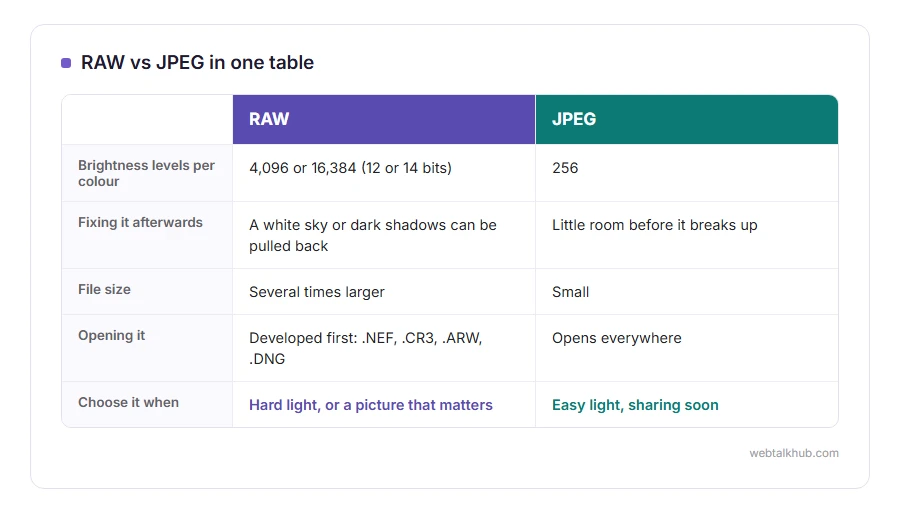
This is the reason RAW exists. A JPEG stores 256 levels of brightness for each colour. A RAW file from a modern camera stores 4,096 or 16,384, because the sensor records 12 or 14 bits.
That extra depth is what lets you pull detail back out of a sky that looked white, lift a face out of shadow, or correct the colour of indoor light after the fact. Try the same on a JPEG and the sky turns flat grey and the shadows go blotchy, because that information was never kept.
White balance is the clearest example. In a RAW file it is only a setting, changed freely later. In a JPEG it is baked into every pixel.
File size and storage
RAW files are several times larger than the JPEG of the same photo, tens of megabytes each on a modern camera, and a memory card or phone fills up much faster.
Shooting RAW and JPEG together, which most cameras offer, adds a JPEG to every RAW file, so each shot takes a little more space than RAW alone. It gives you a JPEG to share now and a RAW to rescue the shots that need it.
Sharing and opening them
A JPEG opens everywhere and posts anywhere. A RAW file has to be developed first, and it has a different ending for every maker: .NEF for Nikon, .CR3 for Canon, .ARW for Sony, and .DNG, an open format that some cameras and most phones use.
Windows Photos and Preview on a Mac open many RAW files for viewing. For real editing, Adobe Lightroom is the common paid choice, and darktable and RawTherapee are free.
On phones
iPhone Pro models offer Apple ProRAW, and many Android phones offer RAW as DNG in their pro camera mode. Keep in mind that phone RAW files are big, and a phone’s own processing is already good, so the benefit shows mainly in difficult light.
For everyday phone photos, the normal format is the right choice. On an iPhone that is HEIC rather than JPEG, and our guide to what a HEIC file is explains the difference. When you need one as a JPG, our HEIC to JPG converter does it in the browser.
A simple rule for choosing
Shoot JPEG when the light is easy and the pictures are for sharing soon: family events, holidays, anything you will not edit.
Shoot RAW, or RAW with JPEG, when the light is hard or the picture matters: sunsets, indoor shots, weddings, anything you might print large. If you are new to editing, I recommend RAW and JPEG together for a while, so you always have a finished picture and a rescue copy.
A RAW file does not work as a fix for a blurry or badly framed shot. It recovers light and colour, not focus or movement.
Related guides
Once developed, most photos are saved as JPEG or PNG, and our comparisons of JPG vs PNG and JPG vs JPEG cover that choice. For printing big, our guide on increasing the resolution of an image explains what a file can and cannot give you.
FAQ(RAW vs JPEG)
Is RAW better quality than JPEG?
It holds far more information, so a well edited RAW can look better. Straight out of the camera, a JPEG often looks nicer, because it has already been processed.
Why do RAW photos look dull?
They are undeveloped. The contrast, colour and sharpening a JPEG gets in the camera are left for you to add.
Can I convert RAW to JPEG?
Yes. Any RAW editor exports JPEG, and so do Windows Photos and Preview on a Mac for supported cameras.
Should I shoot RAW on my phone?
Only for difficult light or photos you plan to edit. For everyday pictures, the normal format is simpler and smaller.
Does RAW take more space?
Yes, several times more than a JPEG of the same photo.
If you have any issues, you can ask me via comment, and I will love to help you out.
