
Are you seeing Cloudflare Error 1033, sometimes titled Argo Tunnel error or Cloudflare Tunnel error, instead of the website you wanted?
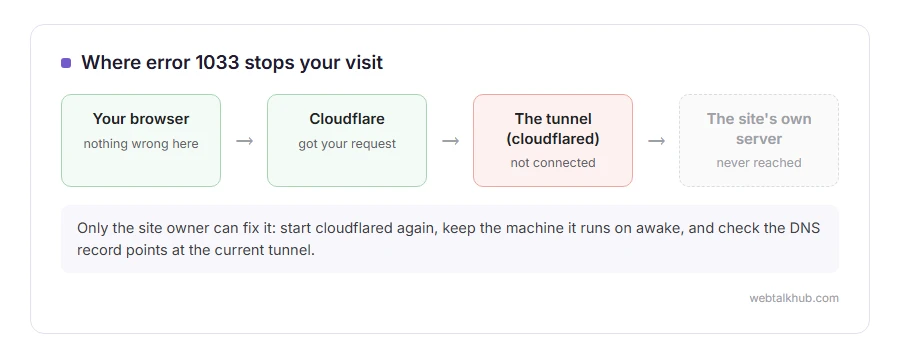
Don’t worry, nothing is wrong with your device or your connection. Error 1033 means the website does not face the internet directly. It is reached through a Cloudflare Tunnel, a private link from the site’s own server to Cloudflare, and that link is down at the moment. Cloudflare got your request and had nowhere to send it.
The usual causes, all on the site owner’s side, are:
- The program that runs the tunnel, cloudflared, has stopped or crashed
- The server or home computer it runs on is switched off or offline
- The tunnel was deleted or recreated, and the DNS record still points at the old one
- The tunnel’s login credentials expired or were removed
In this guide I will say what a visitor can do, which is short, then go through the owner’s checks in the order that finds the fault fastest.
So let’s get started.
If you are a visitor
There is nothing to fix on your side. Waiting and trying again later is the whole answer, because the site returns the moment its tunnel reconnects.
If it stays down, let the owner know, and include the Ray ID shown at the bottom of the error page. It points them straight at your failed visit in their Cloudflare logs.
1) Check the tunnel’s status in Cloudflare
Open the Cloudflare dashboard and go to Networking, then Tunnels. Each tunnel shows a status: Healthy, Degraded, Inactive or Down.
Down or Inactive means no cloudflared connector is running for it right now, which confirms the cause is on your server, not in your DNS.
2) Check cloudflared is running on your server
On Linux, systemctl status cloudflared shows whether the service is running, and journalctl -u cloudflared shows its recent messages. On Windows, look for the Cloudflared service in the Services window.
If it has stopped, start it again with systemctl restart cloudflared, or Start in Services. Then watch the status in the dashboard turn Healthy within a minute or so.
This will not help if the machine itself is off, asleep or has lost its internet connection. A tunnel on a home computer goes down every time that computer sleeps, so set it never to sleep.
3) Check the DNS record points at the right tunnel
Every public hostname on a tunnel has a DNS record pointing at an address ending in cfargotunnel.com, which starts with that tunnel’s long ID. If the tunnel was deleted and created again, it has a new ID, and the old record now points at nothing.
First delete the old DNS record for that hostname, or the save fails. Then open the tunnel in the dashboard, go to the Routes tab, and save the route again. Cloudflare then makes a new DNS record for you that points at the new tunnel. Our guide to what DNS is explains what that record does.
4) Check the credentials
A tunnel installed from the dashboard uses a token in its service settings. If the token was rotated or the tunnel was recreated, the old one stops working, and the logs say so.
On the server, remove the old service first with sudo cloudflared service uninstall on Linux, or cloudflared service uninstall on Windows. Then copy the install command from the tunnel’s page again and run it, which loads the new token. I recommend running the connector as a service rather than in an open terminal window, so it survives reboots and logouts.
Other Cloudflare errors
A 1033 is always about a tunnel. If you see error 1005 instead, the owner has blocked your network on purpose. Error 520, 525 and 526 are faults between Cloudflare and an ordinary server, and a challenge that never clears is the verify you are human loop.
FAQ(Cloudflare Error 1033)
What does Cloudflare error 1033 mean?
The site is reached through a Cloudflare Tunnel and the tunnel is not connected, so Cloudflare cannot pass your request on.
Can I fix error 1033 as a visitor?
No. It is on the site’s side. Try again later, or tell the owner and give them the Ray ID.
What is cloudflared?
The small program on the owner’s server that keeps the tunnel to Cloudflare open.
Why does my tunnel keep dropping?
Usually the machine sleeps, restarts without cloudflared set to start automatically, or loses its internet connection.
Is error 1033 the same as Argo Tunnel error?
Yes. Argo Tunnel was the old name for Cloudflare Tunnel, and some error pages still use it.
If you have any issues, you can ask me via comment, and I will love to help you out.
