
Is your site showing a Cloudflare page that says ssl handshake failed error code 525, with a line underneath saying the problem is with your host rather than the visitor?
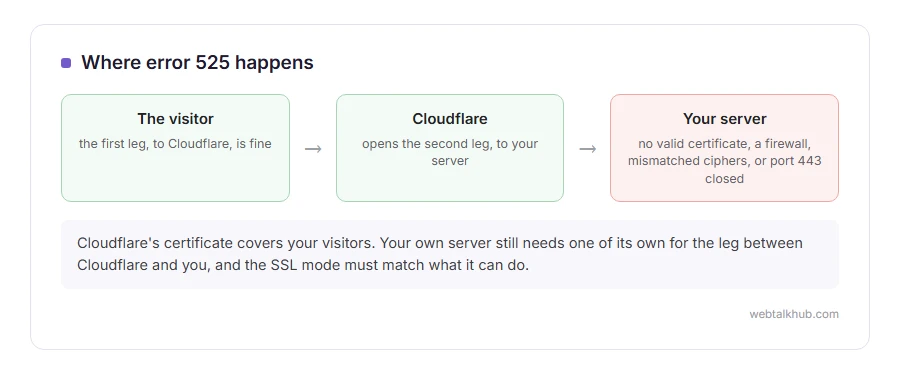
Don’t worry, that line is accurate and the fix is on your side, which means you can actually do something about it. A visitor’s connection has two legs: the visitor to Cloudflare, and Cloudflare to your server. A 525 is always the second leg, so you can ignore everything about the visitor’s browser, their antivirus and their network.
The five causes, in the order they actually happen, are:
- Your own server has no valid certificate on it
- The SSL mode in Cloudflare does not match what your server can do
- Your server firewall is blocking Cloudflare
- Your server has no cipher in common with Cloudflare
- Port 443 is closed, or nothing is listening on it
In this article you will learn each one with its fix, and a five minute test that tells you which half of the journey is broken without taking your site down.
So let’s get started.
1) Your server has no valid certificate
This is the most common one by a distance, and it catches people who assume Cloudflare’s certificate covers everything.
Cloudflare gives your visitors a certificate. Your own server still needs one of its own for the leg between Cloudflare and you, and when it has none and your SSL mode is Full or Full Strict, you get a 525. An expired one with Full Strict gives a 526 instead.
Install a free Let’s Encrypt certificate through your host, or install Cloudflare’s own Origin Certificate, which is free, lasts fifteen years and is made for exactly this job.
If the certificate was renewed recently and the error continues, restart the web server. Many stacks keep the old certificate in memory until they are restarted, which makes a perfectly good certificate look broken.
2) The SSL mode does not match your server
In Cloudflare, under SSL/TLS, there are several modes and only two of them are sensible.
Full (strict) means Cloudflare checks your server’s certificate properly, and that is what you want once you have a real certificate. Full means Cloudflare accepts a self signed certificate, which is a reasonable step while you sort one out.
Switching to Full will not clear a real 525, because Full still needs the handshake to work. If the site does come back, you were really looking at a 526, not a 525.
I do not recommend Flexible, which is the third option. It talks to your server with no encryption at all, so it hides a 525 rather than fixing it, and visitors still see a padlock that is telling them something untrue.
3) Your server firewall is blocking Cloudflare
If your server only lets certain addresses in, or a security tool bans addresses that make many requests, Cloudflare can end up half blocked. Plenty of hosts do this without telling you.
Allow Cloudflare’s published address ranges on port 443 in your server firewall, in the cPanel or Plesk firewall, and in any tool such as fail2ban or ConfigServer Firewall.
A block usually gives a timeout rather than a 525, so this cause comes third. It is worth checking when nothing else fits, especially after a traffic spike.
4) The server has no cipher in common with Cloudflare
Cloudflare and your server must share at least one cipher. A server with a very restricted list of ciphers has nothing in common with it.
Enable TLS 1.2 and 1.3 on your server. On cPanel or Plesk this is a switch, and on a server you manage it is a line in the Apache or Nginx configuration, which does nothing until you restart the service.
This is the likely cause when the error started right after a security hardening change, or after your host moved you to a new machine.
5) Port 443 is closed or nothing is listening
Sometimes the reason is as plain as it sounds.
From another machine, run curl -Iv https://your-server-ip-here or use an online port checker on 443. If nothing answers, your web server is not listening on it, or the firewall never lets anything in.
Test the origin address rather than your domain. Checking the domain does not work here, because you are testing Cloudflare again and learning nothing new.
The five minute test that does not take the site down
Pause Cloudflare rather than changing DNS.
In the Cloudflare dashboard, on the overview page, choose Pause Cloudflare on Site, which sends traffic straight to your server. If the site then loads over https with no warning, your certificate is fine and the problem is in the settings between you and Cloudflare. If your browser complains about the certificate, you have found the cause.
Turn it back on afterwards. Our page on ERR_SSL_PROTOCOL_ERROR explains what that browser complaint means in detail, and ERR_SSL_VERSION_OR_CIPHER_MISMATCH covers the TLS version side.
FAQ(Cloudflare Error 525)
Is error 525 my fault or Cloudflare’s?
It is on your side. Cloudflare is reporting that it could not complete a secure connection to your server.
Why does the site work sometimes and show 525 at other times?
That pattern points at one server among several behind a load balancer, or at a firewall banning an address for a while.
What is the difference between 525 and 526?
525 means the handshake failed. 526 means it completed but the certificate did not pass Cloudflare’s checks, usually expired or self signed with Full Strict on.
Will switching to Flexible fix it?
It will hide it, and the connection between Cloudflare and your server is then unencrypted. Use Full while you fix the certificate, not Flexible.
Does a Cloudflare Origin Certificate work in a browser?
No, and it is not meant to. It is trusted only by Cloudflare, for the leg between them and your server, and visitors never see it.
If you have any issues, you can ask me via comment, and I will love to help you out.
The two Cloudflare errors next to this one
If Cloudflare reached your server and could not read the answer it gave, that is error 520. If the secure handshake worked and the certificate was then refused, that is error 526. Both sit either side of a 525 and the fixes are different.
The other thing Cloudflare puts in the way
A handshake failure is one wall. The checkbox that never clears is the other.
- stuck on verify you are human, cookies, the clock and the address you are coming from.
