

Are you stuck on a page that says verify you are human, ticking the box again and again while it reloads and asks you once more?
Don’t worry, you are not being accused of anything and your computer is almost certainly clean. That checkbox is Cloudflare’s Turnstile check, and when it loops it is because something about your connection stops the check from completing, not because you failed it. The check itself is passive: it watches how the browser behaves rather than testing you.
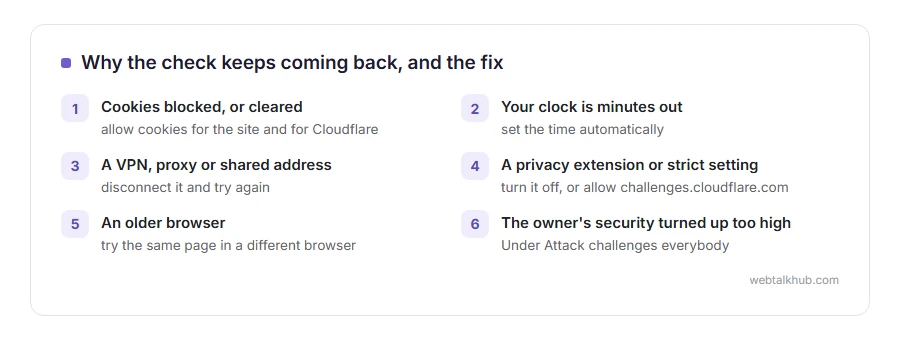
The things that cause the loop are:
- Cookies blocked, or cleared between the check and the page
- The clock on your computer being minutes out
- A VPN, a company proxy or a shared address other people have abused
- A privacy extension or a strict browser setting blocking challenges.cloudflare.com
- An older browser, or one with JavaScript restricted
- The site owner’s own security settings being turned up too high
In this article you will learn the seven fixes in the order that clears it most often, and the two settings a site owner should look at when their visitors are the ones stuck.
So let’s get started.
1) Allow cookies for the site, and for Cloudflare
The check hands out a cookie that says you passed. Block that cookie and you are asked again, forever.
In Chrome, open Settings, Privacy and security, Third-party cookies, and make sure they are not blocked for this site. In Safari, turn off Prevent Cross-Site Tracking for a moment. In Firefox, click the shield at the left of the address bar and turn Enhanced Tracking Protection off for that site.
This will not help if you are in a private window that clears cookies as you go, so test in a normal window before deciding it failed.
2) Check your clock
A clock that is minutes out makes the check’s own token look invalid, and around it goes again.
On Windows, Settings, Time and language, set time automatically. On a Mac, System Settings, General, Date and Time. On a phone, the same setting under date and time.
It sounds far fetched and it is genuinely one of the most common causes, especially on a machine that has been switched off for a long time.
3) Turn off the VPN and any proxy
Cloudflare scores the address you are coming from. A VPN exit used by thousands of people, or a cheap proxy, carries a poor reputation earned by other people.
Disconnect it and try again. If the page then loads instantly, you have your answer, and the fix is a better VPN endpoint rather than anything on your computer. If you need the VPN on, I recommend switching to a server in your own country, since those addresses are usually shared with fewer people and carry a better score.
On a work laptop the proxy may be compulsory, in which case this will not help and your IT people are the ones who can ask for the site to be allowed.
4) Turn off privacy extensions for that site
Ad blockers, anti-fingerprinting extensions and script blockers all interfere with a check that works by watching the browser.
Open the page in a private window with extensions off, or turn them off one at a time. The usual culprits are the aggressive privacy tools rather than ordinary ad blockers.
5) Let challenges.cloudflare.com load
The check lives on that address, and some network filters, parental controls and DNS blocklists refuse it outright.
If you run the filtering yourself, allow challenges.cloudflare.com. On a school or office network, this is a question for whoever manages it rather than something you can fix from the keyboard.
You can tell this is your case when the box never appears at all, or appears and never finishes, on every Cloudflare protected site rather than one.
6) Update or change the browser
Turnstile needs a current browser. A very old Chrome, an unusual privacy browser, or a webview inside another app can fail the check without saying so.
Try the same page in a different browser. If it passes there, the first browser is the problem, and updating it is the fix rather than fighting the setting.
7) Clear the cookies for that one site
If you have been round the loop many times, stale cookies can keep it going.
In Chrome, click the icon left of the address, then Cookies and site data, then Manage on-device site data, and delete the entries for that site. Then reload.
Clearing everything is not necessary and signs you out of half the web, so keep it to the site you are stuck on.
If the site is yours and visitors are stuck
Two settings cause nearly all of it, and both are yours to change.
In the Cloudflare dashboard, look at Security, then Settings, and check the security level. Under Attack on a normal day challenges everybody, including your customers. Also read the WAF custom rules and any managed rules you have switched on, because a broad rule can challenge a whole country or a whole browser family.
Then look at Bot Fight Mode. It is useful and blunt, and it challenges plenty of legitimate visitors, so if your support inbox is full of people saying they cannot get in, turn it off first and watch.
If your visitors see a Cloudflare error rather than a challenge, our pages on Cloudflare error 520, error 525 and error 526 cover those.
FAQ(Cloudflare Verify You Are Human)
Why does Cloudflare keep asking me to verify?
Because the check never completes: usually a blocked cookie, a wrong clock or an address with a poor reputation. It is not a judgement about you.
Is it a virus?
No. It is a security check on the website’s side, and being asked repeatedly is a sign of a setting rather than an infection.
Why does it happen on my phone and not my computer?
Different browser settings and often a different network. Mobile networks share addresses between many people, which affects the score.
Can I skip the check?
No, and you would not want a site where anybody could. Fixing the cause takes less time than hunting for a way round it.
It happens on every site, not one.
Then it is your side: cookies, clock, VPN or an extension. The first three fixes above cover nearly all of those.
If you have any issues, you can ask me via comment, and I will love to help you out.
When it says access denied instead
A challenge that never clears is one thing. A flat refusal with a four digit number is another.
- Cloudflare error 1005, the whole network you are on has been blocked by the site owner, and how to get in.
