

Is your site showing a Cloudflare page saying invalid ssl certificate error code 526, while the certificate looks perfectly fine to you in the browser?
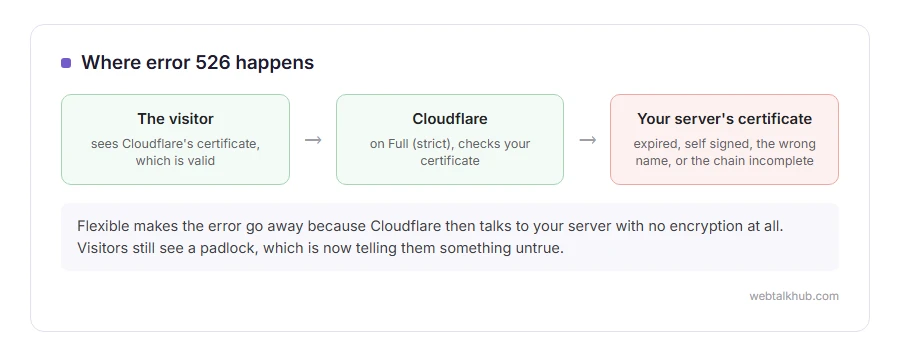
Don’t worry, that combination makes sense once you know what Cloudflare is checking. Your visitors see Cloudflare’s certificate, which is valid. Behind the scenes, Cloudflare then opens its own connection to your server, and on the Full (strict) setting it checks your server’s certificate properly. A 526 means that check failed, so the problem is on your own server even though everything looks right from outside.
The usual cause is one of these four:
- It has expired, or the renewal did not actually load
- It is self signed, and Full (strict) does not accept those by default
- It is issued for a different name than the one Cloudflare is asking for
- The chain is incomplete, so Cloudflare cannot trace it back to an authority it trusts
In this article you will learn how to tell which of the four you have in about a minute, the fix for each, and why switching Cloudflare to Flexible is the wrong way out even though it makes the error disappear.
So let’s get started.
First, see your server’s certificate the way Cloudflare sees it
Your browser is not the right tool here, because it is looking at Cloudflare rather than at your server.
Run curl -vI https://yourdomain.com --resolve yourdomain.com:443:your-server-ip-here from any machine. Keep your domain in the address and put the server IP only after --resolve, so curl skips Cloudflare but still asks for your site by name. What comes back is exactly what Cloudflare sees: the issuer, the dates and the names on the certificate.
If you cannot run commands, pause Cloudflare for five minutes on the overview page and load the site directly. Your browser will then name most of these problems in plain words, but a broken chain often loads fine. For that one, run your domain through an SSL checker while Cloudflare is paused.
1) The certificate has expired
The most common cause, and the one with the simplest fix.
Renew it through your host or with Let’s Encrypt, then restart the web server. That restart matters: many stacks keep the old certificate in memory, so a renewed certificate that was never loaded looks exactly like an expired one.
Check the dates on the origin afterwards rather than in your browser. Renewing does not work if the new file was written somewhere the server is not reading, which happens more often than people expect.
2) It is self signed
A self signed certificate is fine for a test server, but Full (strict) will not accept it unless you add it to Cloudflare’s paid Custom Origin Trust Store.
Install a real certificate, or install Cloudflare’s own Origin Certificate, which is free, lasts fifteen years and is built exactly for the leg between Cloudflare and your server. Cloudflare trusts it, browsers never see it, and it ends this class of error for good.
If you want to keep the self signed one for now, switch Cloudflare to Full rather than Full (strict). That is a step on the way, not a destination.
3) The name on it does not match
A certificate issued for example.com does not cover www.example.com, or a subdomain, unless it was issued for those names too.
Look at the Subject Alternative Names in the certificate and make sure they cover the hostname Cloudflare is requesting. A wildcard, or a certificate listing both the bare domain and www, solves it.
This is the one that shows up when only one subdomain fails while the main site is fine.
4) The chain is incomplete
Your certificate is signed by an intermediate, and the intermediate is signed by a root. If the server does not send the intermediate, some clients can fill the gap from memory and Cloudflare will not.
Install the full chain file your issuer gave you, usually called fullchain or bundle, rather than only the certificate itself, then restart the web server.
This is the sneaky one, because it often works in your own browser and fails for Cloudflare, which is why the test at the top of this page matters more than what you see on screen.
Why Flexible is not the answer
Switching the SSL mode to Flexible makes the error go away in seconds, and I do not recommend it.
On Flexible, Cloudflare talks to your server with no encryption at all. Visitors still see a padlock, so the padlock is now telling them something untrue, and anything between Cloudflare and your server can read the traffic. It also causes redirect loops on sites that force https at the server.
Use Full while you fix the certificate, and go back to Full (strict) once it is right.
525 and 526 are not the same
They sit next to each other and they fail at different moments.
525 means the secure handshake between Cloudflare and your server failed, before any certificate could be judged, and that is covered on our Cloudflare error 525 page. 526 means the handshake worked and the certificate was then refused. If the browser itself is complaining rather than Cloudflare, see your connection is not private.
FAQ(Cloudflare Error 526)
Why does my certificate look valid in the browser?
Because the browser is looking at Cloudflare’s certificate. A 526 is about the one on your own server, which visitors never see.
Is 526 Cloudflare’s fault?
No. Cloudflare is reporting that your server’s certificate did not pass the check you asked it to make.
Will a free Let’s Encrypt certificate fix it?
Yes, as long as it is installed with its full chain and the web server is restarted afterwards.
Can I use Cloudflare’s Origin Certificate on a normal site?
Yes, for the connection between Cloudflare and your server, which is all that matters here. It is not trusted by browsers and it does not need to be.
It worked yesterday and broke today.
Look at the expiry date first, because an automatic renewal that failed quietly is the most common overnight cause.
If you have any issues, you can ask me via comment, and I will love to help you out.
A block rather than a fault
Not every Cloudflare page means something is broken. Some mean the owner chose to keep you out.
- error 1005, access denied, what an ASN block is, and what to change if it is your site.
