
Do you want to block emails on Yahoo from one sender who keeps writing, or clear out the ones that arrive every single morning?
Don’t worry, this takes two minutes once you know where Yahoo hides the setting, and it is worth knowing what blocking does before you start. Blocking works on one address at a time. It is perfect for a person or a company that keeps writing, and it does very little against mass spam, because those senders change address constantly.
So there are four things worth doing, and which ones you need depends on what is arriving:
- Block the address, for a sender who keeps coming back
- Use a filter, for a whole pattern such as everything from one domain
- Report as spam, so Yahoo learns rather than just moving one message
- Unsubscribe properly, for mail you actually signed up for once
In this article you will learn all four, on the website and in the Yahoo Mail app, and where the blocked list has a limit that nobody mentions.
So let’s get started.
1) Block an address on the Yahoo website
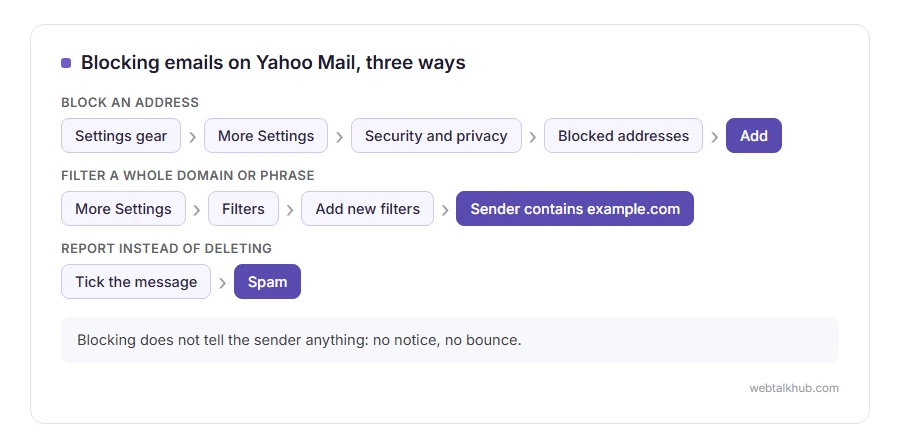
Sign in at Yahoo Mail, click the settings gear at the top right, then More Settings.
Open Security and privacy, find Blocked addresses, and click Add. Type the address you want blocked and save it. Their future messages go straight to the bin instead of your inbox.
The limit worth knowing before you spend an hour here: Yahoo caps the blocked list at 1,000 addresses, and blocking is per address rather than per domain, so a spammer with a hundred addresses walks straight around it. For those, use the filter in step 2 instead.
2) Block a whole pattern with a filter
This is the part most people never find, and it does far more than blocking.
In More Settings, open Filters and click Add new filters. Give the filter a name, then set a rule: the sender contains a domain such as example.com, or the subject contains a phrase that keeps appearing. Choose the destination folder, and pick Trash if you never want to see them.
A filter on a domain kills every future address behind it in one go, which is exactly what blocking cannot do.
For the first few weeks, send them to a folder rather than to Trash. A filter that deletes is a filter you cannot check, and you want to see what it caught before you trust it.
3) Report as spam instead of deleting
Deleting teaches Yahoo nothing. Reporting teaches it something about that sender, that wording and those links, for you and for other people on the same service.
Tick the message in the list and click the Spam button in the toolbar. On the app, swipe or open the message, tap the three dots and choose Report spam.
Never report a newsletter you actually signed up for, though. Unsubscribe from that one instead, or you teach the filter to distrust mail you asked for. The Yahoo Mail app lists your mailing lists in one place, which our guide on mass unsubscribing walks through.
4) In the Yahoo Mail app
The app has fewer settings than the website, and this is where people get stuck.
Open the app, tap the profile icon, then Settings, then your account, and look for Blocked addresses. If your version does not show it, the blocked list is still there and you can manage it on the website, which is the honest answer rather than hunting through menus.
Reporting spam works fully in the app, so use that on the phone and manage blocks and filters on a computer when you have one. Hunting through the app settings does not work on every version, and the website has the full list either way.
What blocking cannot do
Three things are worth saying plainly, because people expect them and are then disappointed.
Blocking does not tell the sender anything. There is no notice, no bounce, and nothing they can see, which is what you want.
It does not stop a spammer who changes address, and most do, so filters matter more than blocks for real spam.
And it does not remove your address from the lists you are on. Our page on how to stop spam and junk emails covers what actually reduces the volume, including what to do when your address has leaked in a breach.
FAQ(Blocking Emails on Yahoo)
Does the sender know they are blocked?
No. Nothing is sent back to them and their message simply does not reach your inbox.
How many addresses can I block on Yahoo?
The blocked list holds up to 1,000 addresses. If you are anywhere near that, filters are the better tool.
Can I block a whole domain in Yahoo?
Not in the blocked list, which is per address. A filter matching the domain does the same job and has no such limit.
Where do blocked messages go?
They are deleted rather than kept, so check the list if you think you blocked somebody by mistake.
I keep getting the same spam from new addresses.
That is the case where blocking will not help. Write a filter on the domain, or on a phrase in the subject, and report the messages as spam so the filter learns.
If you have any issues, you can ask me via comment, and I will love to help you out.
On Gmail instead?
Gmail does the same job with a different menu and one important difference.
- blocking someone on Gmail, on a computer and in the app, what happens to their emails, and when a filter works better.
