

Is your site showing a Cloudflare page with error code 520 and the line “web server is returning an unknown error”, which tells you almost nothing about what to do next?
Don’t worry, you are not alone, and the vagueness is the point rather than a bug. A 520 is Cloudflare’s way of saying your server answered, and the answer made no sense: an empty reply, a connection cut halfway, or headers too big or malformed to read. Because it is a catch all, the useful work is narrowing it down, and that is what this page does.
The causes that actually turn up are:
- The server crashed or restarted mid request, often out of memory
- A PHP fatal error that produced an empty response
- Headers that are too large, usually from too many cookies
- A firewall or security tool on your server cutting Cloudflare off
- A slow query that made the process die rather than finish
- Too many requests for the number of workers the server has
In this article you will learn the one test that tells you where to start looking, then the six causes with the fix for each, and where a 520 sits next to 521, 522 and 525.
So let’s get started.
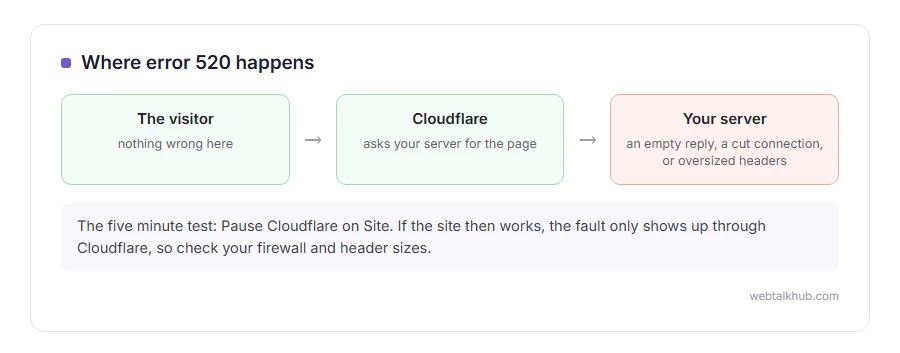
The test that costs five minutes
Pause Cloudflare rather than changing your DNS.
In the Cloudflare dashboard, on the overview page, choose Pause Cloudflare on Site. Traffic then goes straight to your server. If the site works, that does not clear your server. The fault only shows up on the path through Cloudflare, which usually means your server treats Cloudflare’s requests differently, so start at steps 3 and 4. If the same pages fail with your server answering directly, the server itself is failing, and step 1 is where to start.
Turn it back on afterwards. Leaving it paused removes your caching and your protection.
1) Read the server error log first
This is the step that turns a 520 from a mystery into a sentence.
Open the PHP error log and the web server log in your hosting panel, and read the lines from the minute the error happened. A fatal error, an out of memory message, or a segmentation fault will be sitting there in plain words.
If your host does not expose the logs, ask support for the last hundred lines from that time. They can see what you cannot, and the honest limit of this page is that without those lines you are guessing.
2) Look for an empty response from PHP
A PHP process that dies part way through sends nothing back, and nothing is exactly what a 520 reports.
The usual causes are a memory limit, an infinite loop, or a plugin fatal on one particular page. Raise the PHP memory limit to 256M, then test the exact page that fails rather than the home page, because a 520 that only happens on one address is a strong clue that the page itself is the trouble.
Raising memory is not a cure when the real cause is a loop. If the log names a file, fix that file.
3) Check the size of your cookies and headers
Cloudflare rejects a response whose headers add up to more than 128 KB, and a pile of cookies is the usual way to get there.
Open developer tools with F12, go to Network, click the failing request and look at the size of the response headers and the cookies. A long list of cookies, often set by plugins storing too much, is the classic cause. One cookie on its own is far too small to hit the limit.
Clear your cookies for the site and try again in a private window. If it works there and not in your normal window, the trouble follows your cookies or your login. To be sure, pause Cloudflare, load the page again and check the size of the response headers your server sends back.
4) Look at the firewall on your own server
Security tools such as fail2ban, ConfigServer Firewall, or a host level rule can decide Cloudflare’s addresses are making too many requests and start cutting connections.
Allow Cloudflare’s published address ranges, and check whether any tool has banned one of them recently. The logs of that tool will say so.
Be careful before you switch a firewall off to test: do it for two minutes, watch the page, and turn it straight back on.
5) Ask your host about workers and timeouts
On shared hosting a burst of traffic can use every PHP worker, and the front end then gives up in ways that look like a 520.
Ask the host how many workers your plan has, what the PHP maximum execution time is, and whether anything was killed at the time of the error. Those three answers usually end the hunt.
6) Rule out your own recent changes
A 520 that started today usually has a cause from today.
Think about what changed: a plugin update, a new security rule, a PHP version change, a theme edit. Undo the most recent one and test. It is unglamorous and it is quicker than reading logs for an hour.
520, 521, 522 and 525 are not the same thing
Four Cloudflare codes that look alike and mean different things, and knowing which is which saves a lot of time.
520 means your server answered with something Cloudflare could not understand. 521 means your server refused the connection outright, usually because it is down or blocking Cloudflare. 522 means the connection timed out before your server answered at all. 525 means the secure handshake failed, which is covered on our Cloudflare error 525 page.
FAQ(Cloudflare Error 520)
Is a 520 error Cloudflare’s fault?
Almost never. Cloudflare is reporting that your server gave it something it could not read.
Why does it only happen on some pages?
Because those pages run code that fails, or produce a response that is too large. A 520 on one address is a strong clue about where to look.
Can a plugin cause a 520?
Yes, and it is one of the most common causes on WordPress, usually through a fatal error or by setting too many cookies.
Does pausing Cloudflare fix it?
Not really. It can hide the error while it stays paused, but you lose your caching and protection. Its real use is the clue it gives you about where to look, which is worth five minutes before you change anything else.
My host says everything is fine.
Ask them for the error log lines at the exact minute it happened rather than for an opinion. If nothing is in the log, the response size in step 3 is the next thing to check.
If you have any issues, you can ask me via comment, and I will love to help you out.
If visitors see a checkbox instead of an error
Not everything Cloudflare shows is a failure. Sometimes it is a challenge that never completes.
- the verify you are human loop, what causes it, and the two dashboard settings behind most of it.
