
Is somebody filling your inbox, an ex, a pushy seller or a newsletter that ignores unsubscribe, and you want to block someone on Gmail so you stop seeing their emails?
It takes two taps, and don’t worry, the person is not told. Gmail does not send them any notice, and their emails still leave their side as normal. On your side, everything they send from then on goes straight to your Spam folder, where it is deleted after 30 days.
Before you do it, it helps to know what blocking covers and what it does not:
- It works on one email address at a time
- It moves their future emails to Spam, it does not refuse them
- It does not stop them seeing emails you send them
- It does not block them in Google Chat or elsewhere
In this guide I will show you how to block from a computer and from the phone app, how to undo it, and what to do when the same person or company keeps writing from new addresses.
So let’s get started.
1) Block someone on a computer
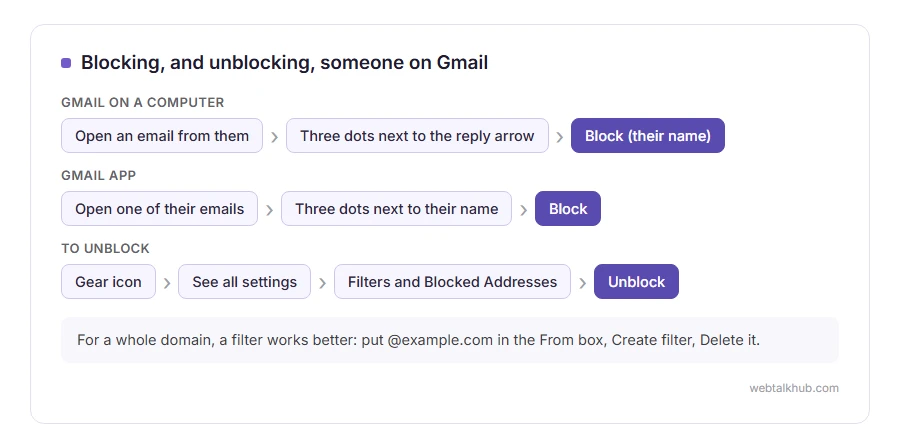
Open an email from the person. At the top right of the message, next to the reply arrow, click the three dots and choose Block followed by their name.
Gmail asks you to confirm. After that, their future emails go to Spam, and the email you had open gets a banner saying the sender is blocked.
2) Block someone in the Gmail app
Open one of their emails in the app on an iPhone or Android phone. Tap the three dots next to their name, not the ones at the very top of the screen, and choose Block.
It is the same block as on a computer. Whatever you block on one device applies everywhere you use that Gmail account.
3) Unblock someone
On a computer, click the gear icon, then See all settings, then Filters and Blocked Addresses. Your blocked addresses are listed at the bottom, each with an Unblock link.
In the app you can unblock from an old email of theirs with the same three dots. Their emails that already went to Spam stay there, so move any you need back to your inbox by hand.
When one address is not enough
Blocking is no use if the emails come from a new address each time, which is how most spam works. For those, a filter is the answer, because a filter can match a whole domain or a phrase.
Click the search bar’s options button, put the domain, such as @example.com, in the From box, choose Create filter, and tick Delete it. I suggest this for any company that keeps writing after you unsubscribe, because it catches every address they use. To leave dozens of newsletters at once rather than one by one, see how to mass unsubscribe.
For newsletters and shops, try the Unsubscribe link Gmail shows next to the sender’s name first. It is more polite than blocking, and it usually works. Our guide on stopping spam and junk emails covers the rest.
If the emails are threats or harassment
Blocking hides the emails, and it also hides evidence. Keep in mind that the police or a solicitor may need those messages, so do not empty them out of Spam if the emails are threatening.
Gmail has a Report phishing option in the same three dot menu for scams. For harassment, report it to whoever the sender’s email provider is, as well as keeping a copy.
Blocking elsewhere
On Yahoo Mail the steps are different, and our guide on blocking emails on Yahoo covers them.
If emails you want are suddenly missing, check Filters and Blocked Addresses before anything else, since a forgotten block or filter is a common cause. Our page on Gmail not receiving emails goes through the other causes.
FAQ(Block Someone on Gmail)
Does the person know I blocked them?
No. Gmail tells them nothing, and their emails appear to send normally from their side.
Can a blocked person still email me?
They can send, and the emails arrive in your Spam folder instead of your inbox. Gmail deletes them from Spam after 30 days.
Does blocking someone on Gmail block them on YouTube or Google Chat?
No. Each Google service has its own blocking, so block them separately there if you need to.
Can I block a whole domain in Gmail?
Not with the Block button, which works on one address. A filter on the domain, set to delete, does the job.
What is the limit on blocked addresses?
Gmail does not publish one, and ordinary use never comes near it. For very long lists, filters are tidier anyway.
If you have any issues, you can ask me via comment, and I will love to help you out.
