
Somebody swears they sent it. You have refreshed Gmail five times and there is nothing there, and you are starting to wonder whether the message is lost or whether your account has quietly stopped working.
Don’t worry, you are not alone, and here is the part that usually settles people down: a message Gmail has accepted is almost never deleted. It is somewhere else in your account. Mail that was refused at the door never entered at all, and the sender got a bounce telling them so, which is the other half of this page.
Gmail not receiving emails nearly always comes down to one of these:
- Your Google storage is full, so new mail is being refused
- A filter you wrote years ago is archiving or deleting it
- The sender is on your blocked list
- It went to Spam, or to the Promotions tab
- Forwarding or POP is set to delete Gmail’s copy as soon as it arrives
- Your work account has an admin rule or a quarantine holding it
In this article you will learn eight checks, in the order that finds the answer fastest, and the first two catch most cases on their own.
So let’s get started.
1) Search everywhere, not just the inbox
The inbox is one view of your mail, not all of it, and a filter or a tab can put a message somewhere you never look.
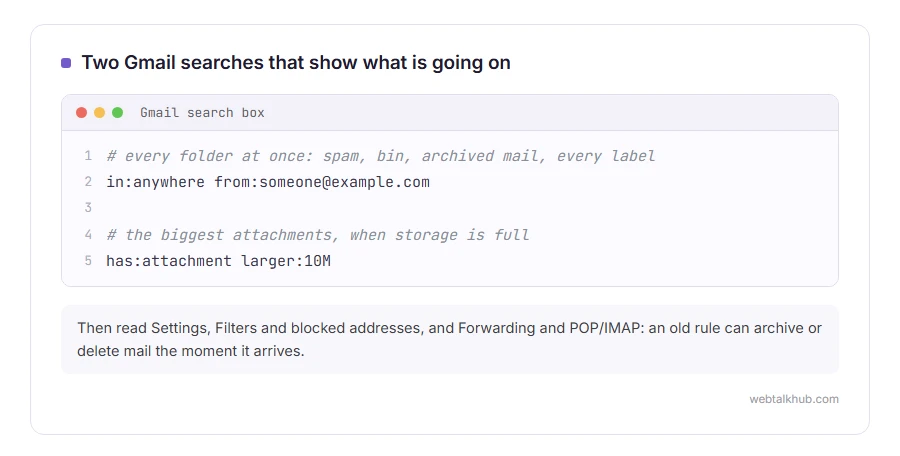
In the Gmail search box, type in:anywhere followed by the sender’s address, for example in:anywhere from:[email protected]. That searches spam, bin, archived mail and every label at once.
If the message turns up, you now know it arrived and the question is only where it landed, which is checks 3 and 4. If in:anywhere finds nothing, the message genuinely never reached your account, so skip this step and go to check 6.
2) Look at your storage
Google gives you one allowance across Gmail, Drive and Photos. When it is full, incoming mail is refused and the sender gets a bounce.
Open one.google.com/storage and look at the number. If you are at the limit, empty the bin in Drive and in Gmail, then delete the largest attachments with the search has:attachment larger:10M.
Deleted items still count until the bin is emptied, and after a big clear-out the freed space can take up to three days to show, so wait until the storage page shows the lower number before you ask the sender to try again. Emptying the bin will not help if you were never near the limit, and the storage page tells you that in one glance.
3) Check Spam and the Promotions tab
Open Spam from the left menu. If the message is there, open it and click Report not spam, which moves it and teaches the filter.
If you use the tabbed inbox, look in Promotions, Social and Updates. Mail from shops, services and newsletters goes there by design and never appears in Primary at all.
One limit worth knowing: Gmail deletes spam after 30 days. If the message is older than that it is gone, and the sender has to send it again.
4) Read your filters
This is the one that catches people who set something up years ago and forgot about it.
Open Settings, then Filters and blocked addresses, and read every rule. Look for any that deletes, archives, or applies a label with skip inbox. A filter written to tidy one sender can easily catch far more than it was meant to.
While you are there, read the blocked addresses list underneath, because people block senders by accident more often than you would think.
Deleting a filter does not bring back the mail it already moved. Use the in:anywhere search from check 1 to find those.
5) Check forwarding and POP
Open Settings, then Forwarding and POP/IMAP.
If forwarding is on with the option to delete Gmail’s copy, your mail is arriving and leaving immediately. If POP is enabled and set to delete, another program pulling your mail can be taking it off the server before you ever see it.
Set forwarding to keep Gmail’s copy in the inbox, and set POP to keep the copy too. The culprit here is often another device you had forgotten about, an old phone or a mail program at work still signed in.
6) Ask the sender what the bounce says
If nothing arrived at all, the answer is usually sitting in the sender’s mailbox already.
Ask them to look for a failure message and to send you the exact wording. A line saying the mailbox is full, the address does not exist, or the message was rejected as spam tells you precisely where to look next.
Not every bounce reaches the person who sent it, though. It can land in their own spam folder, or go to the website or mailing tool that sent the message instead, so an empty answer here does not prove anything either way.
7) Send yourself a plain test
Send a message from a different account with a simple subject and no attachment.
If it arrives, the account works and the trouble is with one sender or one kind of message. If it does not, the account itself is the problem, which points back at storage or at a filter.
Send it from a different provider rather than a second Gmail address, because mail between two Gmail accounts takes a shorter path and can hide the very fault you are hunting. If you are on a work address, I recommend asking a colleague outside the company to send that test, since internal mail never leaves the building and proves nothing.
8) For a work address, ask about admin rules
If your address is at your company domain rather than gmail.com, an administrator can set rules for everybody.
Ask whoever runs your Google Workspace to check the routing and compliance rules, the spam quarantine, and whether your address is in a group that redirects mail. The quarantine is the common one, because they can see it and you cannot.
On a personal gmail.com account there is no admin and no quarantine, so skip this step entirely.
While you are waiting for it to be fixed
If you are waiting on something important, give the sender a second route: another address, a message on your phone, or a shared link to the file. It is obvious, and people forget it while they are busy digging through settings.
FAQ(Gmail Not Receiving Emails)
Does Gmail ever just lose emails?
Very rarely once a message has been accepted. Mail that was refused at the door, for example when storage is full, never enters the account and the sender gets a bounce.
Why do some senders reach me and others do not?
That pattern points at a filter, a block or spam scoring. Search in:anywhere for one of the missing senders and see where those messages went.
I get mail on my phone but not on my computer.
Then it is arriving fine and it is a sync or display problem in one app. Check at gmail.com in a browser to see the truth.
Can a full Google Drive stop my email?
Yes. Drive, Photos and Gmail share one allowance, so a big upload to Drive can stop your mail arriving the same day.
How long should I wait before assuming it is lost?
Most mail arrives in seconds. Give it fifteen minutes, then start checking rather than waiting longer. If your own outgoing mail is the problem instead, see email not sending, and if the missing mail is junk you want to stop, see how to stop spam and junk emails.
If you have any issues, you can ask me via comment, and I will love to help you out.
Where the mail actually lives
When mail goes missing rather than failing, the protocol underneath is usually the explanation.
- IMAP explained, mail stays on the server, and a second device set to POP3 can empty it.
- SMTP explained, the sending half, which is a separate server with separate settings.
If the emails did arrive and then vanished
Missing mail is not always mail that never came. Sometimes it was deleted, archived or filed.
- how to find deleted emails, Trash, All Mail, filters, and how long Gmail and Outlook keep things.
