
Has a mail program or a website plugin asked you for SMTP settings, and you are wondering what is smtp and why sending mail needs its own server at all?
The short answer is Simple Mail Transfer Protocol, and the one thing worth holding on to is that it only sends. It has no way of showing you a single message in your inbox. That job belongs to IMAP or POP3, which is why every mail setup screen asks you for two servers rather than one.
Think of it as the post van and the sorting office. SMTP takes your message from your hand and drives it to the recipient’s mail server. Getting it back out of the letterbox at the other end is a different protocol doing a different job.
So an SMTP setup screen is really asking you five things:
- The server address, such as smtp.gmail.com
- The port, which decides how the connection is secured
- Your username, almost always your full email address
- Your password, which on Gmail and Outlook is now a special one
- Whether to use TLS or SSL
In this article you will learn what each of those means, which port to pick, the exact settings for Gmail, Outlook and Yahoo, and the handful of reasons mail refuses to go.
So let’s get started.
What SMTP actually does
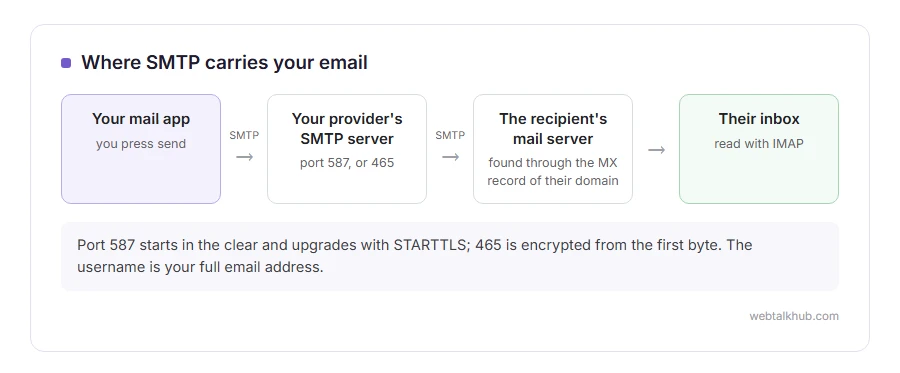
When you press send, your mail program opens a connection to your provider’s SMTP server and hands over the message with a short conversation: who it is from, who it is for, then the message itself.
Your provider’s server then finds the recipient’s mail server by looking up the MX record of their domain, and passes the message along, again over SMTP. So the protocol is used twice: once from you to your provider, and once between servers.
The protocol dates from 1982 and was never designed with security in mind. Everything added since, from passwords to SPF, is a layer bolted on top of a conversation that originally trusted whatever it was told.
The ports, and which one to use
Port 587 is the one to use. It is the submission port, meant for a person or an app sending through their own provider, and it starts in the clear then upgrades to an encrypted connection with STARTTLS.
Port 465 is encrypted from the first byte. It was deprecated years ago, then brought back into the standards. Gmail and Yahoo support it, but Microsoft does not. On Gmail or Yahoo, if 587 gives you trouble, try 465 before changing anything else.
Port 25 is for server to server delivery and is not for you. Home internet providers block it, and so do most hosting companies, precisely because spam software used it for years. Setting port 25 in a mail app will usually just sit there and time out.
Port 2525 is not a standard at all. Sending services such as SendGrid and Mailgun offer it as a way round a network that blocks the other three, and it only works with a provider that has chosen to listen there.
The settings for Gmail, Outlook and Yahoo
For a Gmail account, the server is smtp.gmail.com on port 587 with STARTTLS, or port 465 with SSL. The username is your full Gmail address.
For an Outlook.com or Hotmail account, it is smtp-mail.outlook.com on port 587. For a work Microsoft 365 account it is smtp.office365.com, also on 587. For Yahoo Mail it is smtp.mail.yahoo.com on 465 or 587.
The password is where people get stuck. Your ordinary account password does not work any more on Gmail, because Google stopped apps signing in that way in 2022. You switch on 2-step verification, then generate an app password, which is sixteen letters, and that is what goes in the box. Microsoft has been closing the same door on personal accounts.
Keep in mind that an app password cannot be created at all while 2-step verification is off, and the option simply is not there in the account screen, which is what makes people think Google removed the feature.
Why your mail will not send
Nearly every failure is one of five things, and the error message usually names it if you read past the first line.
Authentication failed means the username or password is wrong, and on Gmail that almost always means an ordinary password where an app password belongs. A timeout means the port is blocked, by your network or by your host, so try 587, then 465 if you are on Gmail or Yahoo. Relay access denied means the server will not pass your mail on to an outside address because it does not know you, which usually means authentication is switched off in your mail app or the login failed.
Then there are the two that are not really SMTP at all: the message sends and lands in spam, or it sits in the outbox and never leaves the app. Our pages on email not sending, the outbox and mail queued in Gmail go through those. If you just want the steps for writing and sending, how to send an email has them.
SMTP on a website, which is where most people meet it
A WordPress site sends mail through PHP’s own mail function by default, which hands the message to whatever the server has installed locally. Plenty of hosts have nothing configured, and plenty of receiving servers distrust mail that arrives from a random web server, so the message is dropped without a bounce.
That is why every contact form guide ends up telling you to install an SMTP plugin. You are not adding a feature, you are moving the sending job to a mail server that is allowed to speak for your domain.
If you run a small site and you are new to this, I recommend using your existing mailbox provider over sending through the web server, since you already pay for it and its reputation is already established. It stops working once you send in bulk, because a normal Gmail account allows around 500 messages a day and a Workspace account around 2,000, and going past that gets you throttled rather than warned.
SPF, DKIM and DMARC in one paragraph each
SMTP never checks who you say you are. The From line can claim anything, which is the whole reason phishing works, and the three records below are the patches for that.
SPF is a line in your domain’s DNS listing which servers are allowed to send for you. DKIM signs each message with a key, so the receiver can prove it was not altered and really came from your domain. DMARC ties the two together and tells receivers what to do when a message fails: nothing, spam folder, or reject.
Since 2024, Gmail and Yahoo have required these from anyone sending in volume. For a personal mailbox you do not have to touch any of it, and for a domain you send from, all three are worth an hour of somebody’s time.
FAQ(SMTP)
What does SMTP stand for?
Simple Mail Transfer Protocol. It is the standard for moving a message from your app to your provider, and from one mail server to the next.
What is the difference between SMTP and IMAP?
SMTP sends, IMAP reads. They are two separate servers with separate settings, which is why a mail account can send fine and still show you nothing.
Which SMTP port should I use?
587 first, and 465 if that will not connect on Gmail or Yahoo, since Microsoft does not take it. Leave 25 alone unless you are configuring a mail server yourself.
Why does my SMTP password not work?
On Gmail and most Microsoft accounts your normal password is refused on purpose. Turn on 2-step verification, create an app password, and use that instead.
Do I need my own SMTP server?
Almost never. Your mailbox provider already gives you one, and running your own means looking after reputation, blocklists and DNS records for years.
If you have any issues, you can ask me via comment, and I will love to help you out.
Putting it to work on your own domain
All of this becomes practical the day you want an address on your own business name.
- getting a business email address, the providers, the MX records and the SPF and DKIM setup, in order.
