
Is a mail app asking you to choose between IMAP and POP3, and you would rather know what is imap before picking the one your mail lives on?
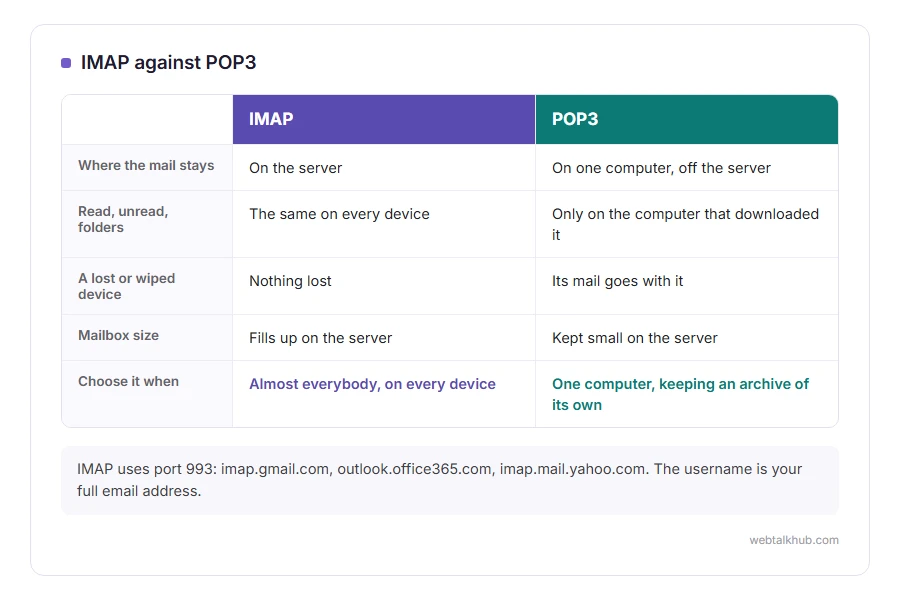
It stands for Internet Message Access Protocol, and the whole idea fits in one line: your mail stays on the server, and every device you own shows a live view of it. Read something on your phone and it is already read on your laptop, because both are looking at the same mailbox rather than their own copy.
POP3 works the other way round. It downloads the messages to one device and, in its original setting, deletes them from the server afterwards. So it is like taking the post home from the office, while IMAP is like reading it at the office and leaving it on the shelf for whoever looks next.
That difference decides five things people ask about:
- Whether read and unread match across your devices
- Whether a folder you make on one device shows on the others
- Whether deleting on the phone deletes everywhere
- Whether your mail survives a lost or wiped device
- Whether your mailbox fills up
In this article you will learn how IMAP works, where POP3 still makes sense, the ports and settings for the big providers, and the two habits that make mail seem to vanish.
So let’s get started.
How IMAP works
Your mail app holds a connection open to the server and asks for what it needs: the list of messages in a folder, then the body of the one you open, then any attachment you tap.
Because the server keeps everything, the app is showing a view rather than an archive. Flags such as read, unread, starred and deleted are stored on the server too, and that is why they follow you from device to device.
Most apps also keep a local cache so you can read recent mail on a plane. The cache is usually the last few weeks rather than everything, so searching offline will not find a message from two years ago even though the app shows the folder.
IMAP against POP3, and when POP3 still fits
For almost everybody, IMAP is the right choice, and it is what every provider sets up by default now.
POP3 still has one honest use: pulling mail down to a single computer and off the server for good, either to keep the mailbox under its size limit or to hold an archive somewhere nobody else can reach. If you are new to this and have more than one device, I do not recommend POP3, because the second device only ever sees what arrives after the first one has finished taking messages away.
The classic mess is a phone on IMAP and a desktop program on POP3 set to delete after download. Mail arrives, the desktop swallows it, and the phone shows an inbox that keeps emptying itself for no visible reason.
The ports and settings
IMAP uses port 993 with SSL or TLS, which is what you want. Port 143 is the old unencrypted port, still used with STARTTLS on some servers, and there is no reason to choose it by hand.
For Gmail the server is imap.gmail.com on 993. For Outlook.com and Microsoft 365 it is outlook.office365.com on 993. For Yahoo it is imap.mail.yahoo.com on 993. The username is your full email address in every case.
As with sending, Gmail and Microsoft refuse your ordinary password. Add the account with the app’s Google or Microsoft option so it opens their own sign-in page. Gmail still takes an app password with 2-step verification switched on, but Microsoft no longer accepts one for IMAP. Our page on what SMTP is covers that side of the same setup, since a working account needs both servers.
Gmail’s IMAP is not quite ordinary IMAP
Gmail has labels rather than folders, and it presents them to IMAP as folders, which works until it does not.
One message with two labels shows up in two folders, and it is still one message, so deleting it in one folder leaves it in the other. The All Mail folder holds everything, including things you thought you had filed, and a client set to sync every folder will download the same mail twice.
Keep in mind that removing a message from a label folder in some clients only takes the label off, and the mail sits in All Mail looking deleted but still counting against your storage. If your Google account says it is full after a big clear out, that is usually where it went.
When mail goes missing
Three causes cover nearly all of it, and none of them is the protocol failing.
The first is POP3 on another device quietly removing messages from the server, as above. The second is a filter or rule moving mail into a folder your app does not sync, which is easy to do in Outlook and easy to forget. The third is a full mailbox, where the server starts refusing new mail while everything already there looks perfectly normal.
Archiving does not help with the third one. Archived mail still sits on the server and still counts, so the only thing that frees space is deleting, and emptying the trash afterwards. If new mail has stopped arriving, our page on Gmail not receiving emails works through the rest, and how to stop spam and junk emails covers the filter side.
FAQ(IMAP)
What does IMAP stand for?
Internet Message Access Protocol. It is the standard for reading mail that stays on the server, rather than downloading it to one machine.
Should I use IMAP or POP3?
IMAP, unless you deliberately want mail pulled off the server onto one computer. Every provider defaults to IMAP for that reason.
Does IMAP send email?
No. Sending is SMTP, which is a separate server with separate settings in the same setup screen.
If I delete an email on my phone, is it gone from my laptop?
Yes. That is IMAP working as intended, since both devices are showing the same mailbox on the server.
Does IMAP use more data?
A little, because it talks to the server whenever you open something. On a phone it is small next to anything with pictures in it, and you can limit how far back the app syncs.
If you have any issues, you can ask me via comment, and I will love to help you out.
Setting up an address of your own
IMAP is one of the settings you meet when you add a mailbox on your own domain.
- how to get a business email address, from buying the domain to the first test email that does not land in spam.
Deleted on one device, gone from all of them
That is IMAP working as intended, and it is also how most emails go missing.
- finding deleted emails, where to look first and what is honestly gone after the trash is emptied.
