

Has an email you need disappeared, deleted by accident, swept away in a clear out, or simply not where you left it, and now you need to find deleted emails before they are gone for good?
Don’t lose hope yet. Deleted is almost never gone straight away. Gmail and Outlook both keep deleted emails for weeks before removing them, and a good share of “deleted” emails turn out never to have been deleted at all, only archived or filed by a rule.
Here is where to look, in the order that finds them fastest:
- The Trash or Deleted Items folder
- All Mail or Archive, for emails that were archived rather than deleted
- Spam, and any folder a filter or rule moves mail into
- Outlook’s second chance, Recover Deleted Items
- Your organisation’s administrator, for work accounts
In this guide I will show you each place in Gmail and Outlook, how long each keeps your email, and what is honestly impossible once the time has passed.
So let’s get started.
1) Search everywhere at once
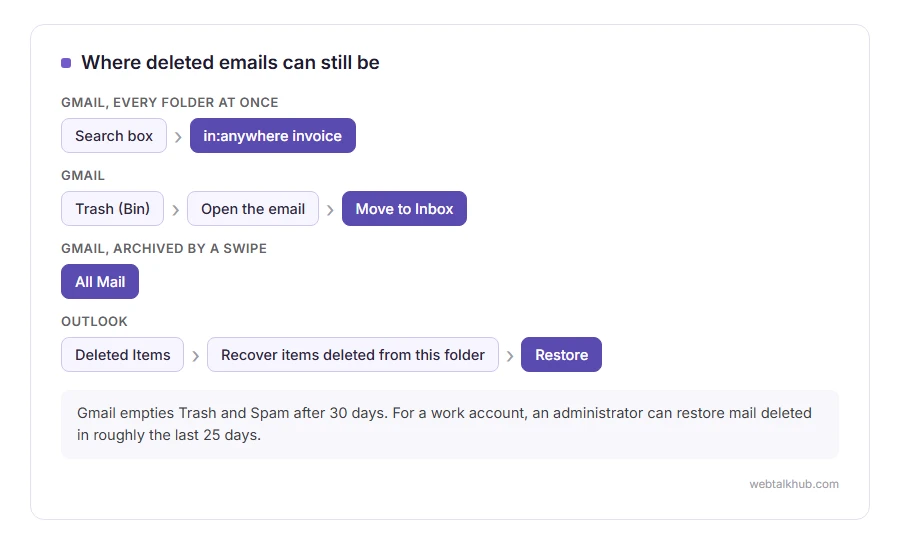
In Gmail, type in:anywhere followed by a word you remember from the email, such as in:anywhere invoice. It searches every folder including Trash and Spam, which the normal search skips.
In Outlook, change the search scope from Current Folder to All Mailboxes or All Folders, in the dropdown next to the search box.
This finds the email wherever it is, and the folder it turns up in tells you what happened to it. It will not help with an email already removed from Trash, since the search only covers what still exists.
2) Gmail: Trash, and All Mail
Open Trash, called Bin in some countries, from the left menu, under More if you cannot see it. Deleted emails stay there for 30 days. Open the email and click Move to Inbox.
Then check All Mail. Archiving takes an email out of the inbox without deleting it, and on the phone app a swipe often archives rather than deletes. Everything you ever archived is still in All Mail.
3) Outlook: Deleted Items, then the second chance
In Outlook.com or the Outlook app, open Deleted Items, find the email, and choose Move or Restore.
If Deleted Items has already been emptied, look for Recover items deleted from this folder at the top of it. That opens a second list of recently removed emails, usually kept for up to 30 days, and you can restore them from there.
In the desktop Outlook for a work account, the same thing is on the Home tab as Recover Deleted Items From Server. How long it reaches back depends on your organisation, often two weeks.
4) Check Spam and your filters
Emails that never arrived in the inbox may be sitting in Spam, which Gmail also empties after 30 days. A filter or rule can also move mail somewhere quietly, or delete it on arrival.
In Gmail, check Settings, Filters and Blocked Addresses. In Outlook, check Rules. A forgotten rule or a block is behind plenty of “my emails keep disappearing” complaints, and our guides on blocking someone on Gmail and Gmail not receiving emails show where those live.
5) Work accounts: ask your administrator
If you use Gmail through your employer’s Google Workspace, an administrator can restore mail deleted in roughly the last 25 days, even after it has left your Trash. Microsoft 365 administrators have similar tools.
I recommend asking quickly rather than searching for days, because the clock keeps running while you look.
When emails really are gone
Once Gmail’s Trash has been emptied or the 30 days have passed, a personal Gmail email cannot be brought back. Recovery programs advertised online cannot reach it either, because the email lived on Google’s servers, not on your computer.
Those programs only help with email stored on your own computer, such as old Outlook data files. They do nothing if your mail is webmail or synced over IMAP.
Keep in mind that deleting on one device deletes everywhere when your account uses IMAP, which is how most phones connect. Our page on what IMAP is explains why, and why a phone set up with POP3 can make mail vanish from the server.
FAQ(Find Deleted Emails)
How long does Gmail keep deleted emails?
30 days in Trash. After that, or once you empty Trash, they are permanently removed from a personal account.
Can I recover emails deleted from Trash in Gmail?
Not on a personal account. On a work Google Workspace account, an administrator can often restore them for about 25 days after.
Where do archived emails go?
Into All Mail in Gmail, or the Archive folder in Outlook. They are not deleted, just out of the inbox.
Why do my emails keep disappearing?
Usually a filter, a rule, a block, or a device set to POP3 taking them off the server. Check those before assuming they were deleted.
Can I find deleted emails on my iPhone?
Check the Trash folder for that account in the Mail app. With IMAP, anything deleted there is deleted on every device too.
If you have any issues, you can ask me via comment, and I will love to help you out.
