
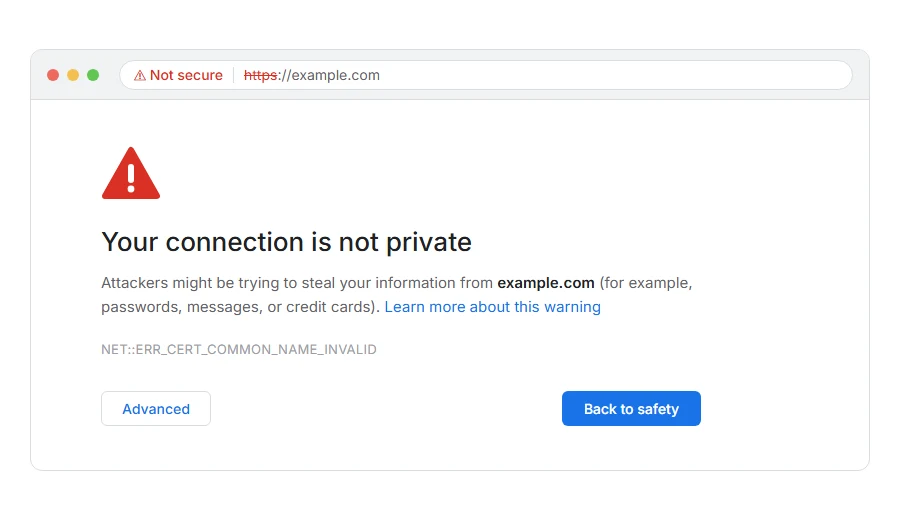
Is Chrome showing “Your connection is not private” with NET::ERR_CERT_COMMON_NAME_INVALID underneath, on a site you use every day or one you have just set up yourself?
The error means the site did send a security certificate, and the certificate is made out to a different name than the address in your address bar. Picture a parcel that arrives with the right street and the wrong house number: it may well be from the right sender, and the browser refuses to assume so.
The usual reasons are:
- The certificate covers example.com and you typed www.example.com, or the other way round
- The certificate covers the main site and not the subdomain you visited
- A new domain is showing the hosting company’s default certificate
- You opened the site by its IP address instead of its name
- Antivirus or an office firewall is inspecting secure connections
In this guide I will show you what a visitor can safely try, then the fix if the site is yours.
So let’s get started.
Where it actually breaks
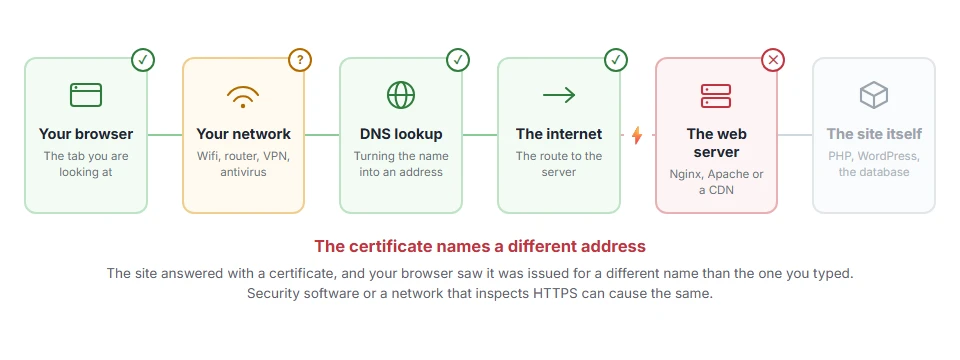
Every page you open makes the same journey. Knowing which step this error stops at tells you which half of the list below is worth your time, because the green steps are already proven to be working.
1) Check the exact address
Look at the address bar. If you clicked a link to www.example.com, try example.com without the www, or the other way round.
Many sites are covered on one form and not the other. If the other form opens with a padlock, the site simply forgot to include both names on its certificate.
2) Do not click through on anything that matters
Chrome offers an Advanced button and a Proceed link. Be careful with it: the whole point of the check is that you cannot be sure who is on the other end.
For a site where you sign in, pay or type anything private, do not proceed. For your own test site on your own network, it is harmless.
3) Rule out your own computer
If many different sites show certificate errors at once, the problem is on your side. Antivirus with web or HTTPS scanning, a company firewall, and hotel or airport Wi-Fi sign-in pages all get in the middle of secure connections.
Turn off the antivirus’s HTTPS scanning briefly, or try the site on mobile data. If it opens fine there, the cause is the network or software you were on, and the site itself is fine.
If the site is yours
Cover every name people use. Your certificate must list example.com and www.example.com, and every subdomain you serve, in its Subject Alternative Names. Reissue it with all of them. On most hosting panels that means ticking both forms in the SSL section, and Let’s Encrypt handles several names on one certificate for free.
Remember what a wildcard covers. A certificate for *.example.com covers shop.example.com, and not example.com itself or deeper names like a.shop.example.com. That surprise causes a lot of these errors.
Check where the name actually points. If your DNS still points at an old server, or a new domain was added before its certificate was issued, visitors get somebody else’s certificate. Our page on what DNS is explains the records to look at.
I recommend testing with a free SSL checker after every change, since it shows exactly which names the live certificate covers.
Why it still says common name
The Common Name was the one name field on older certificates. Chrome stopped reading it in 2017 and now only checks the Subject Alternative Names list, and the error message simply kept its old name.
So a certificate with the right Common Name and an incomplete names list still fails. It does not work to fix only the Common Name.
Related certificate errors
A certificate signed by somebody the browser does not trust gives NET::ERR_CERT_AUTHORITY_INVALID, and an expired one gives NET::ERR_CERT_DATE_INVALID. All of them sit behind your connection is not private, and behind Cloudflare a mismatch on your own server shows as error 526.
FAQ(NET::ERR_CERT_COMMON_NAME_INVALID)
What does NET::ERR_CERT_COMMON_NAME_INVALID mean?
The certificate the site sent is made out to a different name than the address you visited.
Is it safe to proceed anyway?
Not on a site you do not control. You cannot tell whether the mismatch is a mistake or somebody in the middle.
Why does it happen only with www?
The certificate was issued for the name without www, or only with it. Reissuing it with both fixes it.
Can antivirus cause this error?
Yes. Antivirus that scans secure connections replaces certificates, and sometimes gets the name wrong.
Does a wildcard certificate cover the main domain?
No. *.example.com covers the subdomains one level down, and example.com has to be listed separately.
If you have any issues, you can ask me via comment, and I will love to help you out.
When the name matches and it still fails
A certificate can carry exactly the right names and still be refused, because the browser cannot trace who signed it.
- The SSL certificate chain, how intermediates link your certificate to a trusted root, and the fix when one is missing.
