

Do you need to make an image transparent, a logo with a white box around it, a product photo for a website, or a signature to drop onto a document?
You almost certainly have a tool for it already. Windows Paint, a Mac, an iPhone and PowerPoint can all remove a background now, free, in a few clicks. The step people miss comes at the end: saving in a format that can actually hold see-through pixels.
There are two different jobs people mean by transparent:
- Removing the background, so only the subject is left
- Making the whole picture see-through, like a faint watermark
In this guide I will show you how to do both on Windows, a Mac, an iPhone, in PowerPoint and in free editors, then explain the saving step that decides whether it works.
Before you start, keep a copy of the original picture. Background removal is a guess made by software, and you will want the untouched version if the first attempt cuts off an ear or a corner of the logo.
So let’s get started.
1) Windows: Paint
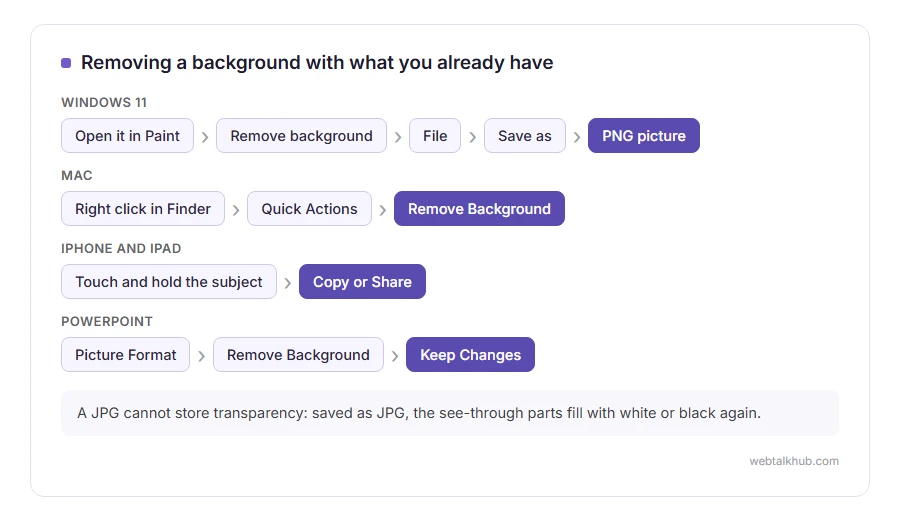
Open the picture in Paint on Windows 11 and click Remove background in the toolbar. Paint finds the subject and deletes everything around it.
Then choose File, Save as, PNG picture. It does not work on older versions of Paint, which never had the button, so update Windows or use one of the other methods.
2) Mac: Finder or Preview
On a current Mac, right click the picture in Finder and choose Quick Actions, then Remove Background. A new copy appears next to the original, already transparent.
For more control, open it in Preview, click the markup pen, then the Instant Alpha wand, and drag across the background until it turns red. Press Delete and save as PNG.
3) iPhone and iPad
Open the photo, then touch and hold the subject for a second until it lifts off with a glowing edge. Tap Copy or Share, and what you get is the subject alone on a transparent background.
It works best on clear subjects such as people, pets and products. A busy scene with no obvious subject is where it guesses badly.
4) PowerPoint
Click the picture, then Picture Format. Remove Background marks the parts it thinks should go in purple, and you can mark areas to keep or remove before clicking Keep Changes.
For a logo on a plain white box, Picture Format, Color, Set Transparent Color is quicker: click the white once and it disappears. Right click the picture and choose Save as Picture, then PNG, to keep the result.
5) Making the whole picture see-through
In PowerPoint on Microsoft 365, click the picture, then Picture Format and Transparency, and pick a level. It is the easy way to make a faint watermark or a background for text.
In GIMP, which is free, use the Opacity slider on the layer, then export as PNG. Photoshop has the same slider on the Layers panel.
6) Free editors, for fiddly edges
GIMP: choose Layer, Transparency, Add Alpha Channel, then click the background with the Fuzzy Select tool and press Delete. Colors, Color to Alpha removes one colour everywhere, which suits logos.
If you are comfortable with editing software, this is the route for hair, fur and glass, where the automatic tools struggle.
The step that decides whether it worked: PNG
A JPG cannot store transparency at all. Save a transparent picture as JPG and the see-through parts are filled with white or black again, and all the work is gone.
Save as PNG, which keeps every see-through pixel. WEBP keeps them too. Keep in mind that converting an existing JPG to PNG does not make anything transparent on its own: the white background simply becomes white pixels in a PNG. Our comparison of JPG vs PNG explains why, and our JPG to PNG converter is for when you have already removed the background and only need the format changed.
About the online background removers
The websites at the top of search results do this well, and most of them upload your picture to do it. The free versions often give you a small download and charge for full size.
For anything private, the built in tools above keep the picture on your own device.
FAQ(Make an Image Transparent)
How do I make an image background transparent for free?
Use Remove background in Windows 11 Paint, Remove Background in a Mac’s Quick Actions, or touch and hold the subject on an iPhone. Then save as PNG.
Why does my transparent image have a white background?
It was saved as a JPG, which cannot hold transparency, or the program you are viewing it in shows see-through areas as white.
Can I make a JPG transparent?
Only by removing the background and saving the result as a PNG. A JPG file itself can never be transparent.
How do I make a logo transparent?
In PowerPoint, use Set Transparent Color on the white background, then save as picture in PNG format.
How do I make an image semi-transparent?
Use the Transparency setting in PowerPoint or the Opacity slider in GIMP or Photoshop, then save as PNG.
If you have any issues, you can ask me via comment, and I will love to help you out.
