
Are you seeing Error 1005 with the words “Access denied” and something about an autonomous system number, on a site that worked yesterday or works for everybody else?
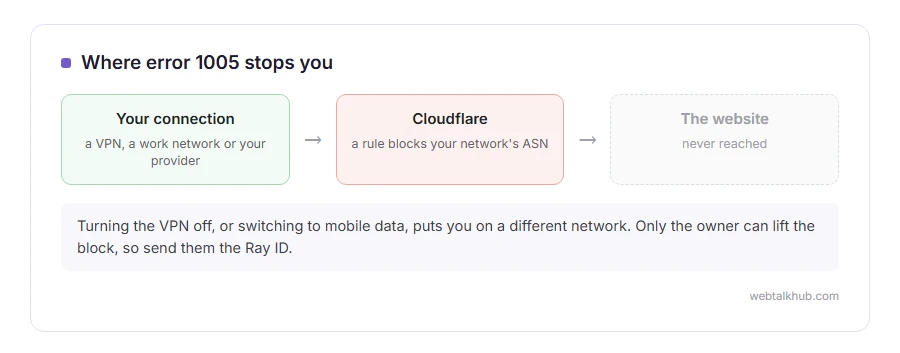
Don’t worry, you have not been reported or banned personally. Error 1005 means the owner of the website has used Cloudflare to block an entire network, and the internet connection you are on happens to belong to it. Every person on that network gets the same page.
The network is named by its ASN, autonomous system number, which is simply the number every internet provider, mobile network, VPN company and cloud host is given. The error page shows it as a number in brackets.
The usual reasons your network is blocked are:
- You are on a VPN or a proxy, and the site blocks that VPN company
- You are on a work or school network that shares its address with many people
- The site blocks whole hosting and cloud providers to stop scraping bots
- The owner blocked a broad range by mistake and swept up an ordinary provider
In this guide I will show you how to get in as a visitor, and, if the site is yours, where the block lives in Cloudflare and how to make it gentler.
So let’s get started.
1) Turn off the VPN or proxy
This fixes it more often than anything else. Disconnect the VPN, reload the page, and it usually opens.
VPN companies run their servers on hosting networks, and those networks are exactly what sites block to keep out automated traffic. If you need the VPN on, try a server in another location, which may sit on a different network.
2) Try a different connection
Switch your phone from Wi-Fi to mobile data, or the other way round, and try again. A different connection means a different network, and a different ASN.
If the site opens on mobile data and not on your home broadband, your provider’s whole network is blocked. This will not help in the long run, since you cannot change which network your home provider uses.
3) Tell the site owner
Only the owner can lift an ASN block. Use their contact page from another connection, or their social media, and send them the Ray ID from the bottom of the error page along with the AS number.
The Ray ID lets them find your exact blocked visit in their Cloudflare logs within seconds. Without it, they have to guess.
If the site is yours
Open the Cloudflare dashboard and go to Security, then Analytics. Open the Events tab and search for the Ray ID the visitor sent you. It shows the exact rule that blocked them. On the Free and Pro plans the events only go back 24 hours, so look soon after the block.
A 1005 comes from IP Access Rules, which sit under Security, then Security rules. Find the rule that names that ASN and either remove it or change its action.
I recommend Managed Challenge instead of Block for any ASN that real people might use. Bots mostly fail the challenge, and a real visitor on a VPN or an office network gets through after a moment. Our page on the verify you are human loop covers what those visitors see.
Keep in mind that blocking big cloud providers also blocks some useful traffic, such as uptime monitors, payment webhooks and link previews in chat apps. Check those still work after tightening any rule.
Other Cloudflare errors
A 1005 is a block by the owner’s choice. If you see a 5xx number instead, the problem is between Cloudflare and the website’s own server, and our pages on error 520, error 525 and error 526 cover those.
FAQ(Cloudflare Error 1005)
What does error 1005 mean?
The website owner has blocked the network your internet connection belongs to, identified by its autonomous system number.
Is error 1005 my fault?
No. It applies to everybody on the same network, and the block was set by the site owner.
Will clearing my cookies fix error 1005?
No. The block is on your network, not your browser. A different connection or turning off a VPN is what changes it.
How long does an error 1005 block last?
Until the site owner changes the rule. It does not expire on its own.
What is an ASN?
An autonomous system number, the number that identifies a network on the internet, such as your internet provider, a mobile network or a hosting company.
If you have any issues, you can ask me via comment, and I will love to help you out.
A Cloudflare error that is not a block
Error 1005 is a choice the owner made. Error 1033 is different: nothing is blocked, a connection has simply gone down.
- Cloudflare error 1033, what a Cloudflare Tunnel is, and why only the site owner can bring it back.
