
Are you about to start a site and stuck on WordPress.com vs WordPress.org, two websites with the same name, the same logo and very different small print?
They are not two versions of one thing. WordPress.org is where the free WordPress software lives, which you install on hosting you rent. WordPress.com is a company that runs WordPress for you on its own servers, with plans from free upwards.
It is like the difference between renting a furnished flat and owning a house. The flat is ready on day one and the landlord fixes the boiler, but you cannot knock down a wall. The house takes more work, and every decision is yours.
The difference shows up in five places:
- What you can install: plugins and themes
- What it costs, now and every year after
- Who does the updates, backups and security
- What your address looks like
- How easy it is to leave later
In this guide I will go through each one plainly, then say which suits which kind of site.
So let’s get started.
What you can install
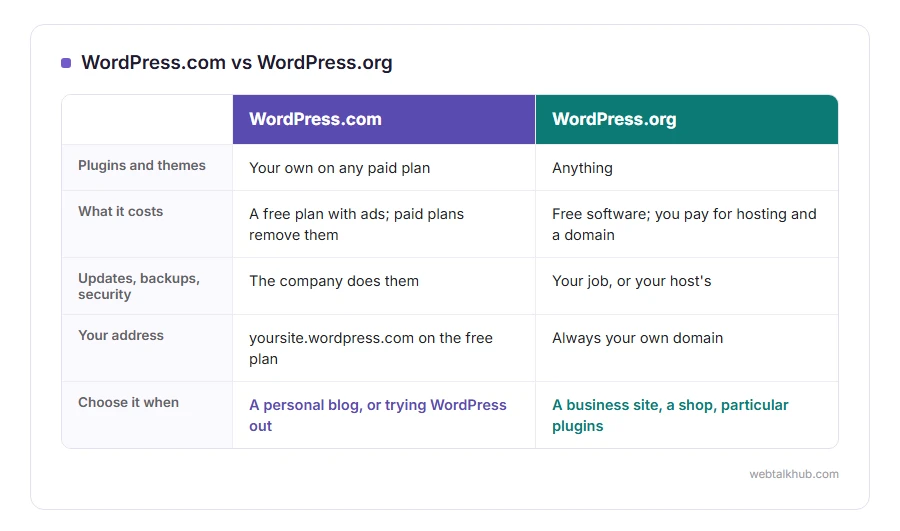
On WordPress.org, anything. Any of the tens of thousands of free plugins, any theme, any code you want to add.
On WordPress.com, the free plan limits you to the themes and features WordPress.com offers. Installing your own plugins and themes needs a paid plan, and every paid plan now allows it, even the cheapest one. This is the single difference that decides it for most people, because plugins are how WordPress does nearly everything.
What it costs
WordPress.org is free software, and you pay for hosting and a domain every year. A small site on ordinary hosting costs a modest amount a month, and premium themes or plugins are extra if you want them.
WordPress.com has a free plan, which shows WordPress.com ads on your site and gives you an address ending in wordpress.com. The paid plans remove the ads, add your own domain, and unlock more as the price rises.
Compare the renewal prices on both sides, not the first year, because both hosting companies and WordPress.com discount the first year heavily.
Who looks after it
On WordPress.com, the company handles updates, security, backups and speed. You never see a server.
On WordPress.org, that is your job or your host’s. Many hosts do updates and backups for you, and it is still worth checking yourself. Our guides on backing up WordPress for free and updating WordPress cover both.
Your address
The free WordPress.com plan gives you yoursite.wordpress.com. Your own domain needs a paid plan. On WordPress.org you always use your own domain, because you bought it along with the hosting.
Leaving later
Both let you export your posts and pages. Moving from WordPress.com to WordPress.org is common and works well, though themes and some settings need redoing on the new site.
Keep in mind that the export does not carry WordPress.com’s own features across, so anything the plan did for you has to be replaced with a plugin after the move.
Which one to choose
For a personal blog, a hobby site or trying WordPress out, WordPress.com’s free or cheaper plans are the easy start.
For a business site, a shop, or anything that will need particular plugins, I recommend WordPress.org on ordinary hosting. It is the version almost every tutorial assumes, including every guide on this site, and our step by step guide to building a website with WordPress starts from exactly that choice.
FAQ(WordPress.com vs WordPress.org)
Is WordPress.org really free?
The software is. Hosting and a domain are not, and they are what you pay for every year.
Can I use plugins on WordPress.com?
Yes, on any paid plan, even the cheapest one. Only the free plan does not allow your own plugins.
Which is better for SEO?
Both can rank well. WordPress.org gives you every SEO plugin and full control, which is why most serious sites use it.
Can I move from WordPress.com to WordPress.org?
Yes. Export from WordPress.com, set up WordPress on your hosting, and import. Themes and some settings need redoing.
Is WordPress.com the same company as WordPress.org?
WordPress.com is run by Automattic, a company founded by one of WordPress’s co-founders. WordPress.org is the home of the open source project that anybody can use.
If you have any issues, you can ask me via comment, and I will love to help you out.
