
Has an SSL checker told you the chain is incomplete, or does your site show a padlock in Chrome while a phone, an app or a script insists the certificate cannot be trusted? Then the SSL certificate chain is the thing to look at.
A browser does not trust your certificate because it recognises it. It trusts it because it was signed by an intermediate authority, which was signed by a root authority the browser already carries in its own list. Your server has to hand over the middle link along with your certificate, and when it does not, some visitors see a warning and others see nothing wrong.
Picture a reference letter chain. You are vouched for by your manager, and your manager is vouched for by the company everybody already trusts. Leave the manager’s letter out and a careful reader has no way to connect you to the company, even though the connection is real.
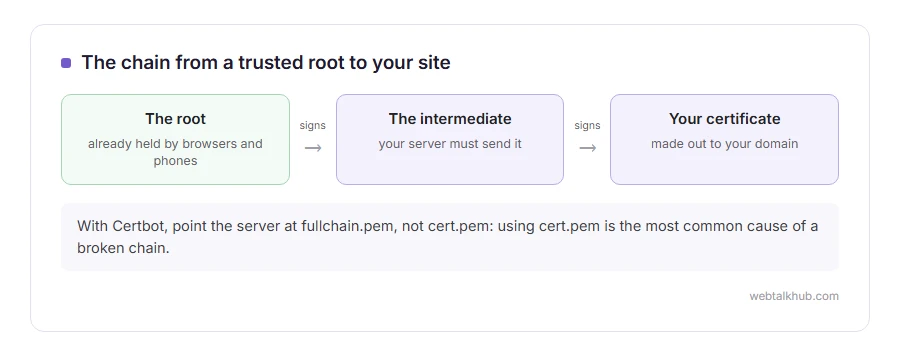
The chain has three parts:
- Your certificate, sometimes called the leaf, made out to your domain
- One or more intermediates, signed by the root and signing yours
- The root, which browsers and phones already hold and your server never needs to send
In this article you will learn why the chain exists, why a broken one fools you in your own browser, how to check it, and the fix on the common servers.
So let’s get started.
Why intermediates exist at all
Root authorities keep their master keys offline, locked away, because every certificate on the internet depends on them in the end. The day to day signing is done by intermediates, which can be replaced if one is ever compromised without the whole system falling over.
So nearly every certificate you will ever install was signed by an intermediate, not by a root directly.
Why it works for you and fails for others
Chrome and Edge on a desktop often fill in a missing intermediate themselves, because they have seen it on another site or can fetch it. So the site looks perfect when you test it.
Many phones, older systems, command line tools such as curl, and apps that call your site do not fill the gap. They report that the certificate cannot be verified, often as unable to get local issuer certificate, and to their users your site is broken.
Keep in mind that this is why testing only in your own browser does not work as a check for this fault.
How to check the chain
The free SSL Labs test at ssllabs.com shows it plainly: look for Chain issues, which should say None rather than Incomplete, and the Certification paths section, which lists every link.
From a command line, openssl s_client -connect yoursite.com:443 -showcerts prints every certificate the server sends. A healthy site sends at least two: yours, then the intermediate.
The fix
Install the full chain, not just your own certificate. Your certificate authority provides the intermediate file, usually called something like ca-bundle or intermediate, and your server needs your certificate followed by it.
Let’s Encrypt with Certbot: point your server at fullchain.pem, not cert.pem. The first contains the chain, the second only your certificate, and using cert.pem is the single most common cause of this fault.
Nginx: the file in ssl_certificate must contain your certificate first and the intermediate after it, pasted one after the other in that order.
Apache: the same fullchain file goes in SSLCertificateFile on current versions. Older setups use a separate SSLCertificateChainFile line.
Hosting panels: paste the bundle into the box labelled CA bundle or intermediate, next to the certificate and key.
I do not recommend adding the root to the file as well. It is harmless in most cases and only makes every connection slightly larger, since every device already has it.
Related problems
A certificate signed by an authority the device does not trust at all shows as NET::ERR_CERT_AUTHORITY_INVALID. An expired certificate anywhere in the chain gives NET::ERR_CERT_DATE_INVALID, and behind Cloudflare a broken chain on your own server shows as error 526. Our guide to what HTTPS is covers the bigger picture.
FAQ(SSL Certificate Chain)
What is an SSL certificate chain?
The line of signatures from your certificate, through one or more intermediates, up to a root that browsers already trust.
What does chain incomplete mean?
Your server is sending your certificate without the intermediate, so some devices cannot link it to a trusted root.
Should the root certificate be in the chain?
No. Devices already hold their trusted roots, so the server only needs your certificate and the intermediates.
Why does my site work in Chrome but not on some phones?
Desktop Chrome often fills in a missing intermediate by itself. Many phones and apps do not, so they see an untrusted certificate.
What order should the certificates be in?
Your own certificate first, then the intermediate that signed it, then any further intermediate above that.
If you have any issues, you can ask me via comment, and I will love to help you out.
