
Every address you visit starts with http or https, and browsers now warn you about the ones without the s. So what is HTTPS, what does that little padlock actually protect, and does your own website need it?
HTTPS is the normal language of the web, HTTP, sent inside an encrypted connection. The S stands for secure. Nobody between you and the website, not the café Wi-Fi, not your internet provider, can read what you send or quietly change the page on its way to you.
Imagine sending a postcard compared with a sealed letter. Plain HTTP is the postcard: every hand it passes through can read it. HTTPS seals it, and the seal also proves which website sent the reply.
What it does and does not do:
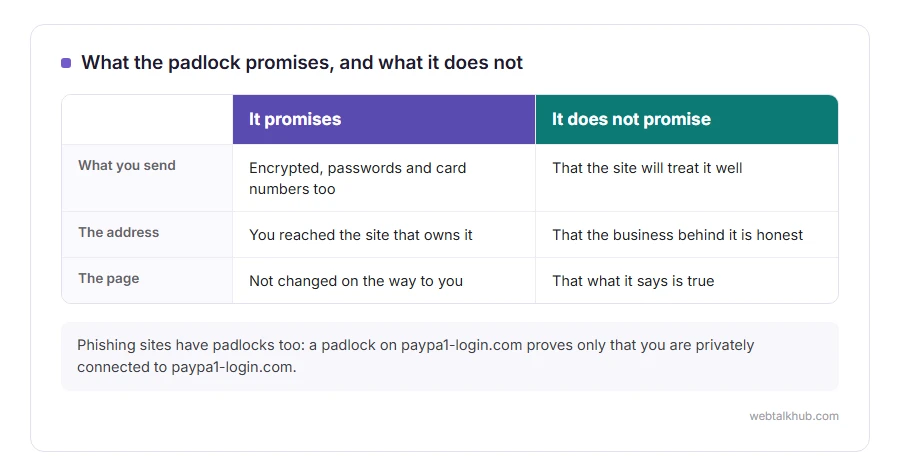
- It encrypts everything you send and receive, including passwords and card numbers
- It proves the site you reached owns the address in the address bar
- It stops pages being altered on the way, such as ads injected by a network
- It does not prove the site is honest, safe or who it claims to be as a business
In this article you will learn how HTTPS works in plain terms, what the padlock really promises, and how to put it on your own site at no cost.
So let’s get started.
How it works, without the maths
When you open an HTTPS site, your browser and the server first agree on a secret key that only the two of them know. That opening exchange is called the handshake, and it takes a fraction of a second.
During it, the server shows a certificate: a document signed by a trusted authority, saying this server really does control this domain name. If the certificate checks out, everything after that is encrypted with the shared key. If it does not, you get a warning page instead.
The encryption itself is TLS, the successor to SSL, and our guide to SSL vs TLS explains why both names are still used.
What the padlock does not mean
A padlock means the connection is private and the address is genuine. It says nothing about the people running the site.
Keep in mind that phishing sites have padlocks too, because a certificate for a lookalike address costs nothing. A padlock on paypa1-login.com proves you are privately connected to paypa1-login.com, and that is all. Our guide to what a URL is shows how to read the part of the address that tells you whose site you are really on.
Why browsers warn about plain HTTP
Chrome, Edge, Firefox and Safari mark plain HTTP pages as not secure, and many warn loudly on any page with a form. Search engines also prefer HTTPS pages.
For a visitor, a site with no HTTPS should never be given a password or a card number. For a site owner, the warning costs visitors, and fixing it is free. HTTPS protects a password on its way to the site, and what protects it once it arrives is password hashing.
Getting HTTPS on your own site
Most hosting companies include free certificates from Let’s Encrypt, usually under an SSL or AutoSSL section of the control panel, and switching it on takes a minute. If your site sits behind Cloudflare, it provides HTTPS between visitors and Cloudflare out of the box.
Then send every visitor to the secure version. Our guide on redirecting HTTP to HTTPS covers the settings and the one line in .htaccess that does it.
I recommend checking the finished result with a free SSL checker, which confirms the certificate, the chain behind it and the settings in one go. Our guide to the SSL certificate chain explains the part that most often goes wrong.
When HTTPS goes wrong
A certificate problem shows as a full page warning. Your connection is not private is the general version, and the code underneath it names the exact cause.
A padlock with a warning triangle, or a site that loads without styles, is usually mixed content: a secure page loading pictures or scripts over plain HTTP. Changing those addresses to https fixes it.
FAQ(What Is HTTPS)
What does HTTPS stand for?
Hypertext Transfer Protocol Secure. It is the web’s normal HTTP sent inside an encrypted connection.
Is HTTPS safe?
The connection is. Whether the site itself can be trusted is a separate question the padlock does not answer.
Does HTTPS hide which sites I visit?
It hides what you do on a site, not which site you visit. Your provider can still see the site name.
Is HTTPS free?
Yes. Let’s Encrypt issues certificates at no cost, and most hosts set them up for you.
What port does HTTPS use?
Port 443. Plain HTTP uses port 80.
If you have any issues, you can ask me via comment, and I will love to help you out.
