
Has a hosting panel offered you “Cron Jobs”, or a guide told you to add a line to your crontab, and you would like to know what is cron before typing anything into it?
Cron is the scheduler built into Linux and other Unix style systems, including the servers most websites run on. You give it a command and a time, and it runs that command at that time, every time, with nobody logged in. Backups at 3 in the morning, a report every Monday, clearing old files once a month: that is cron’s whole job.
It is like an alarm clock that runs a command instead of ringing. The list of alarms is called the crontab, short for cron table, and each line in it is one scheduled job.
Most people need to know four things:
- How to read and write a crontab line
- How to see and edit the crontab
- The mistakes that make a job silently never run
- Why WordPress has something called WP-Cron that is not really cron
In this guide I will go through each one, with examples you can copy.
So let’s get started.
Reading a crontab line
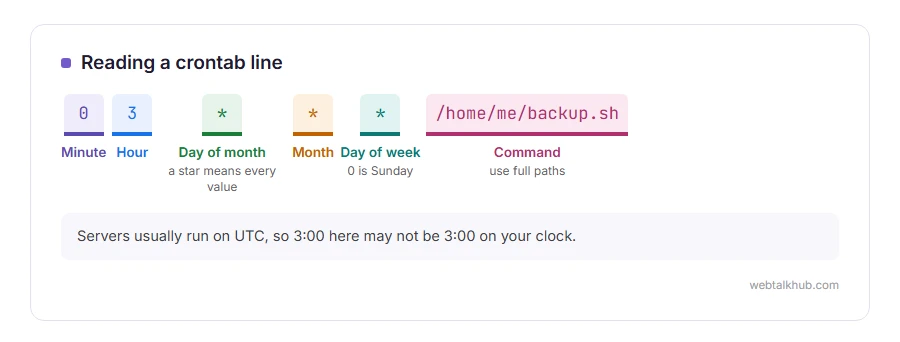
Every line has five time fields, then the command:
minute  hour  day-of-month  month  day-of-week  command
0       3     *             *      *            /home/me/backup.sh
That line runs the backup script at minute 0 of hour 3, on every day of the month, every month, every day of the week. In plain words, every night at 3:00.
A star means every value. A slash means every so many, a dash means a range, and commas separate a list. Days of the week run from 0 for Sunday to 6 for Saturday.
Examples you can copy
*/15 * * * *     every 15 minutes
0 * * * *        at the start of every hour
0 9 * * 1-5      at 9:00 on weekdays
30 2 1 * *       at 2:30 on the 1st of every month
0 0 * * 0        at midnight every Sunday
Each one is followed by the command to run on the same line.
Seeing and editing the crontab
On a server you reach by command line, crontab -l lists your jobs and crontab -e opens them in an editor. If you have never typed a command before, read what a command line is first.
On shared hosting, the control panel usually has a Cron Jobs page with boxes for the five fields and one for the command, which writes the same line for you.
Before you edit the crontab on a server that already has jobs, copy what is there somewhere safe. crontab -r, one letter away from crontab -e on the keyboard, deletes every job without asking.
The mistakes that make a job never run
The time zone is not yours. Servers usually run on UTC, so a job set for 9:00 may run at 9:00 UTC, an hour or more away from your clock. Our guide to the ISO date format explains UTC.
The command cannot find its programs. Cron runs with a bare minimum of settings, so a command that works when you type it can fail under cron. Use full paths, such as /usr/bin/php rather than php.
A percent sign breaks the line. Cron treats % as a new line, so a date format like date +%Y has to be written with a backslash before each percent sign.
Nobody sees the output. Add >> /home/me/job.log 2>&1 to the end of the line, and every run’s messages land in a log file you can read.
Keep in mind that cron does not catch up on missed runs. If the machine was off at 3:00, that night’s job is simply skipped.
WP-Cron is not real cron
WordPress has its own scheduler for things like publishing scheduled posts and checking for updates. It only runs when somebody visits the site, so on a quiet site scheduled posts can go out late or not at all.
The common fix is to turn WP-Cron off in wp-config.php and let a real cron job call the site every few minutes instead. If you are comfortable editing wp-config.php, our wp-config generator shows the exact line, and our guide to editing functions.php covers working safely on site files.
On Windows
Windows has no cron. Task Scheduler does the same job, with a window for the time and the program instead of a line of text.
FAQ(What Is Cron)
What is a cron job?
One scheduled task: a command and the time or times it should run.
What does * * * * * mean in cron?
Every minute of every hour of every day. It is the most frequent schedule cron allows.
How do I know if my cron job ran?
Send its output to a log file with >> file.log 2>&1, or check the system log, which records each run.
Why is my cron job not running?
Usually the time zone, a program cron cannot find without a full path, or a percent sign in the command.
Is cron the same as crontab?
Cron is the program that runs the jobs. The crontab is the list of jobs it reads.
If you have any issues, you can ask me via comment, and I will love to help you out.
