
Has a guide told you to open the command line and type something, and you are staring at a black window wondering what is a command line, and whether you are about to break your computer?
You are not alone, and you will not break anything by opening it. A command line is simply a way of talking to your computer by typing instructions instead of clicking. Every button you click does something you could also type, and the command line is where you type it.
People meet it for a few reasons:
- A fix for an error says to run a command
- A developer tool only works from it
- Something is quicker to type than to click through ten screens
- A server has no screen at all, only a command line
In this article you will learn what the words terminal, shell and prompt actually mean, where the command line is on each system, the handful of commands worth knowing first, and the one habit that keeps you safe.
So let’s get started.
Terminal, shell, console and prompt
People use these words as if they were the same, and they are four slightly different things.
The terminal is the window you type into. The shell is the program inside it that reads what you type and runs it: Command Prompt and PowerShell on Windows, zsh on a Mac, and usually bash on Linux. The prompt is the text at the start of the line, often ending in > or $, telling you the shell is waiting. Console is an older word for the terminal.
Picture a shop counter. The terminal is the counter, the shell is the person serving, and the prompt is them looking up and asking what you want.
Where to find it
Windows 11: right click the Start button and choose Terminal. It opens PowerShell, and Command Prompt is one tab away in the same window.
Windows 10: type cmd or PowerShell into the Start menu search.
Mac: press Command and Space, type Terminal, and press Return. It runs zsh, which has been the Mac’s shell since 2019.
Linux: Ctrl, Alt and T opens a terminal on most desktop versions.
The first commands worth knowing
Most daily use is moving around folders and looking at what is in them.
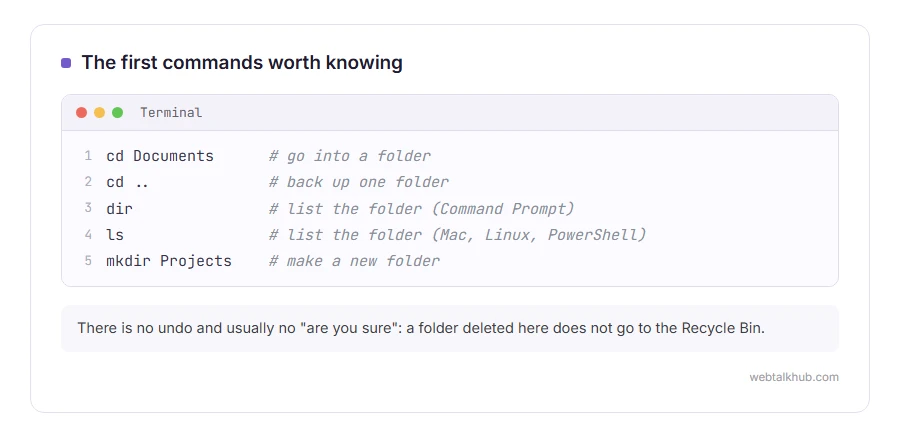
cd changes folder: cd Documents goes into Documents, and cd .. goes back up one. dir on Windows Command Prompt, or ls on a Mac, Linux and PowerShell, lists what is in the current folder. mkdir makes a new folder.
ping webtalkhub.com checks whether your computer can reach a site. ipconfig on Windows, or ifconfig on a Mac, shows your network details, and our guide on flushing the DNS cache is a good first real use of it.
Press the up arrow to bring back the last command, and Tab to finish a file or folder name for you. Those two save more typing than anything else.
Be careful with commands you copy
The command line does exactly what it is told, immediately, with no undo and usually no “are you sure”. A command to delete a folder deletes it, and it does not go to the Recycle Bin.
So never paste a command you do not understand from a stranger, a comment or a video. That is how people are tricked into giving away their computers. If a fix asks you to run something, look up what each word does first, and it only takes a minute.
Why developers live in it
Many programming tools have no buttons at all. Running a project, installing its parts and sending it to a server are all typed, and it is faster once you know the words. Even a job that runs by itself every night is set up there, as a cron job.
If you are learning to code, it is worth the first awkward week. Our pages on what Node.js is and what npm is are two of the tools you would meet next, both used entirely from the command line.
When the command line is not the answer
For everyday tasks, the normal windows and settings are usually quicker and safer. The command line is not the answer when you only need to change a setting once, and a guide that sends you there for something a setting can do is making it harder than it needs to be.
FAQ(What Is a Command Line)
Is the command line the same as the terminal?
Close enough in everyday speech. Strictly, the terminal is the window, and the command line is the line you type into inside it.
Can the command line damage my computer?
Only if you run a harmful command. Opening it and typing harmless commands like dir, ls or ping changes nothing.
Is PowerShell better than Command Prompt?
PowerShell can do far more, and it runs most old Command Prompt commands too. For following a guide, use whichever the guide was written for.
Why is it called a prompt?
Because it prompts you to type. The short text at the start of the line means the shell is ready.
Do I need the command line to use a computer?
No. Most people never open it. It is there for fixes, programming and servers.
If you have any issues, you can ask me via comment, and I will love to help you out.
Typed a command and got invalid syntax?
The most common way to meet a syntax error in a terminal is typing a command at the wrong prompt.
- the Python invalid syntax error, including pip typed at the Python prompt instead of the command line.
