
A tutorial told you to run npm install, a folder called node_modules just appeared with thousands of files in it, and now you want to know what is npm and what it just did to your computer.
npm is the package manager that comes with Node.js. A package is a bundle of code somebody else wrote, such as a date formatter or a whole web framework, and npm is the tool that downloads packages, keeps track of their versions, and fetches everything each of them needs in turn.
It is like an app store for code, without the shop front. You name what you want, npm finds it in a huge public registry, and it installs it into your project rather than onto the whole computer.
Most confusion comes from five things:
- What npm install actually does
- What package.json is for
- Why node_modules is so big
- What the little symbols in version numbers mean
- The difference between npm and npx
In this article you will learn all five, plus the security habits worth having from the first day.
So let’s get started.
npm comes with Node.js
You do not install npm separately. When you install Node.js, npm arrives with it, and npm -v in a terminal shows its version. If that command fails, Node.js is not installed, and our page on what Node.js is covers installing it.
The name is usually read as Node Package Manager, though npm itself says the name is not an acronym.
package.json, the project’s shopping list
Every Node.js project has a file called package.json. It names the project and lists the packages it depends on, with the versions it accepts.
npm init makes a new one. npm install express adds a package to it and downloads it. And npm install on its own, in a project somebody gave you, reads the list and downloads everything on it.
Because package.json is plain JSON, a missing comma breaks every npm command in the project. Our JSON formatter points at the exact spot.
node_modules, and why it is so big
Downloaded packages go into a folder called node_modules inside your project. Each package can depend on other packages, which depend on others again, so installing one thing can bring in hundreds.
Never edit anything inside node_modules and never send it to anybody. It can always be rebuilt from package.json with npm install, which is why it is left out of backups and code sharing.
package-lock.json
npm also writes package-lock.json, which records the exact version of every package it installed, including the hidden ones underneath. Keep it and share it with the project, because it is what makes the same install give the same result on another computer.
What ^ and ~ mean in version numbers
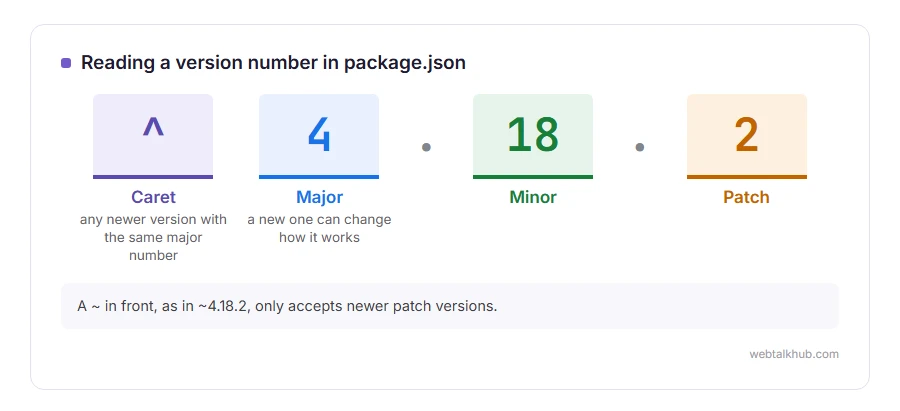
Versions look like 4.18.2: major, minor and patch. A ^ in front, as in ^4.18.2, accepts any newer version with the same major number. A ~, as in ~4.18.2, only accepts newer patch versions.
A new major version can change how a package works, which is why npm does not jump to it on its own.
npm and npx
npm installs packages. npx runs a package’s command without installing it into your project first. npx create-vite downloads the tool, runs it once and leaves nothing behind in your project.
Be careful what you install
Anyone can publish to the npm registry, and a package can run code on your machine the moment it is installed. Before you run npm install on a project from a stranger, look at what package.json asks for.
Check that a package is widely downloaded and recently maintained before adding it, and watch for names one letter away from a popular package. npm audit lists known security problems in what you have installed. Keep in mind that it only knows about problems somebody has already reported, so it does not work as a full safety check, and it is still worth running.
If npm commands fail
Most errors print a long log, and the useful line is near the top, often a syntax error in a JSON file or a missing permission. Our page on what a syntax error is helps with the first kind. The command line itself is explained in our guide to what a command line is.
FAQ(What Is npm)
What does npm stand for?
It is usually read as Node Package Manager. npm itself says the name is not an acronym.
Is npm free?
Yes, for installing and publishing public packages. Private packages are the paid part, for one person or a team.
Can I delete node_modules?
Yes. Run npm install again and it comes back exactly as package.json and package-lock.json describe.
What is the difference between npm and Node.js?
Node.js runs JavaScript outside a browser. npm installs packages of code for it, and it comes with Node.js.
What is npm install -g?
It installs a package for the whole computer rather than one project, which is meant for command line tools you use everywhere.
If you have any issues, you can ask me via comment, and I will love to help you out.
The two files inside every package
Open any package folder and you will find a package.json and a README.md. Both formats are worth knowing on their own.
- what JSON is, the format package.json is written in, and the rules that stop it loading.
- what a .md file is, the format of the README that npm shows on every package page.
