
You downloaded a project, a template or a set of notes, and next to everything else sits a file called README.md. Double clicking it either does nothing useful or shows a page of text full of hash signs and stars. So what is a Markdown file, and what are you meant to do with it?
It is a plain text file, readable in any text editor, written with a handful of symbols that a Markdown viewer turns into formatting. A line starting with # becomes a heading, words between two stars become bold, and lines starting with a dash become a bullet list. The .md ending just says the text follows those rules.
Think of it as a note written in shorthand. Anybody can read the shorthand as it is, and a program that knows the rules can show it as a tidy formatted page.
You meet Markdown in more places than you might expect:
- README files in software projects, especially on GitHub
- Note apps such as Obsidian, Bear and Joplin
- Documentation sites and knowledge bases
- Chat apps like Discord and Slack, where similar stars and backticks format your messages
- Blog platforms that let you write posts without a formatting toolbar
In this article you will learn the symbols that matter, how to open a .md file on any computer, how to see it formatted, and where Markdown’s limits are.
So let’s get started.
The symbols that do most of the work
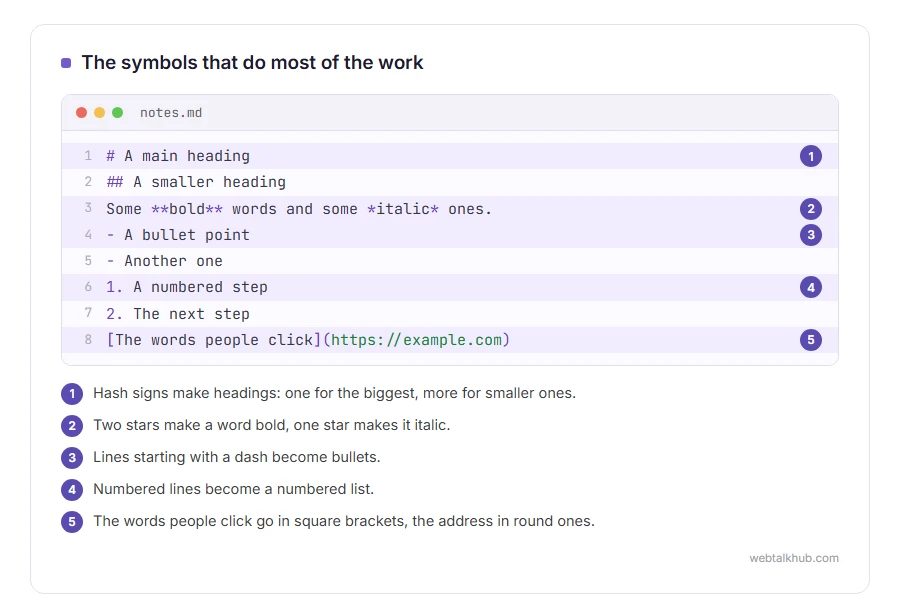
Here is a small Markdown file, exactly as it looks in a text editor:
# A main heading
## A smaller heading

Some **bold** words and some *italic* ones.

- A bullet point
- Another one

1. A numbered step
2. The next step

[The words people click](https://example.com)
Hash signs make headings, one for the biggest and more for smaller ones. Two stars on each side of a word make it bold, and one star makes it italic. Lines starting with a dash become bullets, and numbered lines become a numbered list. Square brackets followed by an address in round brackets make a link.
Words between backticks show as code, and three backticks on their own line start and end a whole block of code, which is how the example above is written.
That is nearly all of it. The whole point of Markdown, created by John Gruber in 2004, was that the text should read naturally even before it is formatted.
How to open a .md file
Any text editor opens it, because it is plain text. On Windows, right click the file, choose Open with, then Notepad. On a Mac, open it with TextEdit.
If Windows asks what to use every time, choose Notepad and click Always. That makes every .md file open straight away from then on.
How to see it formatted
Most text editors show the symbols as they are. Notepad on Windows 11 now shows a .md file formatted, and you can switch back to the symbols from the View menu. Anywhere else, to see headings and bold as they are meant to look, you need a Markdown viewer.
Visual Studio Code, free on Windows, Mac and Linux, is the easiest. Open the file, press Ctrl and K together, then let go and press V, and a formatted preview opens next to the text. On a Mac it is Command and K, then V. For something to preview, our lorem ipsum generator writes sample paragraphs, headings and lists in Markdown.
GitHub shows any .md file formatted when you open it in a project, which is why nearly every project’s front page is a README.md.
Obsidian and Typora are note apps that show Markdown formatted as you type, and I suggest one of those if you want to write your own notes in Markdown rather than just read somebody else’s.
Turning Markdown into a web page or a PDF
A Markdown viewer can usually export. In VS Code, extensions such as Markdown PDF save a formatted PDF. Pandoc, a free command line tool, converts Markdown to Word, HTML, PDF and many other formats, and our guide to what a command line is explains how to run it.
If you would rather write a web page directly, our guide on creating an HTML file starts from scratch with nothing to install.
Where Markdown stops
There is no single Markdown. The original rules were loose, so apps added their own: tables, task lists with tick boxes, footnotes and highlighting all work in some programs and show as plain symbols in others.
Keep in mind that a file that looks perfect in one app can look broken in another for exactly that reason. Most tools now follow CommonMark or GitHub’s version of it, which covers the common features the same way.
It also does not work for anything with a precise layout. Markdown has no way to set fonts, colours or page positions, which is why documents that must look a certain way are written in Word or made as PDFs instead.
Related file types
Plenty of files that look strange in a text editor are simple once you know their rules. Our guides to what a CSV file is and how to open a JSON file cover two more you will meet in the same project folders.
FAQ(Markdown File)
What does .md stand for?
Markdown. The .md ending marks a plain text file written in Markdown’s formatting rules.
Can I open a .md file in Word?
Word opens it as plain text with the symbols showing. To get the formatting, convert it first with Pandoc, or open it in a Markdown viewer.
Is a Markdown file safe to open?
Yes. It is plain text and cannot run anything by itself.
Why is every project’s README a .md file?
Because GitHub and similar sites show README.md formatted on the project’s front page, and it stays readable as plain text everywhere else.
Is Markdown the same as HTML?
No. Markdown is a simpler way of writing that is usually converted into HTML to be shown on a web page.
If you have any issues, you can ask me via comment, and I will love to help you out.
