
Have you come across a file ending in .json, a setting that says paste your JSON here, or an error about an unexpected token in JSON, and wondered what is JSON in the first place?
JSON stands for JavaScript Object Notation. It is a way of writing data as plain text so that one program can hand it to another: your phone app asking a server for the weather, a website saving your settings, a spreadsheet export feeding a report. Almost every app you use sends JSON back and forth all day, out of sight.
Think of it as a labelled list, where every value has a name next to it. A person can read it, and a program can read it without guessing which number means what.
What makes JSON worth understanding:
- What a piece of JSON looks like
- Why it replaced older formats almost everywhere
- The few strict rules that break it
- Where you are likely to meet it
- What it is bad at
In this article you will learn all five, with an example you can read in ten seconds.
So let’s get started.
What JSON looks like
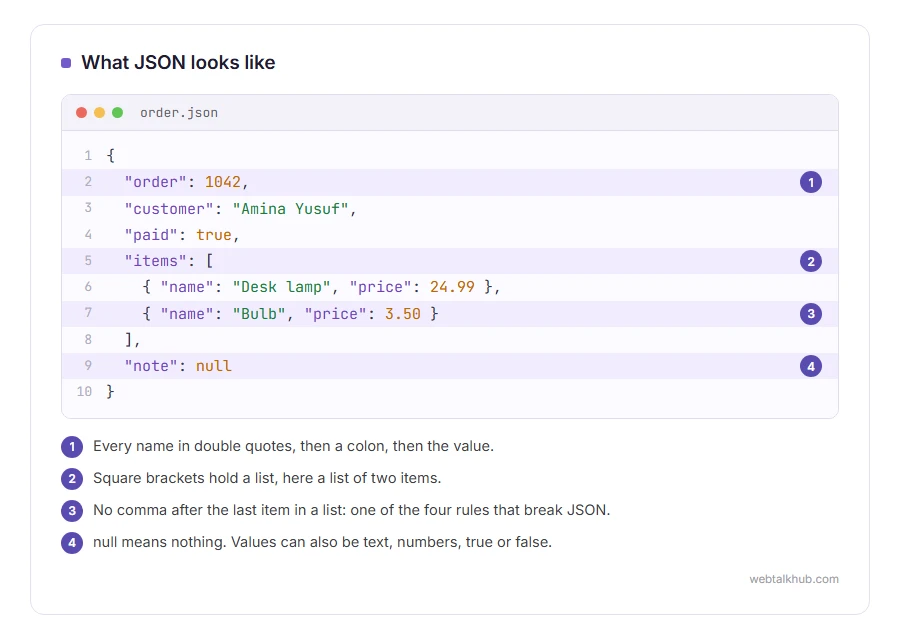
Here is a small piece of JSON describing an order:
{
  "order": 1042,
  "customer": "Amina Yusuf",
  "paid": true,
  "items": [
    { "name": "Desk lamp", "price": 24.99 },
    { "name": "Bulb", "price": 3.50 }
  ],
  "note": null
}
Curly brackets hold named values, each name in double quotes, followed by a colon and the value. Square brackets hold a list. Values can be text in double quotes, numbers, true or false, null for nothing, or another set of brackets inside.
That is the whole format. The full grammar fits on one web page, which is a big part of why it caught on.
Why it won
Before JSON, most systems swapped data as XML, which wraps every value in opening and closing tags and is several times longer for the same information. JSON is shorter, easier to read, and almost every programming language can read and write it, often with one built in command.
It also maps straight onto how programs hold data in memory, which is why it came from JavaScript and was quickly adopted by everything else. Today it is the default for web APIs, configuration files and a great deal of data export.
The rules that break it
JSON is strict, and one small slip makes a whole file unreadable:
- Names and text must use double quotes, never single quotes
- No comma after the last item in a list or a set
- No comments of any kind
- Every bracket must be closed
Those four cause nearly every JSON error people meet. Our JSON formatter points at the exact spot, and our guide on creating a JSON file goes through the rules one by one.
Where you will meet it
Settings files. Many apps and code editors keep their settings in a .json file you can open and edit.
Exports. Social networks, banks and apps often let you download your data as JSON.
Error messages. When a website or WordPress says a response is not valid JSON, something went wrong in the data passed between the page and the server. Our page on the invalid JSON response error covers the WordPress version of that.
If you just need to look inside a file, our guide on how to open a JSON file covers every system. For a quick look, I recommend dragging it into Firefox, which shows any JSON file as a tidy tree you can fold open.
What JSON is bad at
It has no type for dates, so every date is stored as text, and different programs write them differently. Our guide to the ISO date format is the usual fix.
It also does not work well for very large whole numbers. JavaScript stores numbers in a way that loses precision past about nine thousand million million, so long IDs from some systems are quietly rounded when read in a browser, which is why many APIs send them as text instead.
And it cannot hold comments, so a JSON settings file cannot explain itself. That is why some tools use relatives of JSON that allow comments, which a strict JSON reader then refuses.
FAQ(What Is JSON)
What does JSON stand for?
JavaScript Object Notation. It came from JavaScript and is now used by nearly every programming language.
Is JSON a programming language?
No. It is a data format, like a very strict way of writing a list. It stores information and cannot run anything.
What opens a JSON file?
Any text editor, and every browser. For a readable view, paste it into a JSON formatter.
What is the difference between JSON and XML?
Both store data as text. JSON is shorter and simpler to read, and XML is older and more verbose, with tags around every value.
Can JSON have comments?
No. Standard JSON does not allow them, and adding them breaks the file for strict readers.
If you have any issues, you can ask me via comment, and I will love to help you out.
