

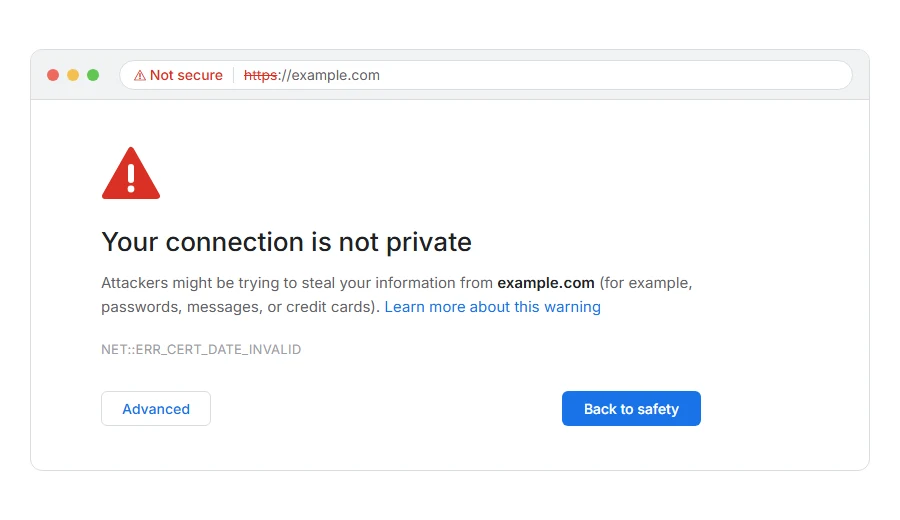
Is Chrome refusing a site with “Your connection is not private” and NET::ERR_CERT_DATE_INVALID in small letters, maybe on several sites at once?
No need to worry, your computer has not been hacked. The error means a security certificate is being judged by its dates: either it has expired, or your device thinks today is a date the certificate does not cover. The quickest way to tell which is to ask one question: is it one site, or every site?
- Every site, or most of them: the date or time on your device is wrong
- One site only: that site’s certificate has expired
- Only on an old phone or computer: the device is missing newer certificates
- Only at work or with antivirus on: something is inspecting your secure connections
In this guide I will go through each case, then the fix if the expired site is yours.
So let’s get started.
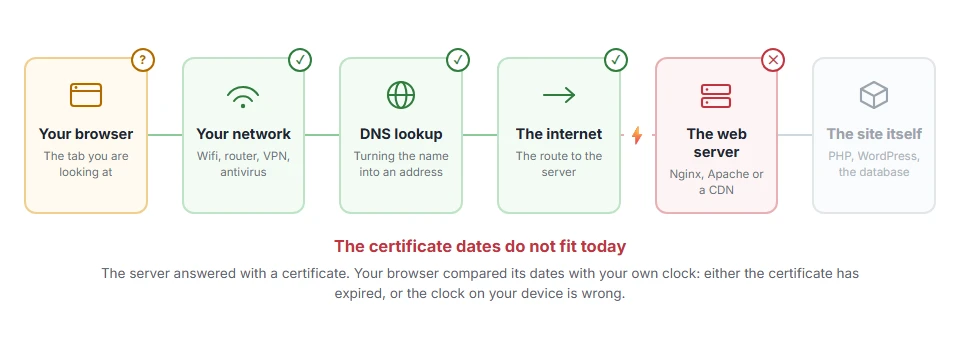
Where it actually breaks
Every page you open makes the same journey. Knowing which step this error stops at tells you which half of the list below is worth your time, because the green steps are already proven to be working.
1) Fix the date and time on your device
A clock that is days, months or years out makes every certificate look expired or not yet valid. This is the most common cause when many sites fail together, especially on a laptop whose battery has run flat or a computer that has been switched off for a long time.
On Windows, open Settings, then Time and language, then Date and time, and turn on Set time automatically, then click Sync now. On a Mac, System Settings, General, Date and Time, and turn on the automatic option. On a phone, the same setting sits under date and time.
Reload the page after fixing it. If every site opens again, that was the whole problem.
2) If it is one site, the certificate has expired
Click Not secure in the address bar, then the certificate details. If the Expires On date is in the past, the site forgot to renew.
There is nothing to fix on your side. I do not recommend clicking through the warning on any site where you sign in or pay, and a site that lets its certificate lapse will usually renew it within hours once somebody notices.
3) If it only happens on an old device
Certificates are checked against a list of trusted authorities built into the device. Very old phones and computers that no longer get updates can be missing the newer ones, so perfectly valid certificates look wrong to them.
Updating the operating system fixes it. If the device cannot be updated, a current browser such as Firefox, which carries its own list, often works where the built in one fails.
4) Antivirus, office networks and Wi-Fi sign-in pages
Security software that scans secure connections replaces each site’s certificate with its own, and if its clock or its own certificate is out of date, you see this error. Office firewalls and hotel Wi-Fi sign-in pages do the same.
Turn off the antivirus’s HTTPS scanning for a moment, or try mobile data. If the site opens, the problem is the software or network in the middle.
If the expired site is yours
Renew the certificate now. On most hosting panels there is an AutoSSL or Let’s Encrypt section that reissues it in a minute, and with Certbot on your own server the command is certbot renew.
Then make sure it cannot happen again. Certificates are getting shorter lived: the industry’s maximum dropped to 200 days in March 2026 and is due to fall further, so a certificate you renew by hand once a year is no longer possible. Automatic renewal is the only safe setup.
Keep in mind that renewing does nothing if the old certificate is still being served. Reload or restart the web server, clear any CDN cache, and check the live site with a free SSL checker to confirm the new dates.
Related certificate errors
A certificate made out to the wrong name gives NET::ERR_CERT_COMMON_NAME_INVALID, and one signed by an authority your browser does not trust gives NET::ERR_CERT_AUTHORITY_INVALID. Our page on your connection is not private covers the warning they all share, and behind Cloudflare an expired certificate on your own server shows as error 526.
FAQ(NET::ERR_CERT_DATE_INVALID)
What causes NET::ERR_CERT_DATE_INVALID?
Either the site’s certificate has expired, or the date on your own device is wrong. Many sites failing at once points to your clock.
Is it safe to ignore the warning?
Not on sites where you sign in or pay. On an expired site you know well, the risk is low, and the owner still needs to renew it.
Why does this error appear on every website?
Your device’s date or time is wrong. Set it to update automatically and reload.
How often do certificates expire?
The maximum is now 200 days, and many sites use 90 day certificates that renew automatically. The maximum is set to shrink further in the coming years.
Can a VPN cause this error?
Rarely. It is more often antivirus or an office network inspecting secure connections.
If you have any issues, you can ask me via comment, and I will love to help you out.
