
Has a print shop, a publisher or an upload form asked for a 300 DPI image, and you need to change the DPI of an image you already have?
It takes a minute in the right program, and it does not have to cost any quality. The key is knowing that there are two different jobs hiding behind that one request, and most tools only do one of them.
The two jobs are:
- Changing the DPI number stored in the file, which alters nothing you can see
- Making the image big enough to print well at the size wanted, which means more pixels
The DPI number is just like the label on a jar: change the label and the jam inside stays exactly the same. Our page on what DPI is explains the idea properly. This guide is the practical side: how to check an image’s DPI, how to change it in the programs people actually have, and what to do when the printer still says no.
So let’s get started.
1) Check the DPI your image has now
On Windows, right click the file, choose Properties, then the Details tab, and look for Horizontal resolution and Vertical resolution.
On a Mac, open the image in Preview, choose Tools, then Show Inspector, and read Image DPI on the first tab.
Write down the pixel size shown in the same place as well, for example 3000 by 2000. You will need it at the end.
2) In Photoshop
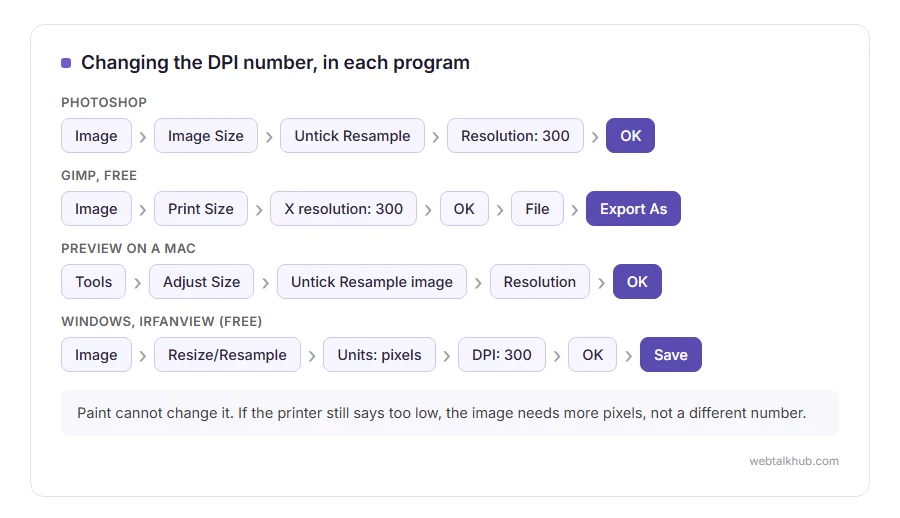
Choose Image, then Image Size. Untick Resample first, then type 300 in the Resolution box and click OK.
With Resample off, Photoshop changes the DPI and the print size together and leaves every pixel alone. Keep in mind that with Resample on, the same box adds or removes pixels instead, which is a different job with a real cost in quality.
3) In GIMP, which is free
Choose Image, then Print Size. Type 300 into X resolution, and Y follows it. Click OK, then File, Export As, and save.
Print Size never touches the pixels, which makes it the safest place to do this. If you do not own Photoshop, I suggest GIMP for this job, because it does not hide the option behind a tick box.
4) In Preview on a Mac
Open the image, choose Tools, then Adjust Size. Untick Resample image, type the new value in Resolution, and click OK. Then save.
5) On Windows without Photoshop
Paint cannot do it: it shows a resolution in Image properties and gives you no way to change it.
IrfanView is free and can. Open the image, choose Image, then Resize/Resample, and type the new value in the DPI box. Leave Units on pixels and the size alone, click OK, and save. GIMP, above, works on Windows too.
When the printer still says it is too low
That means the problem was never the number. Print quality is pixels divided by inches, so a 3000 pixel wide image prints 10 inches wide at 300 DPI, whatever the file says.
If you need 300 DPI at 12 inches, you need 3600 pixels across. Changing the DPI number does nothing if the pixels are not there, and adding pixels by resampling makes the file bigger without adding detail. Our guide on increasing the resolution of an image covers the honest ways to get more real pixels.
About online DPI changers
Plenty of websites change the DPI number for you. They work, and nearly all of them upload your picture to do it, which matters for anything private or unreleased.
For changing pixel dimensions rather than the DPI number, our image resizer works in your browser with nothing uploaded.
FAQ(Change the DPI of an Image)
Does changing DPI reduce quality?
Not when Resample is off. The pixels stay exactly as they were, and only the print size instruction changes.
How do I make an image 300 DPI?
Open it in GIMP, Photoshop or Preview, set the resolution to 300 with resampling off, and save. Then check the pixel size is enough for the print size you need.
Why does my image say 72 DPI?
Many cameras, phones and programs write 72 or 96 by default. On a screen it means nothing at all.
Can I change DPI in Paint?
No. Paint shows the value and cannot change it. GIMP and IrfanView are free and can.
Does DPI matter for images on a website?
No. Browsers ignore it completely and show the pixels. Only the pixel size affects how an image looks on screen.
If you have any issues, you can ask me via comment, and I will love to help you out.
Other jobs a print shop asks for
After DPI, the next request is usually a logo with no white box around it.
- making an image transparent, free, on the computer or phone you already have.
