
Did you just press send and realise it went to the wrong person, without the attachment, or with a sentence you wish you had not written, and now you need to unsend an email in Gmail fast?
No need to worry if you are within the first few seconds. Gmail holds every email for a short time before it really leaves, and during that time an Undo button sits at the bottom of the screen. Click it and the email comes back to you as a draft, as if it was never sent.
Everything depends on how long that window is:
- It is 5 seconds unless you have changed it
- It can be set to 10, 20 or 30 seconds
- After it closes, a normal Gmail email cannot be pulled back
- Confidential and scheduled emails have their own ways out
In this guide I will show you where the Undo button appears, how to set the window to 30 seconds so you have time to use it, and what can still be done once the window has passed.
So let’s get started.
1) Undo on a computer
Straight after you click Send, a small box appears at the bottom left saying Message sent, with Undo next to it. Click Undo and the email reopens as a draft, ready to fix.
You can also press Z on the keyboard while that box is showing, if keyboard shortcuts are switched on.
2) Undo in the Gmail app
On an iPhone or Android phone, a bar appears at the bottom of the screen after sending, with Undo on the right. Tap it within those few seconds and the email comes back.
The bar disappears quickly, so the app is where people most often miss it.
3) Give yourself 30 seconds instead of 5
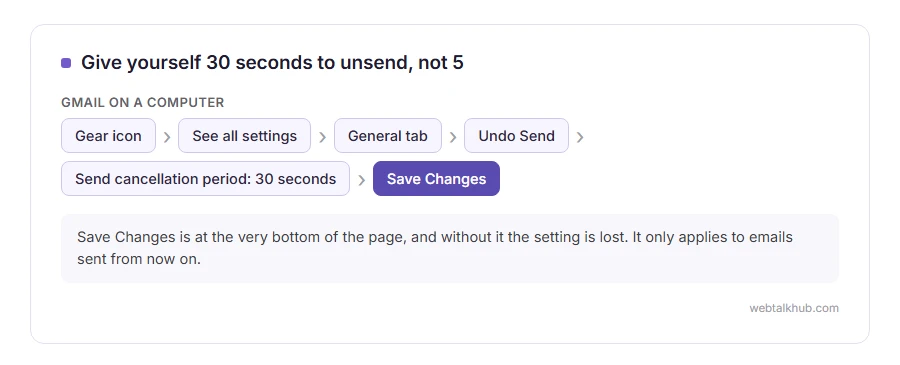
On a computer, click the gear icon, then See all settings. On the General tab, find Undo Send and set the send cancellation period to 30 seconds. Then scroll to the bottom and click Save Changes, which people forget, and the setting is lost.
I recommend 30 seconds for everybody. The only cost is that every email leaves half a minute later, which nobody on the other end ever notices. This will not help the email you have already sent, because the setting only applies from now on.
When the window has passed
A normal Gmail email cannot be recalled once it is delivered. Gmail has no recall button, and anything that says otherwise is talking about Outlook, where recall only works inside the same company. Our guide on recalling an email in Outlook explains those narrow cases.
What you can do is send a short follow up. Keep it plain: say what was wrong and give the correct version. A dramatic “please delete my last email” draws more attention to it than the mistake itself.
If you sent it in confidential mode
Confidential mode, the lock and clock button at the bottom of a new email, lets you take an email back after it has gone. Open it in your Sent folder and click Remove access. The recipient can no longer open it.
It only works for emails sent in confidential mode in the first place. Keep in mind too that the recipient could have taken a screenshot before you removed access.
If it is a scheduled email
A scheduled email has not left yet. Open the Scheduled folder in the left menu, open the email, and click Cancel send. It goes back to your drafts.
If an email is stuck and has not left at all, our page on queued in Gmail explains why and how to clear it.
So it does not happen again
Most unsend moments come from sending too fast. Our guide on how to send an email covers the To, Cc and Bcc boxes that cause the worst mistakes, and writing a professional email covers the last read before sending.
FAQ(Unsend an Email in Gmail)
Can I unsend an email in Gmail after 30 seconds?
No. After the undo window closes, a normal email is delivered and cannot be pulled back. Only confidential mode emails can have access removed.
Does the recipient know I unsent an email?
No. An undone email never left Gmail, so there is nothing for them to see.
Why did the Undo button not appear?
It was probably there for 5 seconds and gone before you looked. Set the window to 30 seconds so it stays long enough to notice.
Does undo send work in the Gmail app?
Yes. A bar with Undo appears at the bottom of the screen for a few seconds after sending.
Can I unsend an email I sent from Gmail to an Outlook address?
Only within the undo window. Recall in Outlook only works for emails sent from Outlook inside the same organisation.
If you have any issues, you can ask me via comment, and I will love to help you out.
