
Has a printer, a shop or a client asked you for a 300 DPI image, and you are not sure whether the photo you have is any good?
Don’t worry, this is simpler than it looks, and most of what gets written about it is wrong. DPI means dots per inch, and it describes how many dots of ink a printer puts into an inch of paper. It only means something when a picture is printed at a size. On a screen it changes nothing at all, and a JPG saved at 72 DPI and one saved at 300 DPI can be exactly the same picture.
So the three questions people are really asking when they search for what is dpi are:
- Is my picture good enough to print at the size I need?
- Why does a photo look sharp on screen and blurry on paper?
- What does DPI mean on a mouse, which is a completely different thing?
In this article you will learn the answer to all three, the sum that tells you what you can print from any photo, and where changing a DPI setting does nothing whatsoever.
So let’s get started.
The only number that matters is the pixels
A picture is a grid of pixels: 3000 across and 2000 down, for example. That is fixed the moment the photo is taken.
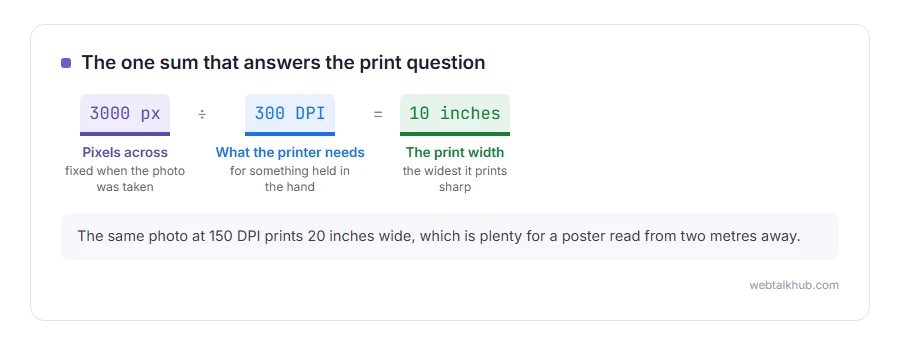
DPI is not part of the picture, it is an instruction about how big to print it. The same 3000 pixel wide photo printed at 300 DPI gives you 10 inches of paper, and at 150 DPI it gives you 20 inches, and the file has not changed at all.
That is why changing the DPI number on its own does nothing to quality. It is arithmetic about size, not detail.
The sum that answers the real question
Take the pixel width of your photo and divide it by the DPI you need.
A 3000 pixel wide photo at 300 DPI prints 10 inches wide, and the same photo at 150 DPI prints 20 inches. Turn it round when you know the size you want: an A4 page is about 8.3 inches wide, so 8.3 times 300 means you need about 2500 pixels across for a good print.
Keep that one sum and you will never need a chart. The honest limit of it is that it tells you nothing about whether the photo is sharp, well lit or in focus, only whether there are enough pixels.
When 300 DPI is the right answer, and when it is not
300 DPI is the usual request for something held in the hand: a leaflet, a brochure, a photo print, a magazine page.
For a poster read from two metres away, 150 DPI is plenty, and printers know this. For a billboard it can drop far lower, because nobody stands next to it. Asking for 300 DPI on a huge print is how people end up with files nobody can email.
For anything on a screen, the number is simply ignored, so a web page, an email or a social post cares about pixels and file size and nothing else.
If you are sending a photo to a printer and you are not sure, I recommend asking them for the pixel size they need rather than the DPI. It is the number that actually decides whether your picture will look right, and a good printer will give it to you in one line.
Where the DPI setting inside a file comes in
Photoshop, Word and most cameras store a DPI number inside the file, and it is only a note for whoever prints it.
Changing it without resampling changes the print size and leaves every pixel alone, which is what you usually want. Changing it with resampling on tells the program to invent or throw away pixels, and inventing detail that was never captured gives you a soft, smeared picture.
So if a printer asks you to change the DPI, change it with resampling off. If they say the image is too small at that size, no setting will save it, because the pixels are not there. Our image resizer changes the pixel size honestly, which is the useful half of this job.
DPI on a mouse is a different thing entirely
This is why searches for DPI return two completely unrelated sets of results.
On a mouse, DPI means how far the pointer moves for each inch you move the mouse. A higher number means a faster, twitchier pointer. Gamers pick a number to suit their grip and their screen, and 800 to 1600 suits most people for ordinary work.
It has nothing to do with printing or with pictures, and no setting on your mouse affects a photo.
PPI, and why two names exist
You will also see PPI, pixels per inch, and people use the two words as if they mean the same thing.
Strictly, DPI is ink dots on paper and PPI is pixels in an image or on a screen. A printer lays down several ink dots for one pixel, so its DPI number is usually much higher than the PPI of the file it is printing.
In everyday conversation nobody minds, and if a printer asks for 300 DPI they mean 300 pixels per inch of paper.
FAQ(What Is DPI)
Does changing DPI improve image quality?
No. It changes the intended print size. Quality comes from the number of pixels and from the photo itself.
What DPI should a web image be?
It does not matter, because screens ignore the number. Choose the pixel size you need and keep the file small.
Is 72 DPI bad?
Not for screens, where it means nothing. For a printed page at the same size it would be too few pixels, which is a different problem.
How do I check the DPI of my image?
On Windows, right click, Properties, Details. On a Mac, open it in Preview and look at Tools, then Show Inspector.
My printer says my file is too low resolution.
Use the sum above to see what size it can print properly. If you need it bigger, you need a photo with more pixels, because enlarging an existing one invents detail rather than recovering it.
If you have any issues, you can ask me via comment, and I will love to help you out.
Choosing the format, not only the size
DPI decides how big a picture prints. Which format to save it in is a different question, and our page on JPG vs PNG gives the short answer for photos, logos and screenshots, with the reason behind each one.
When the pixels are the problem
DPI only matters once there are enough pixels to spread, which is a different question.
- increasing the resolution of an image, what works, what only looks like it works, and where the original is hiding.
Doing it, step by step
Knowing what DPI means is half of it. Setting it in the program you have is the other half.
- how to change the DPI of an image, in Photoshop, GIMP, Preview and free Windows tools, without losing quality.
