
Have you noticed some of your photos end in .jpg and others in .jpeg, and a website just refused one of them, so now you are wondering whether they are really two different formats?
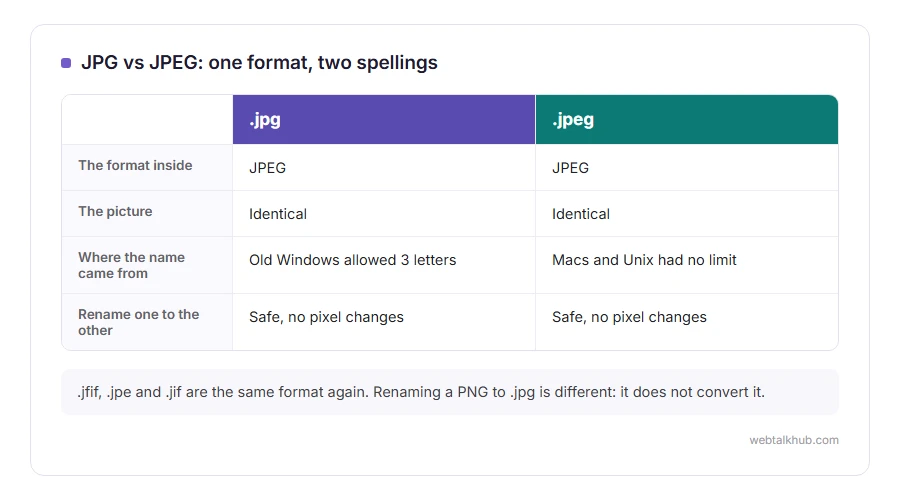
No need to worry, the picture inside is exactly the same. JPG vs JPEG is a spelling difference, nothing more: same format, same compression, same quality, and any program that opens one opens the other.
The question is still a fair one, because the two spellings cause small real problems:
- An upload form that accepts .jpg and quietly refuses .jpeg
- Windows saving pictures as .jfif, which looks like a third format
- Renaming files and worrying about damaging them
- Mixing up JPEG with PNG, which really is different
In this article you will learn where the two spellings came from, what renaming actually does, what JFIF is, and when you should not be using a JPG at all.
So let’s get started.
Where the two spellings came from
JPEG is the name of the committee that designed the format, the Joint Photographic Experts Group, and their standard was published in 1992.
Early Windows, and MS-DOS before it, only allowed three letters after the dot in a file name. So on PCs the extension became .jpg, while Macs and Unix, which had no such limit, used .jpeg. The limit disappeared decades ago and both spellings simply stayed.
It is like colour and color: two spellings of one word, and nobody reading either is confused about what it means.
Is renaming a JPEG to JPG safe?
Completely. The extension is only a label on the outside of the file, and changing it does not touch a single pixel.
That makes renaming the fix for an upload form that refuses one spelling. Click the file name, change .jpeg to .jpg or the other way round, and confirm when Windows warns you about changing extensions.
This only works between names for the same format. Renaming a PNG to .jpg does not convert it, and some programs will then refuse to open it because the inside does not match the label. Our PNG to JPG converter does a real conversion in your browser.
What about .jfif, .jpe and .jif?
They are the same format again. JFIF is the name of the standard way of storing a JPEG image in a file, and most .jpg files are JFIF inside.
Windows sometimes saves pictures from the web with the .jfif extension because of a setting in the system, and plenty of sites then refuse the upload. Renaming it to .jpg fixes it, for the same reason as above.
JPG is the same, JPEG compression is not free
This is the part that actually matters for quality. JPEG throws away detail the eye is unlikely to miss, which is why the files are small, and it does it again every time the picture is saved.
Open a JPG, make a small change, save it, and repeat that a dozen times, and the picture gets steadily blockier around edges and text. Keep in mind that it is the saving that costs quality, not the opening, so keep one untouched original and export copies from it.
When a JPG is the wrong choice
For photographs, JPG is the right answer almost every time. For screenshots, logos, text and anything with a see-through background, PNG is better, because JPG blurs sharp edges and has no transparency at all.
Our comparison of JPG vs PNG goes through that choice properly. If an iPhone gave you a .heic file rather than either, our page on what a HEIC file is explains how to turn it into a JPG. The image resizer makes a large JPG small enough to upload.
FAQ(JPG vs JPEG)
Is JPEG better quality than JPG?
No. They are the same format, so the same picture saved with the same settings is identical under either name.
Which should I use, .jpg or .jpeg?
Either. .jpg is more common and slightly more widely accepted by upload forms, so it is the safer default.
Why does a website not accept my JPEG?
The form was written to check for the three letter spelling only. Rename the file to .jpg and upload it again.
Does converting JPEG to JPG lose quality?
Renaming loses nothing. Opening the file and saving it again as a new JPG does re-compress it and costs a little quality.
What does JPEG stand for?
Joint Photographic Experts Group, the committee that wrote the standard.
If you have any issues, you can ask me via comment, and I will love to help you out.
The other choice a camera gives you
Once the spelling is settled, the next setting on a camera or phone is JPEG or RAW.
- RAW vs JPEG, what each one keeps, what that means for editing and file size, and a simple rule for choosing.
