
You want to delete a page in google docs, you have been through every menu, and there is no delete page button anywhere.
Don’t worry, you are not missing it, because there is no such button. A page in Google Docs is not an object you can select. It is simply the result of how much content there is, so a page disappears when whatever is filling it goes. Once you know that, the blank page at the end stops being a mystery.
Those fillers are only ever one of five things:
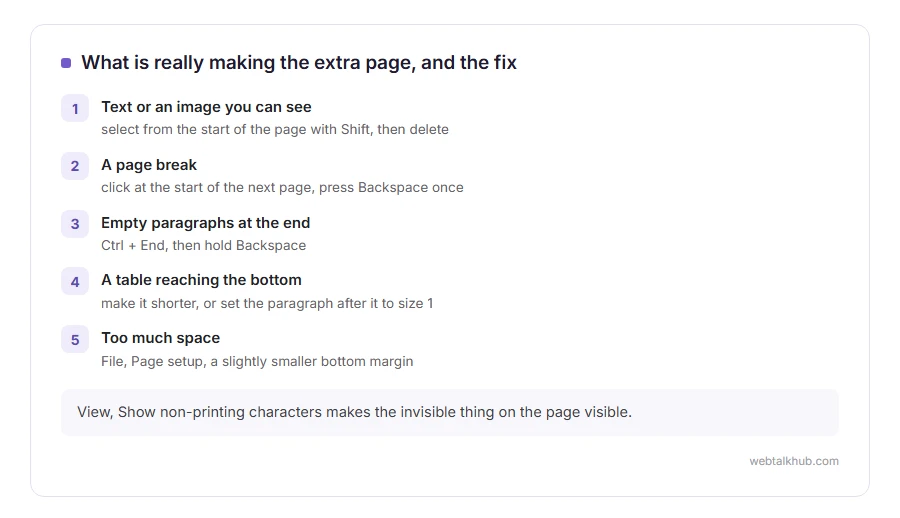
- Text or an image you can see
- A page break somebody inserted
- A pile of empty paragraphs, which look like nothing at all
- A table that reaches the bottom of the page
- Too much space above or below, from the margins or from paragraph spacing
In this article you will learn how to remove each one, starting with the fastest, and how to see the invisible characters that cause most of the blank pages people cannot get rid of.
So let’s get started.
1) Delete the content, the obvious way
Click at the start of the page you want gone, hold Shift, and click at the end of it. Everything between is selected. Press Backspace or Delete.
If the page was the last one in the document, the page itself goes with the content. If it was in the middle, the pages after it flow up to fill the gap, which is what you want.
This will not help with a page that already looks empty, because there is nothing visible to select. That is the next section.
2) Remove a page break
Somebody may have pushed the next section onto a new page deliberately.
Click at the very start of the page after the break, then press Backspace once. If a page break was there, it disappears and the two pages join.
To see where the breaks are before you start, open View and turn on Show non-printing characters, which is the single most useful setting in Google Docs and is switched off by default.
3) Get rid of the blank last page
This is the one everybody searches for, and it is nearly always empty paragraphs.
Go to the end of the document with Ctrl and End, or Cmd and down arrow on a Mac. Then hold Backspace until the cursor jumps up onto the previous page. Those key presses are removing paragraph marks you cannot see.
If the cursor refuses to move, the cause is usually a table sitting right at the bottom of the previous page, which Docs insists on following with a paragraph. Section 4 deals with that.
4) When a table is causing it
A table that ends exactly at the bottom of a page pushes an empty paragraph onto the next one, and Docs will not let you delete that paragraph.
Two things work. Make the table slightly shorter, by reducing the row height or the cell padding in Format, then Table, then Table options. Or select the paragraph after the table and set its font size to 1, which makes it small enough to fit back on the page.
Changing the font size is a workaround rather than a fix, and it is the one most people end up using because it takes five seconds.
5) Change the margins or the spacing
If your content only just overflows, the page after it exists for a couple of lines.
Open File, then Page setup, and reduce the bottom margin a little. Or select everything with Ctrl and A and reduce the line spacing in Format, then Line and paragraph spacing.
Be careful with this one on anything you have to hand in, since a document with margins that do not match the brief gets sent back, and that is a slower problem than an extra page.
A quick way to see what is really there
Turn on Show non-printing characters in the View menu. Paragraph marks, page breaks and section breaks all become visible, and the invisible thing filling your page stops being invisible.
If you only need the document as a PDF, another honest route is to print to PDF and choose the page range, which leaves the document alone and produces the file you actually wanted. Our PDF merger can then drop or reorder pages afterwards, in your browser, with nothing uploaded.
FAQ(Deleting a Page in Google Docs)
Why is there no delete page option?
Because a page is not a thing in Google Docs. It is how the content happens to fall, so you remove the content rather than the page.
How do I delete a blank page at the end?
Put the cursor at the very end and hold Backspace. You are deleting empty paragraphs you cannot see.
Why will my last page not go away?
Usually a table at the bottom of the previous page, which forces a paragraph after it. Shrink the table or set that paragraph to font size 1.
Does this work on the Google Docs phone app?
Yes, and it is fiddly, because you cannot see the non-printing characters there. Doing it on a computer takes a fraction of the time.
Will deleting a page change my page numbers?
Yes, everything after it moves up, which is normally exactly what you want.
If you have any issues, you can ask me via comment, and I will love to help you out.
When the document leaves Google Docs
Most documents end up as a PDF the moment somebody else has to read them.
- what a PDF really is, why the layout stops moving once you export, and what that costs you.
