
Are you seeing ssl handshake failed in a browser, in a curl command or in your server log, with no clue which side of the connection gave up?
Don’t worry, this one narrows down quickly once you know what the handshake actually is. Before any page is sent, the two machines agree on a version of TLS, a cipher, and whose certificate is being trusted. If they cannot agree on all three, nothing is sent at all, and that failure is what you are looking at.
The seven usual reasons it fails are:
- The clock on one machine is wrong, so every certificate looks invalid
- The certificate has expired, or the chain is incomplete
- The two sides support no TLS version in common
- They support no cipher in common, usually after a hardening change
- Something in the middle is intercepting, such as antivirus, a VPN or a proxy
- The server needs a client certificate that the client is not sending
- The name requested does not match what the server offers, which SNI decides
In this article you will learn the one command that shows you which of those it is, then the fixes for a visitor and for a server owner.
So let’s get started.
The command that answers it in one line
From any computer with curl, run curl -vI https://example.com, replacing the address with yours. On Windows, type curl.exe -vI https://example.com in PowerShell instead, because there plain curl is a shortcut for Invoke-WebRequest, not the real curl.
The output prints the TLS version agreed, the cipher, the certificate dates and the issuer. Where it stops is where the handshake failed, and the line before that stop is your cause. The curl that comes with Windows does not print those details, so for them, run the command on a Mac or Linux machine, or use openssl s_client -connect example.com:443 -servername example.com if you have OpenSSL.
If you would rather not use a command, an online SSL checker gives you the same information from the outside. The honest limit of a checker is that it tests from its own location, so it cannot see a problem caused by your antivirus or your office network.
If you are a visitor
Three things cause nearly every handshake failure on a normal computer.
Your clock. A certificate is only valid between two dates, so a clock that is days out makes every certificate look wrong. Switch on automatic time in your system settings.
Your antivirus. Suites that scan encrypted traffic sit in the middle of the handshake with their own certificate, and when that goes wrong you get this. Turn HTTPS scanning off for two minutes to test, then put it back on and add an exception instead.
Your VPN or work proxy. Both stand in the middle in the same way. Disconnect the VPN and try again. On a work laptop you may not be able to turn the proxy off, so test the same address on your phone and tell IT which site fails.
Our page on ERR_SSL_PROTOCOL_ERROR covers the browser version of this in more detail, and your connection is not private covers the red warning screen.
Where it actually breaks
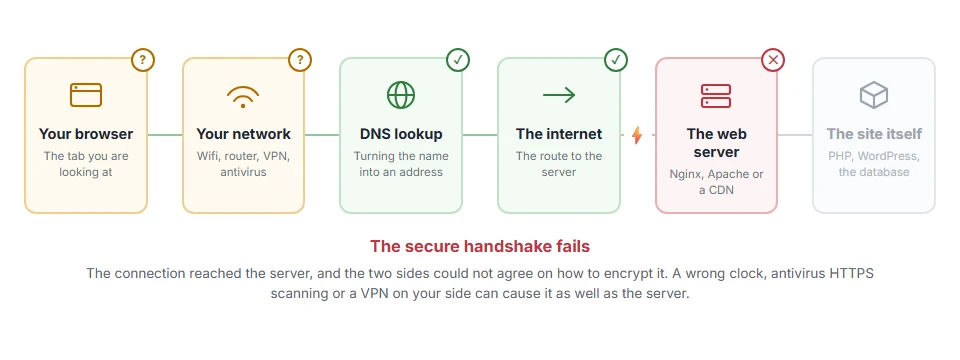
Every page you open makes the same journey. Knowing which step this error stops at tells you which half of the list below is worth your time, because the green steps are already proven to be working.
1) Check the certificate and the chain
For an owner, this is where most of them live.
Run your domain through an SSL checker and read two things: whether the chain is complete, and the expiry date. A missing intermediate certificate is the single most common cause, and it works in some browsers while failing in others, which is why it survives unnoticed for months.
Install the full chain file from your issuer, usually named fullchain or bundle, then restart the web server. Renewing without restarting does not work on many stacks, because the old certificate stays in memory.
2) Enable TLS 1.2 and 1.3
If your server only speaks TLS 1.0 or 1.1, modern clients refuse it and the handshake ends immediately.
On cPanel or Plesk this is a switch. On a server you manage it is a line in the Apache or Nginx configuration, and it needs a restart to take effect.
The opposite also happens: a server locked to TLS 1.3 only will refuse older clients, so if your visitors include old devices, keep 1.2 as well.
3) Look at the cipher list
After a security hardening exercise, a server can end up with a cipher list so short that ordinary clients have nothing in common with it.
Use a checker to see which ciphers are offered, and compare with what your clients need. Mozilla publishes configuration profiles that are a sensible starting point rather than a guess, and if you are not a server administrator by trade, I recommend taking their intermediate profile as it stands instead of hand picking ciphers.
Keep in mind that a stricter list is not automatically safer if it locks out the people you serve. That is a business decision, not only a technical one.
4) Check SNI and the name being requested
One server hosting several sites needs SNI to know which certificate to present. An old client that does not send SNI gets the default certificate, which is usually the wrong one.
Test with curl -vI https://example.com --resolve example.com:443:your-server-ip. If that works and a plain request to the IP address does not, SNI is doing its job and your client is the odd one out.
5) Client certificates, when the server asks for one
Some APIs and internal systems require the client to present a certificate. If it does not, the handshake fails with a message that looks the same as any other.
Check whether the server expects mutual TLS before you spend an afternoon on cipher lists, because nothing on the server side is broken in that case.
6) If Cloudflare is in front of your site
Cloudflare reports a failed handshake between itself and your server as error 525, which is its own page rather than a browser message. Our page on Cloudflare error 525 covers that case, and error 526 covers the one where the handshake works and the certificate is refused.
FAQ(SSL Handshake Failed)
Is an SSL handshake failure my fault or the site’s?
Either. The clock, antivirus and VPN on your side cause many of them, and certificates and TLS settings on the server cause the rest. The command at the top tells you which.
Why does it work in one browser and not another?
Because browsers have different rules about old TLS versions and incomplete chains. That split usually points at a missing intermediate certificate.
Can a wrong clock really cause this?
Yes, and it is the first thing to check, because it is free and it explains failures on every site at once.
What is a cipher suite?
The set of algorithms the two sides use for the connection. They have to support at least one in common, and modern clients refuse the old ones.
Does restarting the web server matter after renewing a certificate?
Yes. On many setups the old certificate stays loaded until the service restarts, so a good certificate keeps failing until you do.
If you have any issues, you can ask me via comment, and I will love to help you out.
Before digging into handshakes
One cause of certificate trouble is simpler than anything above, and it is worth ruling out first.
- the certificate date error, a wrong clock on your device makes every certificate look expired.
