
You keep seeing CSS mentioned in themes, tutorials and settings screens, and nobody stops to say what is css in the first place.
Don’t worry, the idea takes one sentence. HTML says what is on the page, a heading, a paragraph, an image. CSS says what it all looks like: the colours, the sizes, the spacing, where things sit. They are two halves of the same page, and you can change one without touching the other, which is the whole reason CSS exists.
That split explains the things beginners find strange:
- Why you edit a separate file to change a colour
- Why one rule can restyle every page at once
- Why two rules sometimes fight, and the wrong one wins
- Why a change works on your screen and not on a phone
In this article you will learn how a CSS rule is built, the three ways it reaches a page, the rules about which one wins, and where to try it safely on your own site.
So let’s get started.
What a CSS rule looks like
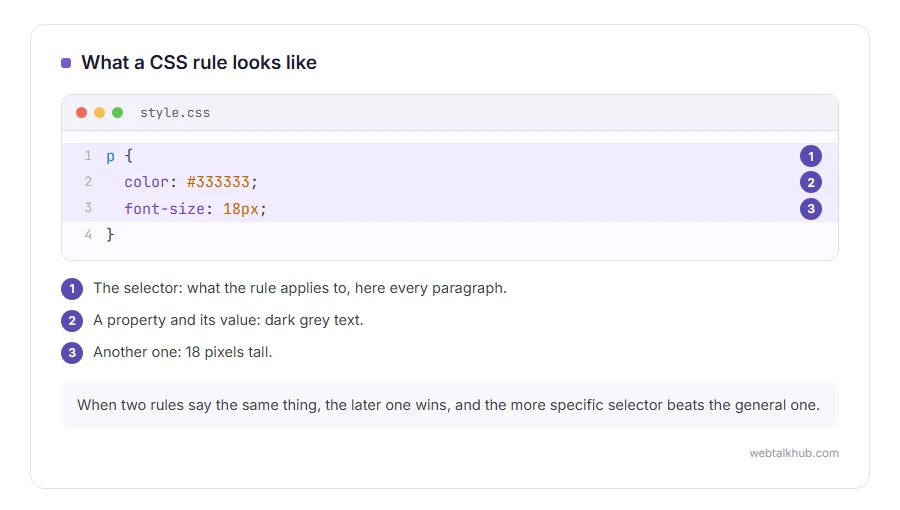
A rule has two parts: what it applies to, and what it does.
p {
  color: #333333;
  font-size: 18px;
}
That says: every paragraph on the page, make the text dark grey and 18 pixels tall. The part before the brackets is the selector, and each line inside is a property and a value.
You can select by tag, as above, by class with a full stop, as in .price, or by id with a hash, as in #header. Those three cover most of what you will ever write.
How CSS reaches the page
There are three ways and they matter, because they decide which rule wins later.
An external stylesheet is a separate .css file linked in the page’s head. This is the normal way, because one file styles every page on the site.
Internal CSS sits in a style block inside the page itself, which is useful for a single page that needs something the others do not.
Inline CSS is written on the element itself with a style attribute. It is the most powerful and the least tidy, and I do not recommend it for anything you will want to change later, because you have to find every element again.
Why one rule beats another
This is the part that confuses people the most, and there are only three things going on.
First, later wins. A rule further down the stylesheet overrides an earlier one that says the same thing.
Second, more specific wins. An id beats a class, and a class beats a tag, whatever the order.
Third, inline beats almost everything, and !important beats even that. If a change refuses to apply, it is nearly always one of those three, rather than a broken file.
Keep in mind that !important is a blunt instrument. It solves today’s problem and makes tomorrow’s harder, because the next rule has to shout louder still.
Why your change did nothing
Four reasons cover nearly every case, and it is worth knowing them before you rewrite anything.
The browser is showing a cached copy, so press Ctrl and F5. Another rule is winning, which the browser’s inspector shows you with a line through the loser. The selector does not match what you think it does. Or you are editing a file the site is not loading, which happens constantly on WordPress sites with a caching plugin.
Right click the element, choose Inspect, and the browser shows you every rule applying to it and which one won. Five minutes with that tool teaches more than an hour of reading.
Trying it safely on your own site
On WordPress, it depends on your theme. With a classic theme, use Appearance, then Customise, then Additional CSS. With a block theme, which is what a fresh WordPress install comes with, use Appearance, then Editor, then Styles, and pick Additional CSS from the three-dot menu. Either way it is saved with the site rather than in the theme files, so a theme update cannot wipe it and there is no file to break.
Never edit the theme’s own style.css directly on a live site unless you are using a child theme. The next update overwrites it and your work disappears without warning.
If you want to see what a change looks like before you commit, edit it in the browser inspector first, because nothing there is saved and a refresh undoes everything.
Where CSS stops
CSS decides how things look and where they sit. It cannot fetch data or do sums with your content. It can react to some things, such as hovers, keyboard focus, screen size and a visitor’s dark mode setting, but anything that needs real logic is beyond it.
For anything else you need JavaScript, and our page on what a script error is is a good sign of what happens when that part goes wrong. If your problem is that a page looks fine on a computer and wrong on a phone, that is CSS, and the answer is usually a media query rather than a fixed width.
FAQ(What Is CSS)
What does CSS stand for?
Cascading Style Sheets. The cascading part is the rule about which style wins when two of them apply.
Do I need to know HTML first?
A little. If you know that a page is made of tags such as a heading and a paragraph, you know enough to start.
Is CSS a programming language?
Not in the usual sense. It has no logic or loops in the way JavaScript does. It is a list of instructions about appearance.
Where do I put my CSS in WordPress?
Additional CSS is the safe place. On a classic theme it is under Appearance, then Customise. On a block theme it is under Appearance, then Editor, then Styles, in the three-dot menu. A child theme is the tidy place for anything larger.
Why does my CSS work locally and not live?
Almost always caching, either in the browser or in a caching plugin. Clear both before you look for anything more complicated.
If you have any issues, you can ask me via comment, and I will love to help you out.
Where JavaScript fits next to CSS
CSS styles the page and JavaScript runs in it, and Node.js takes JavaScript off the page entirely.
- what Node.js is used for, from web servers to the build tools behind most modern sites.
The other two parts of every page
CSS is one of three languages every page is built from. These cover the other two.
- what JavaScript is, the part that makes a page react when you click, type or scroll.
- how to create an HTML file, with Notepad or TextEdit, the starter code, and the two saving mistakes.
