
Are you getting a box on screen saying an error has occurred in the script on this page, or an error log full of lines that say nothing but script error?
Don’t worry, you are not alone, and the first thing to know is that those are two completely different problems sharing one name. A box on screen means a small program on that page failed while it ran. A log full of empty script errors means the browser is hiding the real message on purpose, for a security reason that has a proper fix.
So this article is in two halves:
- If you are a normal user who got a pop-up, read the first four fixes
- If you are a developer looking at a log, read fixes 5 and 6, which explain why the message is empty and how to get the real one
There is also a third thing people call a script error at the end, so you do not read the wrong half of the page.
So let’s get started.
1) Say no to debugging, and carry on
That pop-up is Internet Explorer’s, and it still turns up today inside programs that use the old browser engine: some accounting software, older business applications, and parts of Windows itself.
When the box offers to debug, click No, then Yes to continue running scripts on the page. That is not a workaround, it is the right answer for anybody who is not the person who wrote the page. If you are the developer of that page, I recommend skipping straight to fix 5, because the pop-up tells you far less than your own console will.
If the box comes back on every page you open, the problem is the program showing the page rather than one broken web page, so carry on to fix 2.
2) Turn off script debugging in Internet Options
This stops the box appearing at all, which is what you want when the page works fine apart from the interruption.
Click Start, type Internet Options and open it. Go to the Advanced tab, tick both boxes for disabling script debugging, and untick Display a notification about every script error. Click Apply, then restart the program that was showing the message.
This hides the message, it does not repair the page. If the page also fails to do its job, you still need to tell whoever runs it.
3) Clear the cached files
A half downloaded script file causes exactly this, and it survives until the cache is cleared.
In Internet Options, on the General tab, click Delete under Browsing history, tick Temporary Internet files, and delete them.
That clears the files for the old engine, not for Chrome or Edge. If your problem is in Chrome, clear it there instead, under Delete browsing data, or this will not help at all.
4) Check your antivirus and any ad blocker
Security software that inspects web pages, and blockers that remove parts of them, both break scripts that expect every piece to be there.
Turn the extension or the web shield off for one visit to that page. If the error stops, allow that site rather than leaving your protection off everywhere.
Some corporate filters cannot be turned off from your own machine, and then the site has to be allowed by whoever runs the filter.
5) Developers: the empty message has one cause
Now the useful half, because this one has a precise cause and a precise fix.
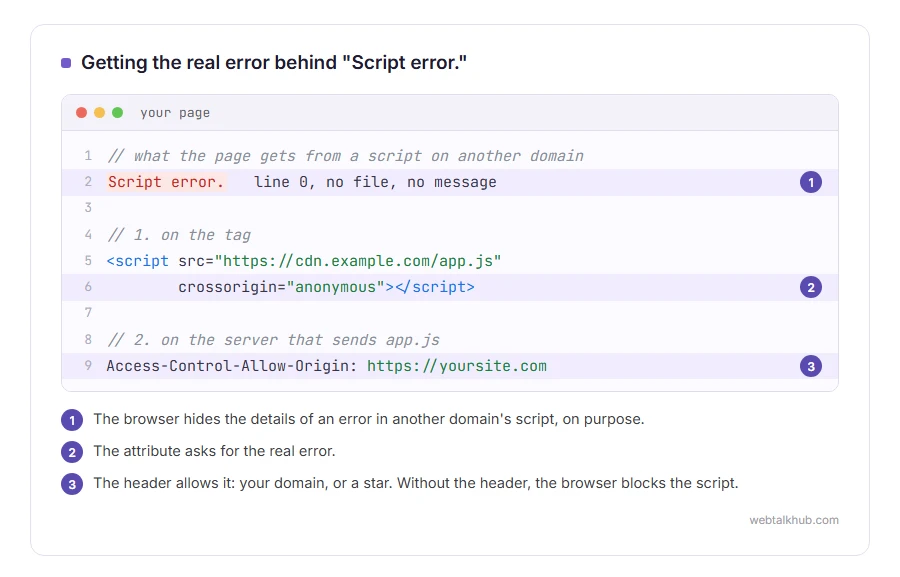
A browser will not tell you what went wrong inside a script that came from another domain. It gives you the text “Script error.” with no message, no file and line zero. That is deliberate, so a page cannot learn about the contents of a file it is not allowed to read.
That is why nearly every empty script error in a log comes from a script served by a CDN, an advertising or analytics script, or your own files on a separate assets domain.
6) Add crossorigin, and send the header
Two things are needed. The header without crossorigin does nothing, but crossorigin without the header is worse, because the browser blocks the script and it never runs. So only add crossorigin to a script whose server already sends the header.
On the tag, add the attribute: <script src="https://cdn.example.com/app.js" crossorigin="anonymous"></script>. On the server that serves that file, send the header Access-Control-Allow-Origin with your domain, or a star.
With both in place, the real message, file and line come through and you can actually debug.
The honest limit: the header has to come from the server hosting the script. That works for your own assets domain and your CDN, and for somebody else’s advertising script you cannot set it, so those lines will stay empty forever. Filter them out of your reporting by ignoring reports where the message is exactly “Script error.” with no file, and keep a count of how many you dropped so the number does not quietly grow. Do that only after your own scripts carry crossorigin, or you will hide your own bugs along with the noise.
The third thing people call a script error
A long running script warning says a page is busy and asks whether to stop it.
That is not a failure, it is a script taking too long, usually a heavy page or a slow computer. Closing other tabs and letting it finish is the answer, and on a page you own it means work to do on performance rather than a bug to hunt.
FAQ(Script Error)
Is a script error dangerous?
No. It means something on the page did not run, not that anything got into your computer.
Why do I get script errors on every website?
That points at your machine rather than the sites: an extension, an antivirus web shield, or a corporate filter changing pages. Test in a private window with extensions off.
Why does my log say “Script error.” with no detail?
Because the script came from another domain and the browser hides the detail. Fix 6 is how you get the real message for your own files.
Does disabling script debugging fix the page?
No. It stops the message appearing. The page still does not do whatever failed.
Will reinstalling the browser help?
Almost never, because the fault is in the page or in something inspecting it. Try another browser first, which takes a minute and tells you far more. If the browser is failing to load files rather than run them, see failed to load resource.
If you have any issues, you can ask me via comment, and I will love to help you out.
If you are new to the language itself
Script errors are a JavaScript problem, and the styling half of a page is separate from it. If you are still working out which part does what, our page on what CSS is explains the split in plain words, including why one rule beats another.
When the error is in the code itself
A script error hides the details. A syntax error is one of the few that tells you almost exactly where to look.
- syntax errors explained, real messages from Python, JavaScript and PHP, and how to find the character that caused them.
