
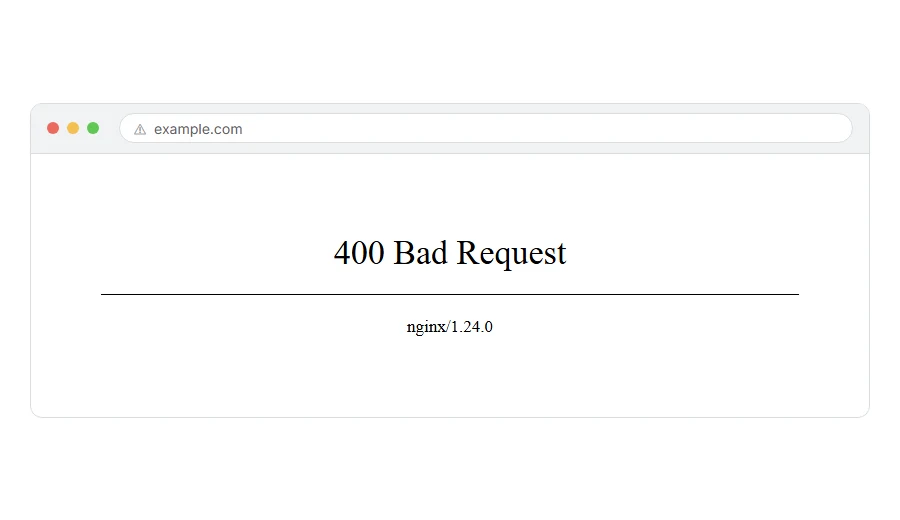
You have hit a page showing 400 Bad Request, sometimes with “your browser sent a request that this server could not understand” underneath.
In one line: the server received your request, could not make sense of it, and threw it away.
Think of it like handing a form across a counter with the writing smudged. The person is willing to help. They simply cannot read what you gave them.
That is different from being refused, which is a 403, and different from the page not existing, which is a 404. A 400 means the request itself was malformed.
Do not worry, you are not alone. On a normal website there is one cause that accounts for most of these, and I am here to help. Start there.
Where it actually breaks
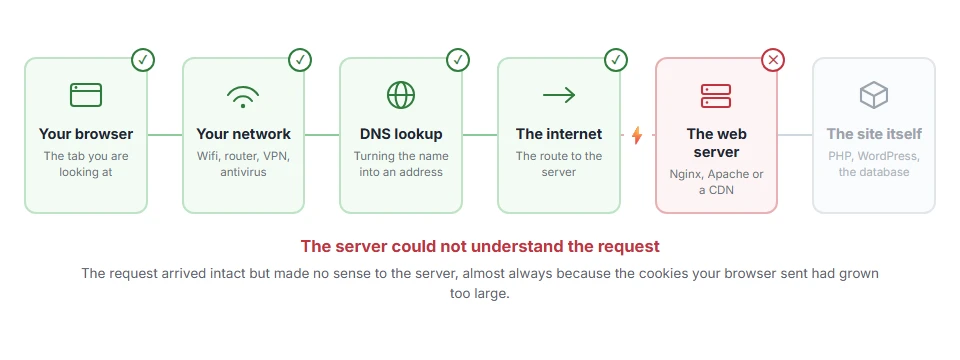
Every page you open makes the same journey. Knowing which step this error stops at tells you which half of the list below is worth your time, because the green steps are already proven to be working.
Start here: clear the cookies for that one site
This fixes the large majority of 400s on ordinary websites, and almost nobody tries it first.
Cookies are sent with every request. Over time they grow, and some sites or plugins store far more in them than they should. When the total goes past what the server will accept, the whole request is rejected as malformed.
In Chrome, click the icon to the left of the address bar, choose Cookies and site data, then Manage on-device site data, and delete the entries for that site. Then reload.
You will be signed out of that one site. Nothing else is affected.
If you want to confirm before deleting anything, open the page in a private window first. A private window carries no cookies, so if it loads there, oversized cookies were your cause.
When this will not help: if the private window also gives a 400, your cookies are not the problem. Carry on down the list.
Step 2: Check the address for something odd
A 400 can be the honest answer to a genuinely broken address.
Look for a stray space, a doubled question mark, an unencoded character, or something pasted in twice. Type the domain by hand and navigate from the home page rather than using the link you were given.
When this will not help: if the address is simple and clean, this is not it. But it costs ten seconds and it is right often enough to be worth doing.
Step 3: Clear your DNS cache
Less common, and worth doing while you are at it.
On Windows, in Command Prompt as administrator:
ipconfig /flushdnsOn macOS, in Terminal:
sudo dscacheutil -flushcache; sudo killall -HUP mDNSResponderWhen this will not help: this only matters if you are being sent to the wrong server. If the site loads fine on your phone, skip it.
Step 4: Turn off extensions and try another browser
An extension that rewrites requests or adds headers can produce a 400 on a site that works everywhere else.
Test in a private window with extensions off, then in a different browser altogether.
When this will not help: if every browser on every device gives a 400, the request is not the problem, the server is. That is the owner’s job.
Step 5: If you are uploading something, check the size
A file larger than the server accepts sometimes comes back as a 400 rather than the clearer 413.
Try a much smaller file. If that works, size was the issue, and the fix belongs to whoever runs the site.
When this will not help: this only applies to uploads and form submissions, not to ordinary page loads.
If it is your own site
Then visitors are being turned away and there are four usual causes.
Cookies that have grown too large
The same cause as the top of this page, seen from the other side. If only logged in visitors get the 400, this is almost certainly it, because logged in people carry more cookie data.
Look at what your plugins are storing. A plugin keeping a lot of data in a cookie rather than in the database is the usual culprit.
You can also raise the limit. In Nginx that is large_client_header_buffers. In Apache it is LimitRequestFieldSize. On shared hosting only your host can change either, so ask.
A request header that is too long
Same idea, different header. A very long referrer, or an authorization token that keeps growing, will do it.
The clue is that it happens after a particular journey through the site rather than everywhere.
A malformed rewrite rule
A rule in .htaccess that builds a broken address will produce a 400 on the pages it touches.
Rename .htaccess to .htaccess-off to test. If the 400 goes, that file is the cause. Rebuild a clean one by going to Settings > Permalinks and clicking Save.
Your CDN or firewall
Cloudflare and similar services return a 400 for requests they consider malformed, before your server ever sees them.
Do not expect the security log to name a rule here. A malformed request breaks no security rule, so it will not show one. Check the request itself, starting with its cookies and its address.
When this will not help: none of this helps if the request really is malformed, for example from a badly written script hitting your site. In that case the 400 is correct and the script needs fixing rather than your server.
For developers calling an API
A 400 from an API almost always means the body or the parameters are wrong, and the response usually says which.
Read the response body, not just the status. Most APIs return a message naming the field. It is remarkable how often that message is never looked at.
Common causes: sending form data where JSON was expected, a missing required field, a date in the wrong format, or a number sent as a string.
Frequently asked questions
Is a 400 my fault or the website’s? Usually yours in the sense that your request was the problem, but not through anything you did wrong. Oversized cookies build up on their own. Clearing them for that site is the fix.
Why does it work in a private window? Because a private window sends no cookies. That is the strongest possible sign that cookies were your cause.
Will clearing cookies lose anything? You will be signed out of that site and any preferences it stored will go. Nothing else on your computer is touched.
What is the difference between 400 and 404? A 404 means the page does not exist. A 400 means the server could not even understand what you were asking for.
If you have any issues, you can ask me via comment, and I will love to help you out.
Two refusals that are not a bad request
If the server understood your request but refused the way you asked, that is a 405 method not allowed. If it refused the form the answer would have to take, that is a 406 not acceptable, which on shared hosting is nearly always a firewall rule rather than a header problem.
