
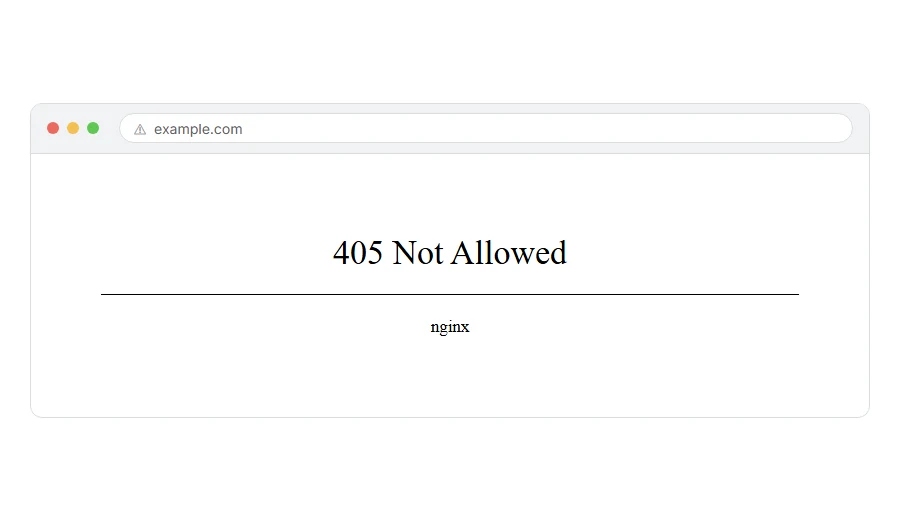
You submitted a form, or clicked an ordinary link, and the screen came back with 405 method not allowed. The page clearly exists, because the server just answered you, and yet it refused to do the thing you asked.
Don’t worry, you are not alone. This one looks far more technical than it is. Every request your browser makes carries a method: GET means give me this page, POST means here is some data, take it. A 405 means the address is fine and that method is not allowed on it, which is why a page can work when you click a link and fail the moment a form posts to it.
On a real site, the cause is nearly always one of these five:
- A form that posts to an address which then redirects, so the method is lost on the way
- A security plugin or a web firewall blocking a method it considers risky
- WebDAV on a Windows server, which quietly claims PUT and DELETE for itself
- A server rule, in Nginx or Apache, that allows only GET on that path
- An API route that exists for one method while the code is calling another
In this article you will learn what a visitor can do about it, then those five causes with the fix for each, and finally how a 405 differs from a 403 and a 400, which people mix up constantly.
So let’s get started.
If the site is not yours
There is one thing worth thirty seconds before you give up.
Go back to the previous page and submit the form again from scratch, rather than refreshing the error page. A refresh often re-sends the same failed request and gives you the same wall.
If that does not work, the site has a bug and only the owner can fix it. When the error appears the instant you click a normal link, there is no form to re-send and nothing on your side to change, so contact them if it matters to you.
Where it actually breaks
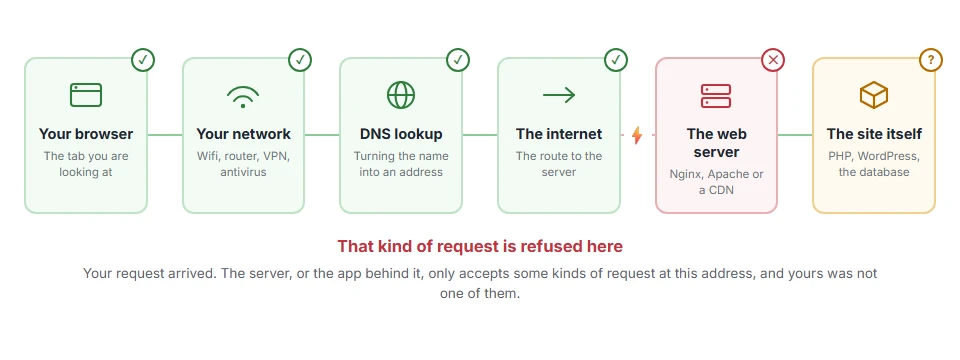
Every page you open makes the same journey. Knowing which step this error stops at tells you which half of the list below is worth your time, because the green steps are already proven to be working.
1) A redirect is eating the method
This is the most common cause by a distance, and the one people never suspect.
A browser following a redirect can turn a POST into a GET, or send the POST on to an address that only accepts GET. So if your site forces HTTPS, or adds a trailing slash, and the form posts to the version without it, the request gets redirected and the method is lost in the middle.
Look at where the form posts to and point it at the exact final address, with the right protocol and the right slash.
This one shows up as an intermittent fault, working from one page and failing from another, because only some of your links go through the redirect. That pattern is a strong hint that this is your cause.
2) A security plugin or firewall is blocking it
Security plugins and web firewalls block methods they consider risky. Blocking POST to an admin path, or blocking PUT and DELETE outright, is a normal rule that can easily catch your own code.
Turn the plugin off for two minutes and try the same action. If it works, turn it back on and look in its log for the rule that fired, then allow that one path.
Leave the plugin on afterwards. A rule you can see and allow is worth far more than no firewall at all, and turning protection off to make an error go away is not a fix. Switching the plugin off will not help if the block sits in your host’s own firewall instead, so check the host panel before you decide the plugin is innocent.
3) WebDAV on a Windows server
On IIS this is the classic trap. The WebDAV module claims PUT and DELETE, then answers 405 to anything else that tries to use them, including your own API.
In IIS Manager, open Modules and Handler Mappings for the site and remove the WebDAV entries, or disable the feature in Server Manager.
Before you remove it, check whether anybody actually uses WebDAV on that server. If somebody does, removing it will break their access, and then you have two problems instead of one.
4) A rule in Nginx or Apache
On Nginx, a location block with a return 405 line, or a try_files that ends at a static file, will refuse a POST. On Apache, look for an AllowMethods line in the server configuration, and for any rewrite rule that sends the request somewhere static.
Static files are the honest version of this error. You genuinely cannot POST to an image or a plain HTML file, and the server is right to say so.
After any configuration change, reload the web server. An edit on disk does nothing at all until the service reads it again, and plenty of people have spent an hour on a fix that was already correct.
5) An API route that exists for a different method
If your own app is getting the 405, print the exact request before it leaves. Nine times out of ten the route exists for one method and the code is sending another, or the URL has a typo that makes it match a different route.
In WordPress it works differently. A REST route registered for POST answers a GET of the same address with a 404 and the code rest_no_route, not a 405. That is very easy to misread as a missing endpoint, when the route is there and only the method is wrong.
Some hosts strip DELETE and PUT at the edge before your code ever sees them. If the route is right and it still fails, that is the question to ask your host.
How a 405 differs from a 403 and a 400
These three feel alike and mean different things, and telling them apart saves you looking in the wrong place.
A 403 forbidden means you are not allowed here at all, and our page on 403 forbidden goes through that one. A 400 bad request means the request itself was malformed, which is covered on the 400 bad request page. A 405 method not allowed means the address is fine and you are allowed, but not this way. If the server refused the format of the answer rather than the method, that is 406 not acceptable.
FAQ(405 Method Not Allowed)
Does a 405 mean the page is broken?
No. The page exists and the server answered. Only that one way of asking was refused.
Why does my form work locally and fail on the live server?
Because the live server has a firewall, a proxy or a redirect that your local setup does not. Compare the two rule sets rather than the code.
Can a 405 hurt my search rankings?
Not directly, as search engines fetch pages with GET. If a whole path returns 405 to a crawler, that path will not be indexed.
Is it safe to allow every method to fix it?
No. Allow only the method that page needs. Opening PUT and DELETE across a site removes a protection you want to keep.
I see 405 in my error log but the site looks fine.
That is often a bot probing for an upload path. Check which addresses are getting it before you change anything.
If you have any issues, you can ask me via comment, and I will love to help you out.
